651. n8n 리서치 자동화
n8n을 활용한 리서치 자동화
- n8n의 핵심 노드 사용법(RSS Read, HTTP Request, Code, Set, Filter, Aggregate, Google Sheets, Gmail, AI)을 실제 상황에서 체득
- 동일한 “수집 → 가공 → 필터 → 저장 → 발송” 뼈대를 세 가지 사례에 응용하며 패턴 학습
- 막힐 때마다 AI(ChatGPT/Claude)에게 던질 수 있는 실전 프롬프트 패턴 습득
3가지 사례 한눈에 보기
Case 1 — Bloomberg RSS
가장 단순한 뼈대. RSS 한 곳 → 시간 필터 → Google Sheets 적재 → 목록 이메일 발송. 핵심 노드 10개를 차분히 익히는 단계.
Case 2 — World Steel
Case 1의 뼈대를 다른 RSS 소스에 그대로 응용. description 필드 정리 등 소스 특성에 맞춘 미세 조정 포인트 학습.
Case 3 — 다중 소스 + AI
HTTP Request + RSS + Code 노드 조합으로 3개 소스 통합, Merge로 하나로 묶고, OpenAI 노드가 뉴스레터 본문을 생성. 가장 실전에 가까운 형태.
Bloomberg RSS로 매일 아침 시장동향 이메일 받기
Bloomberg의 “Commodities” RSS 피드를 가져와, 최근 24시간 기사만 골라 Google Sheets에 축적하고 매일 아침 요약 목록을 Gmail로 발송합니다. n8n 기본기를 다지는 가장 좋은 사례입니다.
① 비즈니스 상황과 데이터 소스
사업개발 직군에서 매일 아침 글로벌 원자재 시장을 훑어야 하는 담당자가 있다고 상정합니다. 사람이 매번 Bloomberg를 열어 어제 기사를 훑는 대신, n8n이 정해진 시간에 RSS를 당겨 오고, 시간 필터를 걸어 “어제 오전 8시 ~ 오늘 오전 8시”만 남기고, Google Sheets에 축적하면서 Gmail로 목록을 보내 주게 만듭니다.
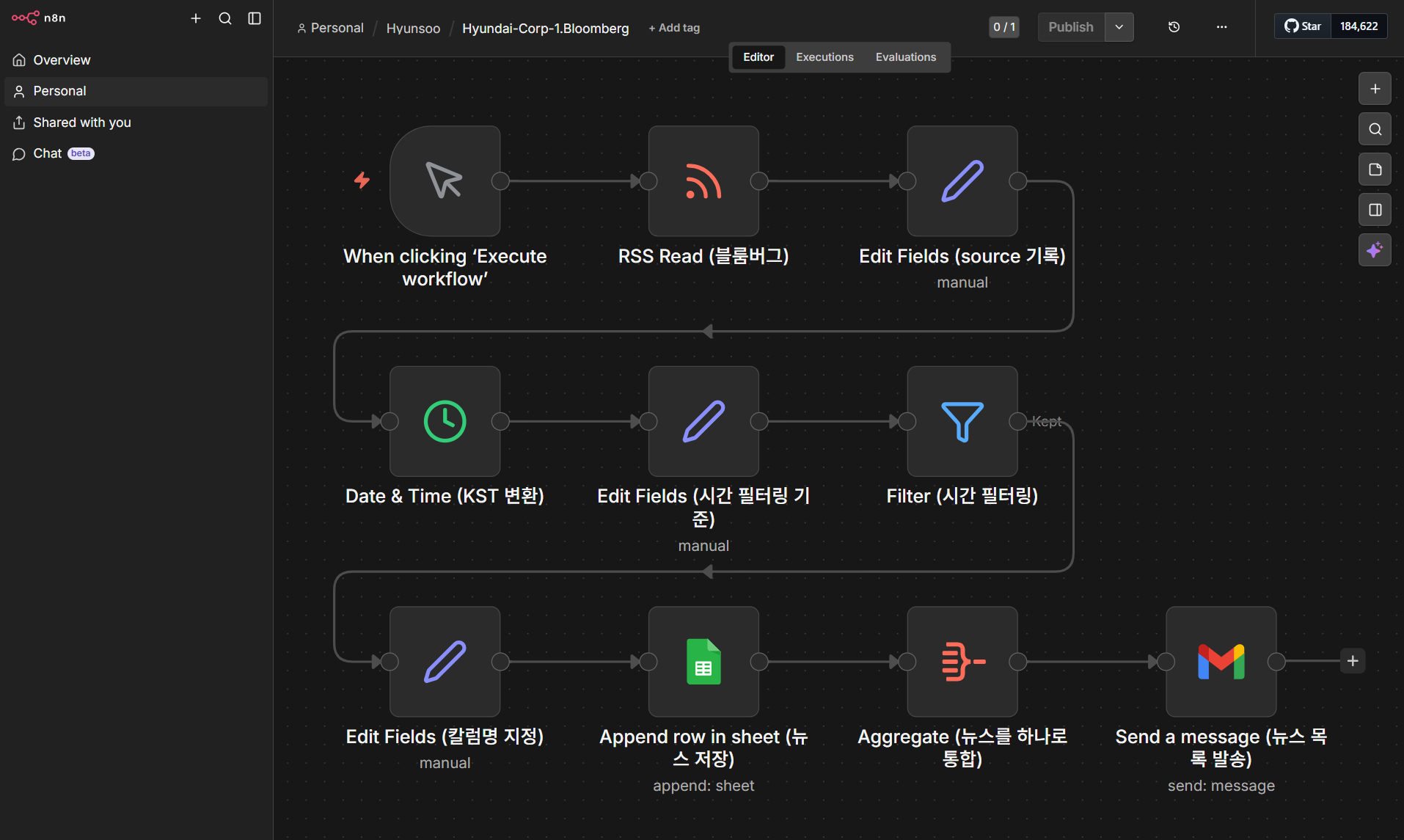
② 노드별 구성 (총 10개 노드)
RSS Read — Bloomberg 피드 가져오기
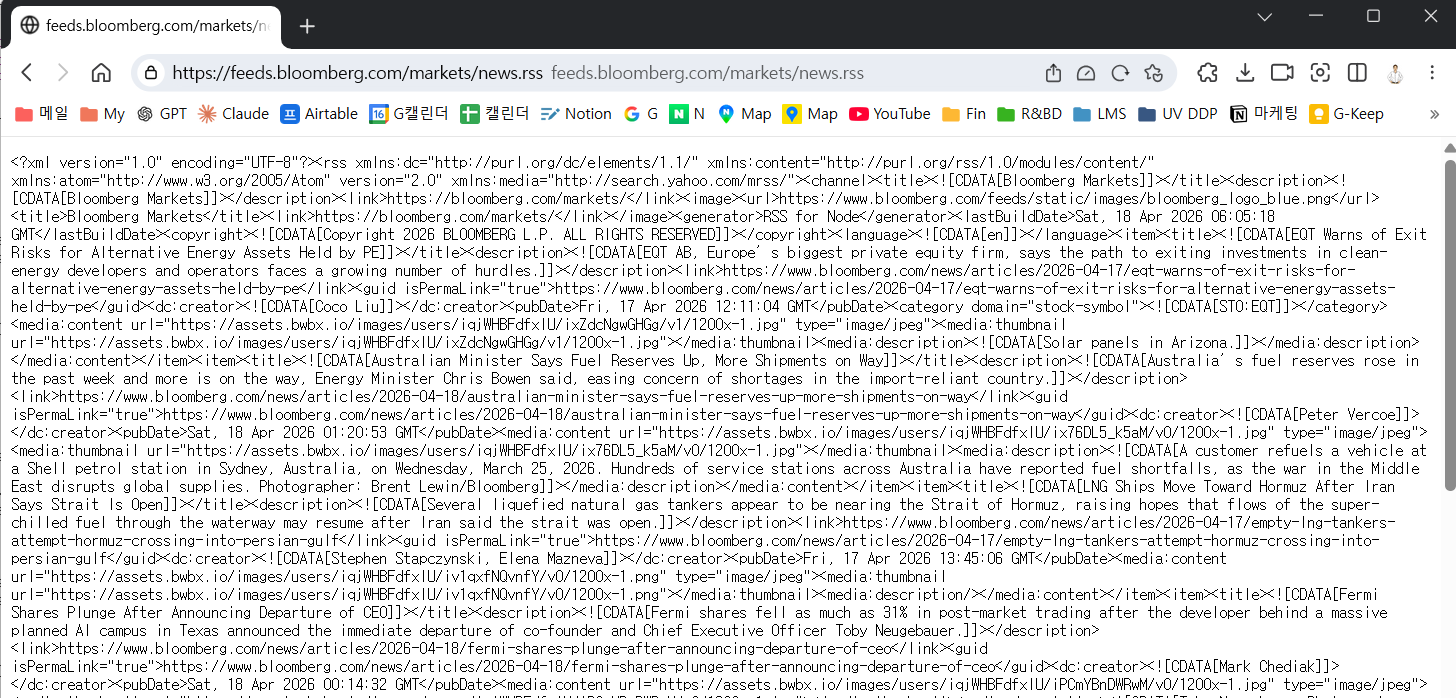
n8n-nodes-base.rssFeedReadBloomberg RSS 피드 URL: https://feeds.bloomberg.com/markets/news.rss — 이 URL을 노드의 URL 필드에 입력하면 피드 내의 기사 하나당 n8n 아이템 하나로 분리되어 나옵니다. title, link, pubDate, description 등의 필드가 자동으로 추출됩니다.
.png)
Code 보기
{
  "nodes": [
    {
      "parameters": {
        "url": "https://feeds.bloomberg.com/markets/news.rss",
        "options": {}
      },
      "type": "n8n-nodes-base.rssFeedRead",
      "typeVersion": 1.2,
      "position": [224, 0],
      "id": "ad16cce4-6f8b-4621-8b8b-514c739d20d5",
      "name": "RSS Read (블룸버그)"
    }
  ],
  "connections": {}
}Edit Fields — source 필드 추가 (출처 표기)
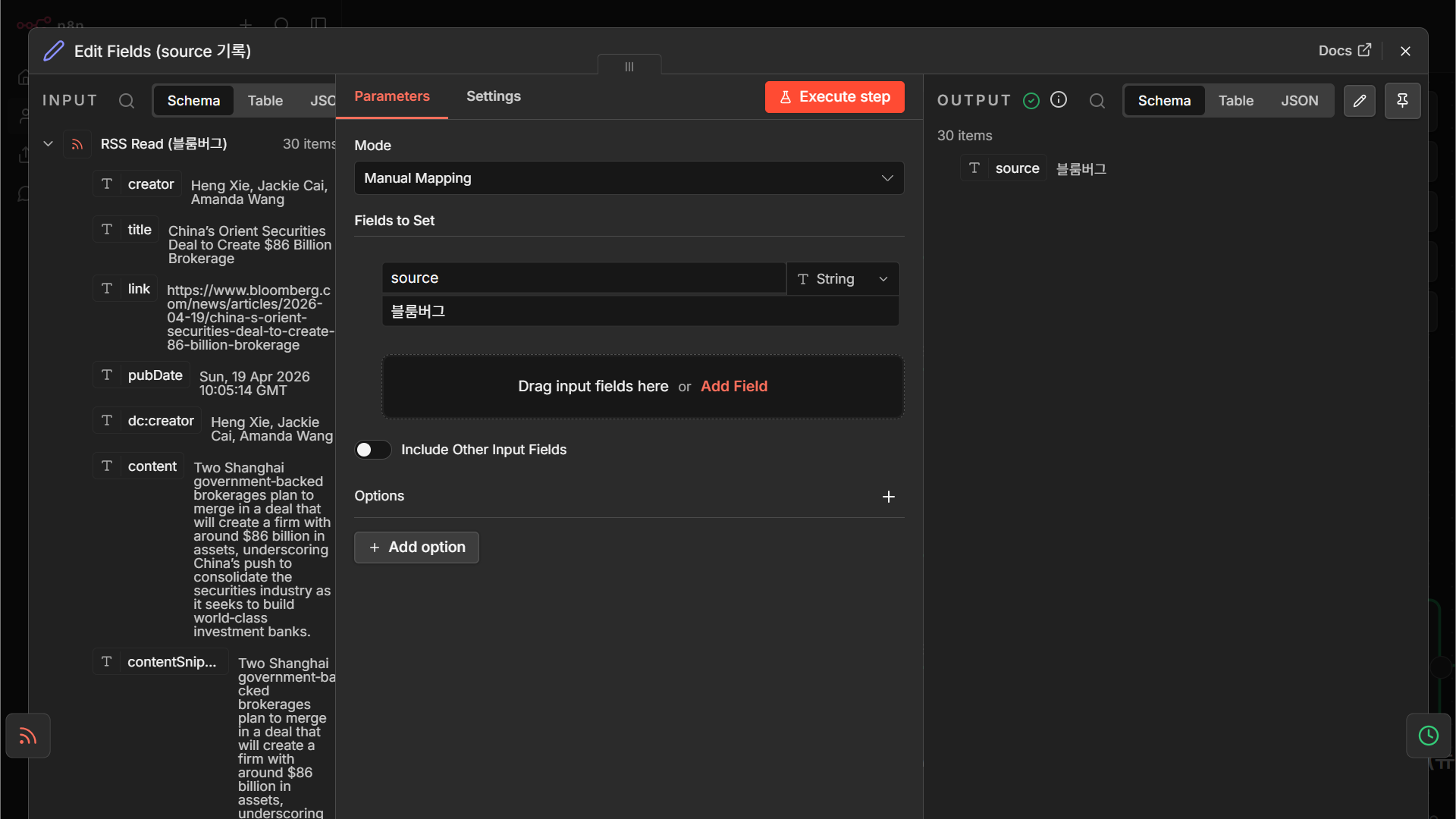
n8n-nodes-base.set뒤에서 여러 소스를 합칠 것을 염두에 두고, 지금 단계에서 source = "Bloomberg" 같은 출처 표기 필드를 각 아이템에 붙여 둡니다. Case 2·3에서 데이터가 합쳐질 때 어느 매체에서 온 기사인지 구분할 근거가 됩니다.
Code 보기
{
  "nodes": [
    {
      "parameters": {
        "assignments": {
          "assignments": [
            {
              "id": "b9e05ce2-30e6-4ebf-98a6-e593e534d6e7",
              "name": "source",
              "value": "블룸버그",
              "type": "string"
            }
          ]
        },
        "options": {}
      },
      "type": "n8n-nodes-base.set",
      "typeVersion": 3.4,
      "position": [
        448,
        0
      ],
      "id": "5ba65c58-1b5a-4bda-81ab-0289683e159f",
      "name": "Edit Fields (source 기록)"
    }
  ],
  "connections": {}
}Date & Time — 기사 시간을 KST로 변환
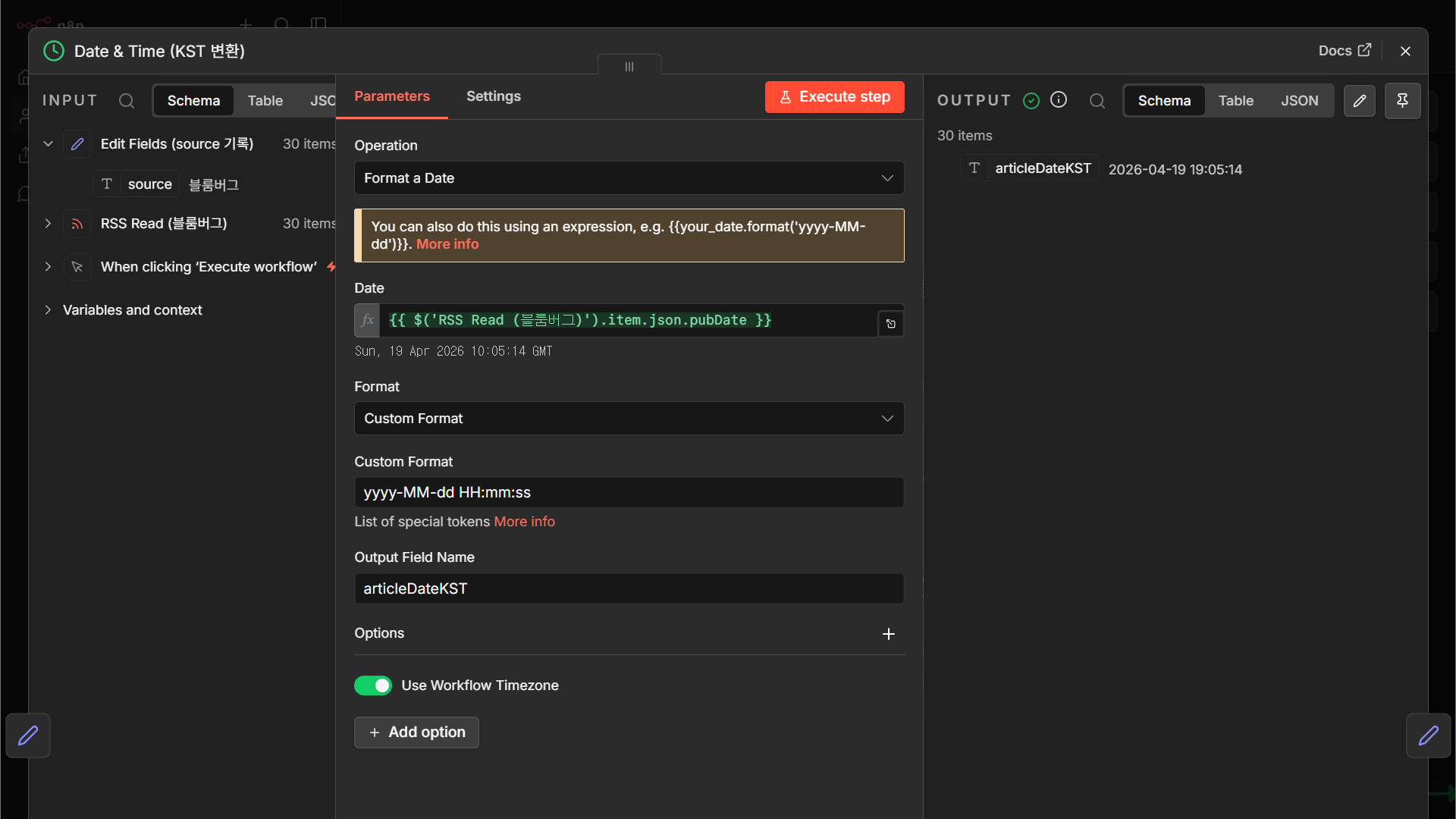
n8n-nodes-base.dateTimeRSS의 pubDate는 UTC/GMT 기준으로 옵니다. 이어지는 필터에서 “한국 시간으로 어제 8시 이후인가?”를 묻기 위해 KST(+09:00)로 변환해 새 필드로 저장합니다.
Code 보기
{
  "nodes": [
    {
      "parameters": {
        "operation": "formatDate",
        "date": "={{ $('RSS Read (블룸버그)').item.json.pubDate }}",
        "format": "custom",
        "customFormat": "yyyy-MM-dd HH:mm:ss",
        "outputFieldName": "articleDateKST",
        "options": {
          "timezone": true
        }
      },
      "type": "n8n-nodes-base.dateTime",
      "typeVersion": 2,
      "position": [
        0,
        208
      ],
      "id": "c60f5ed1-99c2-4ab4-adf0-15cafb6bd8a6",
      "name": "Date & Time (KST 변환)"
    }
  ],
  "connections": {}
}Edit Fields — 시간 필터링 기준값 계산
n8n-nodes-base.set“어제 오전 8시” 같은 경계값을 식(expression)으로 미리 계산해 필드로 만들어 둡니다. Filter 노드에서 매 아이템마다 이 기준값과 비교하게 됩니다. 식으로는 n8n의 {{ $now.minus({days:1}).startOf('day').plus({hours:8}) }} 패턴을 주로 사용합니다.
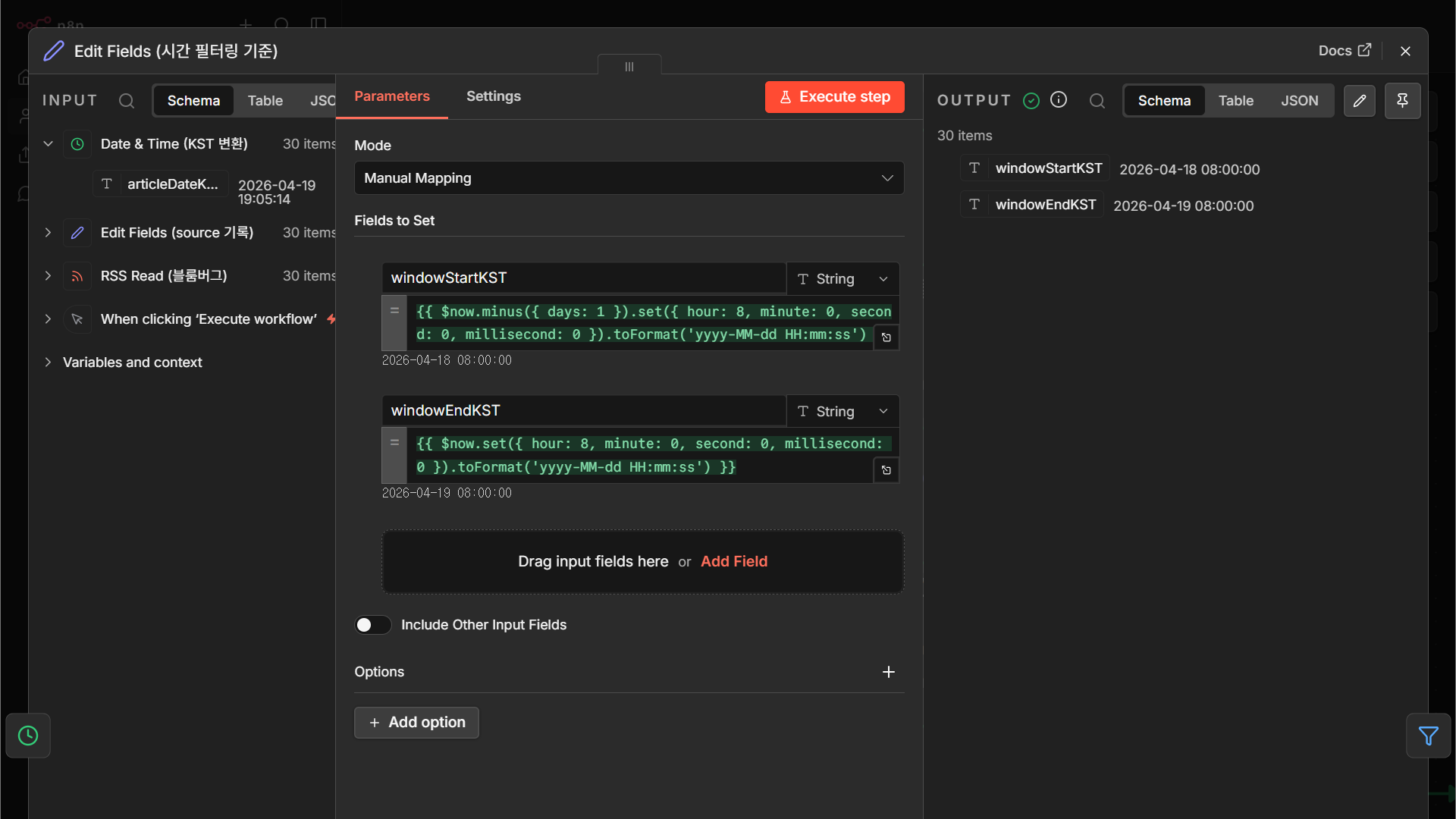
Code 보기
{
  "nodes": [
    {
      "parameters": {
        "assignments": {
          "assignments": [
            {
              "id": "da540810-0c95-49c3-94f4-94f5416c4fef",
              "name": "windowStartKST",
              "value": "={{ $now.minus({ days: 1 }).set({ hour: 8, minute: 0, second: 0, millisecond: 0 }).toFormat('yyyy-MM-dd HH:mm:ss') }}",
              "type": "string"
            },
            {
              "id": "89fc7156-596d-423e-ac2c-a9c9fb86361d",
              "name": "windowEndKST",
              "value": "={{ $now.set({ hour: 8, minute: 0, second: 0, millisecond: 0 }).toFormat('yyyy-MM-dd HH:mm:ss') }}",
              "type": "string"
            }
          ]
        },
        "options": {}
      },
      "type": "n8n-nodes-base.set",
      "typeVersion": 3.4,
      "position": [
        224,
        208
      ],
      "id": "444c5662-2651-4788-aaef-58aaff9507c8",
      "name": "Edit Fields (시간 필터링 기준)"
    }
  ],
  "connections": {}
}Filter — 시간 조건으로 기사 걸러내기
n8n-nodes-base.filter“기사 발행시각이 필터 기준값 이후” 조건을 걸어 어제~오늘 기사만 통과시킵니다. 조건을 만족하지 않는 아이템은 노드의 “Discard” 출력으로 빠져 뒤 단계에 전달되지 않습니다.
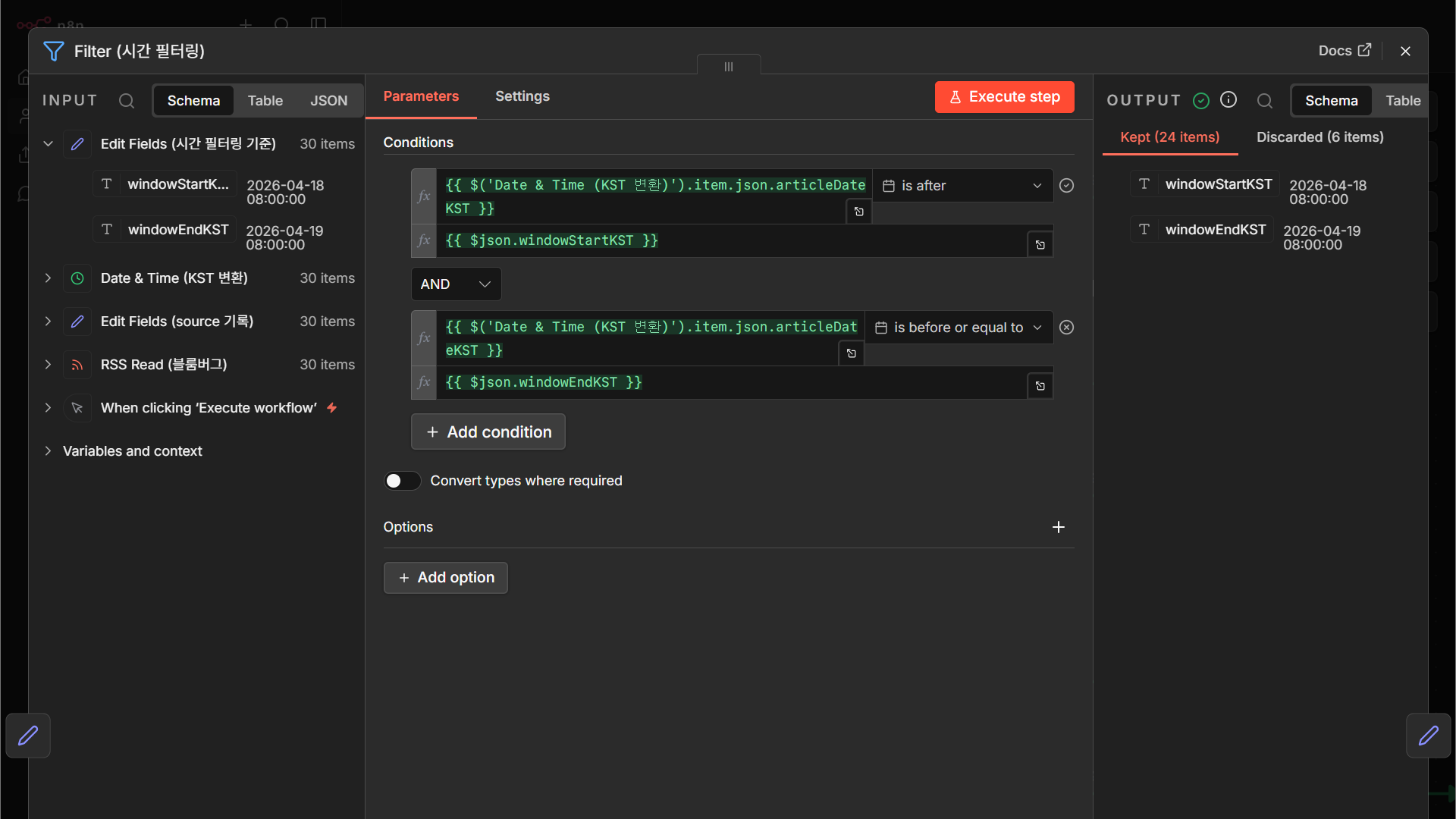
Code 보기
{
  "nodes": [
    {
      "parameters": {
        "conditions": {
          "options": {
            "caseSensitive": true,
            "leftValue": "",
            "typeValidation": "strict",
            "version": 3
          },
          "conditions": [
            {
              "id": "ea6179ee-0c93-4544-8fe0-0bba2cb7da6f",
              "leftValue": "={{ $('Date & Time (KST 변환)').item.json.articleDateKST }}",
              "rightValue": "={{ $json.windowStartKST }}",
              "operator": {
                "type": "dateTime",
                "operation": "after"
              }
            },
            {
              "id": "124b24c8-7c07-4ed9-b266-8995324457b1",
              "leftValue": "={{ $('Date & Time (KST 변환)').item.json.articleDateKST }}",
              "rightValue": "={{ $json.windowEndKST }}",
              "operator": {
                "type": "dateTime",
                "operation": "beforeOrEquals"
              }
            }
          ],
          "combinator": "and"
        },
        "options": {}
      },
      "type": "n8n-nodes-base.filter",
      "typeVersion": 2.3,
      "position": [
        448,
        208
      ],
      "id": "2f7aec37-efad-4465-82c3-224b0f7af57e",
      "name": "Filter (시간 필터링)"
    }
  ],
  "connections": {}
}Edit Fields — Google Sheets 칼럼명으로 정리
n8n-nodes-base.set스프레드시트에 넣을 칼럼 순서와 이름을 맞추기 위해 필드를 재정렬합니다. 예: date, source, title, link, description. 이 단계를 건너뛰면 Sheets의 헤더와 아이템 키가 어긋나 적재가 실패합니다.
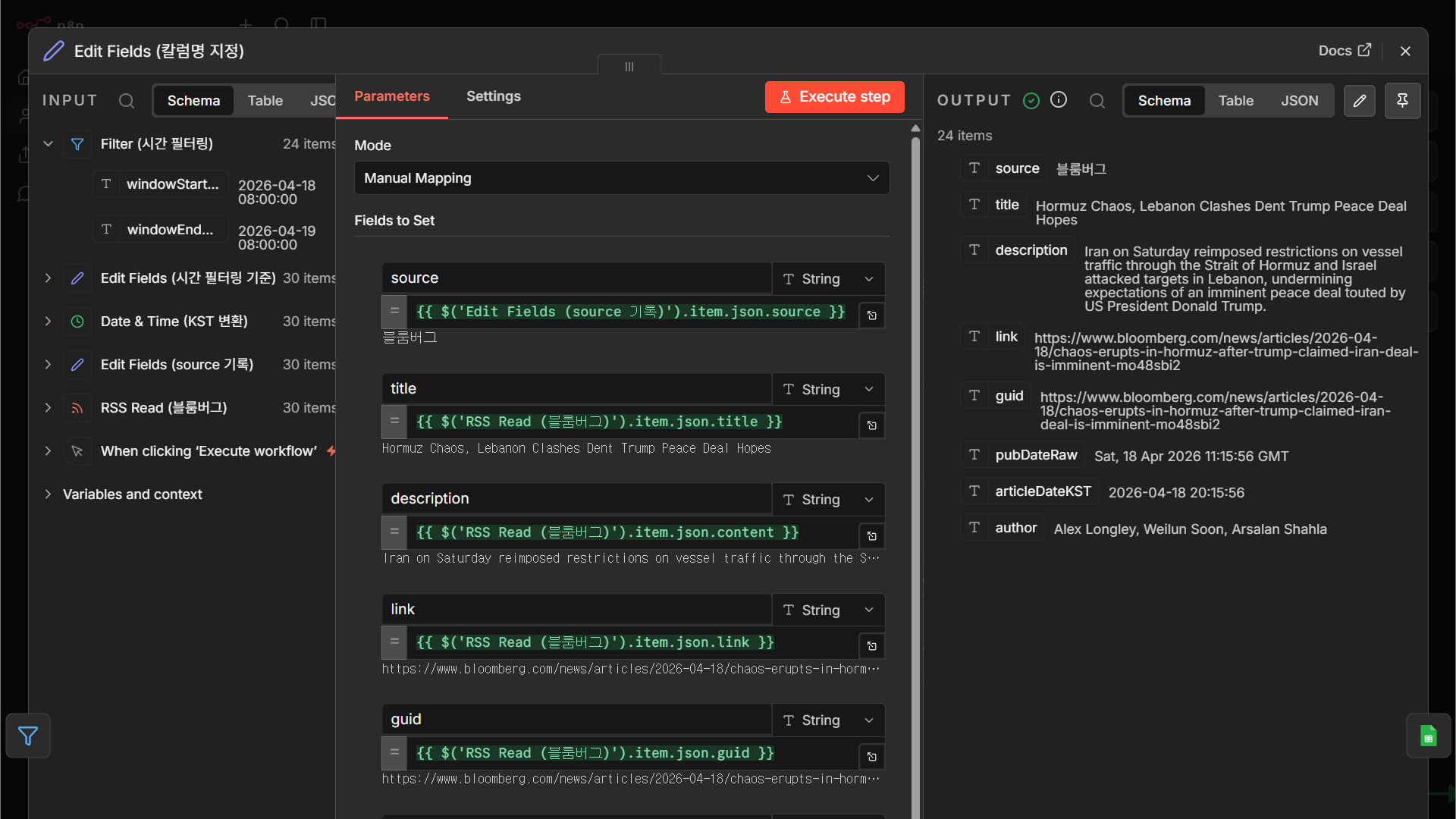
Code 보기
{
  "nodes": [
    {
      "parameters": {
        "assignments": {
          "assignments": [
            {
              "id": "fa902690-75fd-4bbe-bab8-41fe664a9774",
              "name": "source",
              "value": "={{ $('Edit Fields (source 기록)').item.json.source }}",
              "type": "string"
            },
            {
              "id": "1b815529-08c5-4096-be88-6ea14d97ece8",
              "name": "title",
              "value": "={{ $('RSS Read (블룸버그)').item.json.title }}",
              "type": "string"
            },
            {
              "id": "9f68365a-62af-4d99-9394-bae46aee4708",
              "name": "description",
              "value": "={{ $('RSS Read (블룸버그)').item.json.content }}",
              "type": "string"
            },
            {
              "id": "fbca3bfa-bb26-4b67-b2f5-e54f6a91f702",
              "name": "link",
              "value": "={{ $('RSS Read (블룸버그)').item.json.link }}",
              "type": "string"
            },
            {
              "id": "1bd9e766-4747-49b6-b3ee-043fc7886754",
              "name": "guid",
              "value": "={{ $('RSS Read (블룸버그)').item.json.guid }}",
              "type": "string"
            },
            {
              "id": "d7d401ce-5899-4ba9-8569-adfe50996786",
              "name": "pubDateRaw",
              "value": "={{ $('RSS Read (블룸버그)').item.json.pubDate }}",
              "type": "string"
            },
            {
              "id": "1bd7d061-10fc-4cf7-850e-d4c717d11a7a",
              "name": "articleDateKST",
              "value": "={{ $('Date & Time (KST 변환)').item.json.articleDateKST }}",
              "type": "string"
            },
            {
              "id": "9eb68fc7-b0cf-4aff-8def-ddd709c1639c",
              "name": "author",
              "value": "={{ $('RSS Read (블룸버그)').item.json['dc:creator'] }}",
              "type": "string"
            }
          ]
        },
        "options": {}
      },
      "type": "n8n-nodes-base.set",
      "typeVersion": 3.4,
      "position": [
        0,
        416
      ],
      "id": "a2a5dfc4-687e-4f10-bd06-5a71cce4df7b",
      "name": "Edit Fields (칼럼명 지정)"
    }
  ],
  "connections": {}
}Google Sheets — DB 준비 (시트 생성 및 헤더)
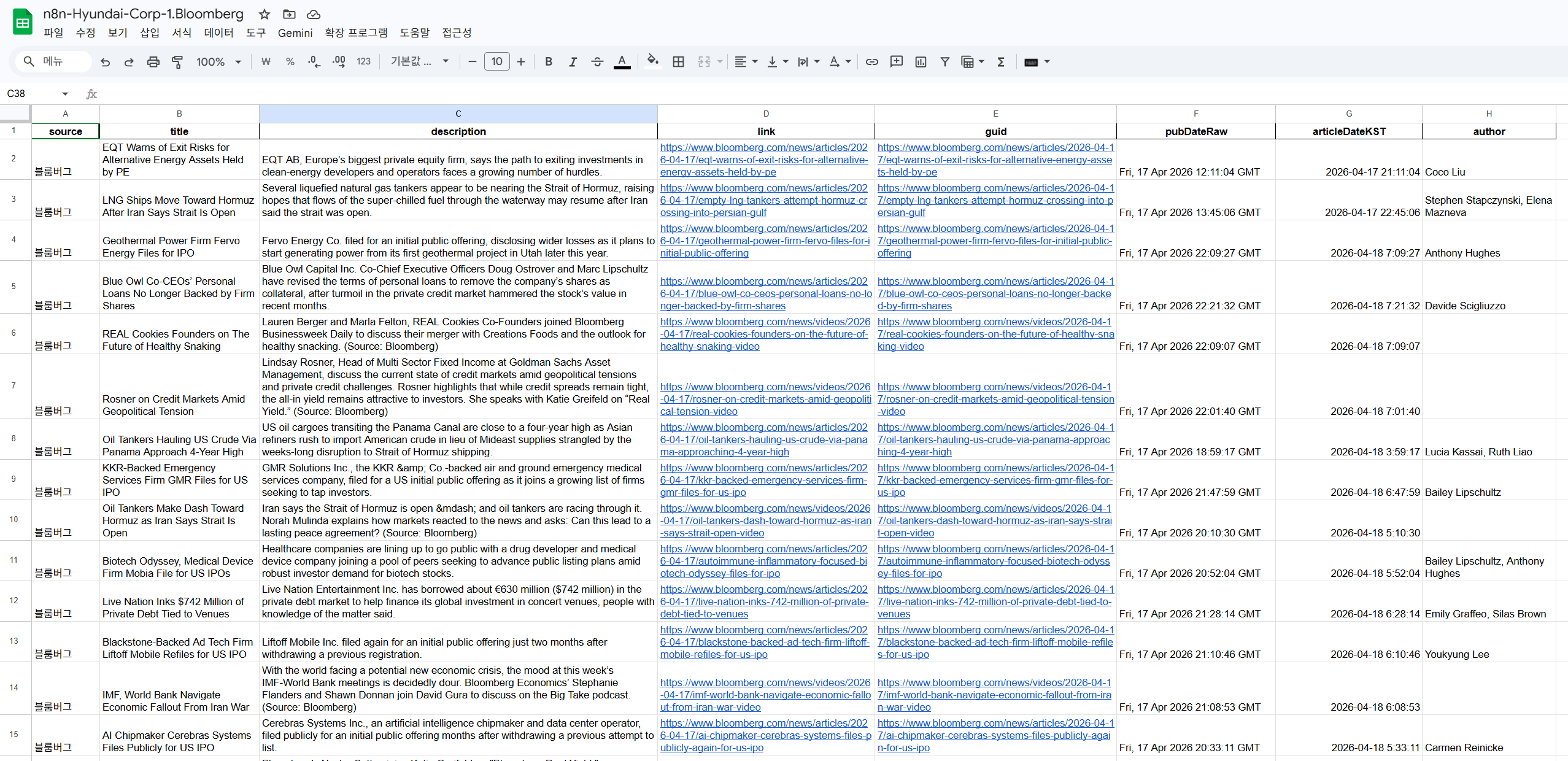
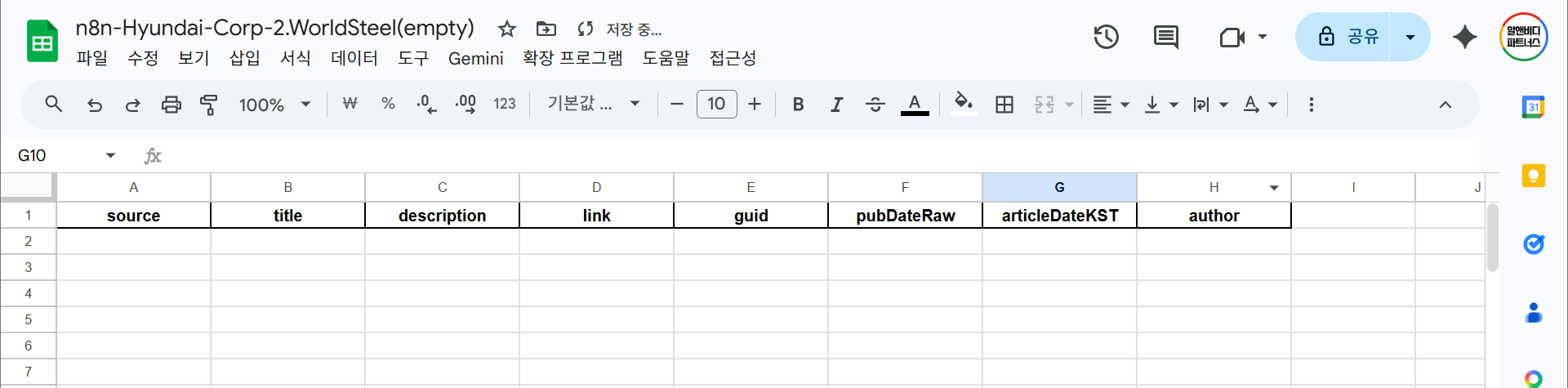
(사전 준비)n8n이 쓸 Google Sheets 파일을 미리 만들고 첫 행을 헤더로 채워 둡니다. 노드가 Append 모드로 동작하면 새 기사가 한 행씩 아래에 쌓입니다.
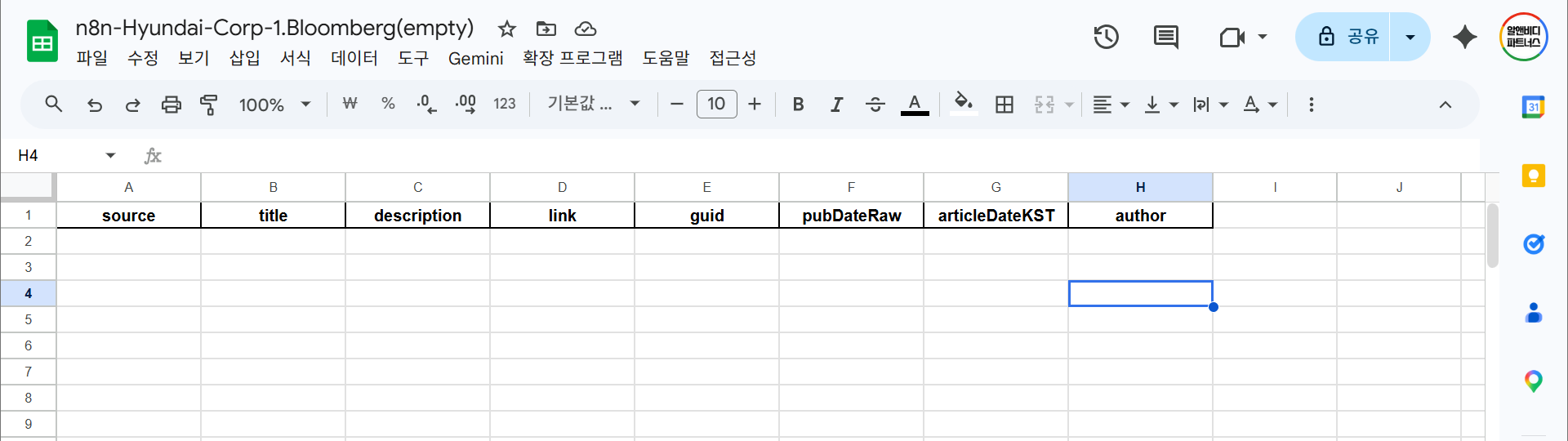
Google Sheets — 계정 연결 (OAuth2)
n8n-nodes-base.googleSheetsn8n에서 Credentials로 Google 계정을 OAuth2 연결합니다. 최초 한 번만 하면 이후 같은 계정의 모든 스프레드시트에 재사용 가능합니다. 회사 계정 사용 시 IT 정책으로 OAuth 차단된 경우는 개인 지메일로 우회하거나 사내 IT에 미리 승인 요청하십시오.
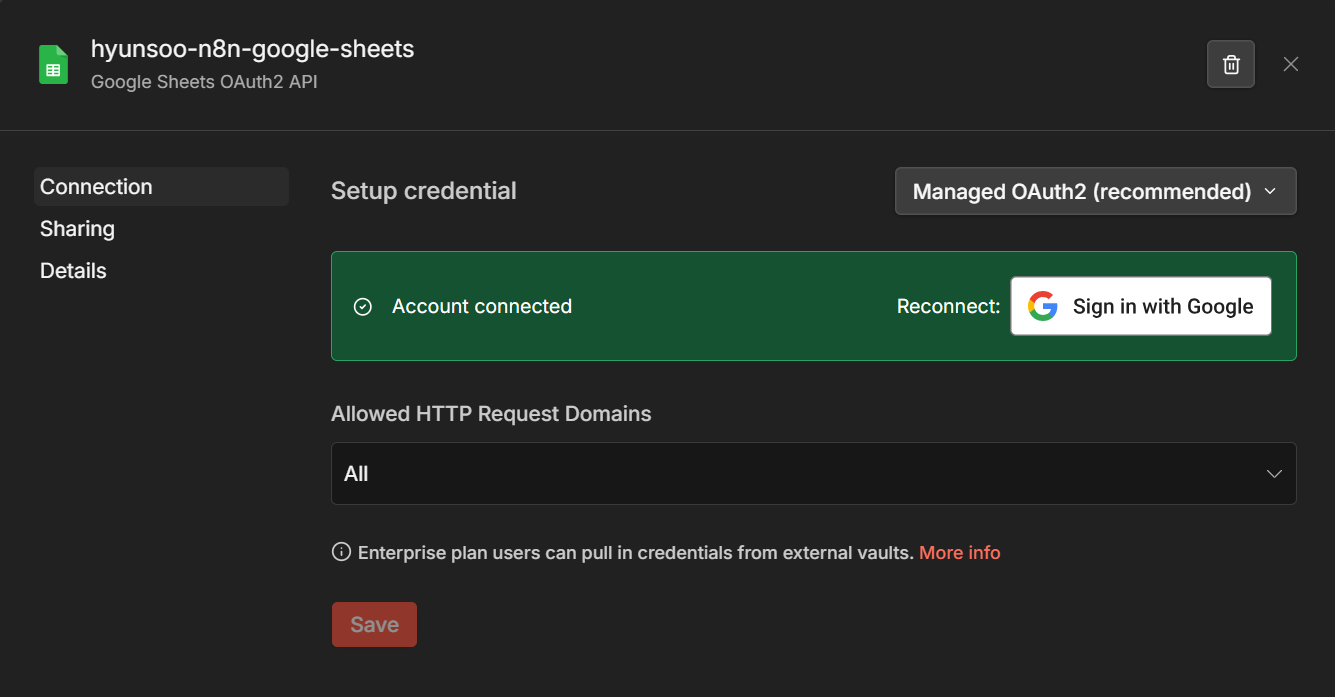
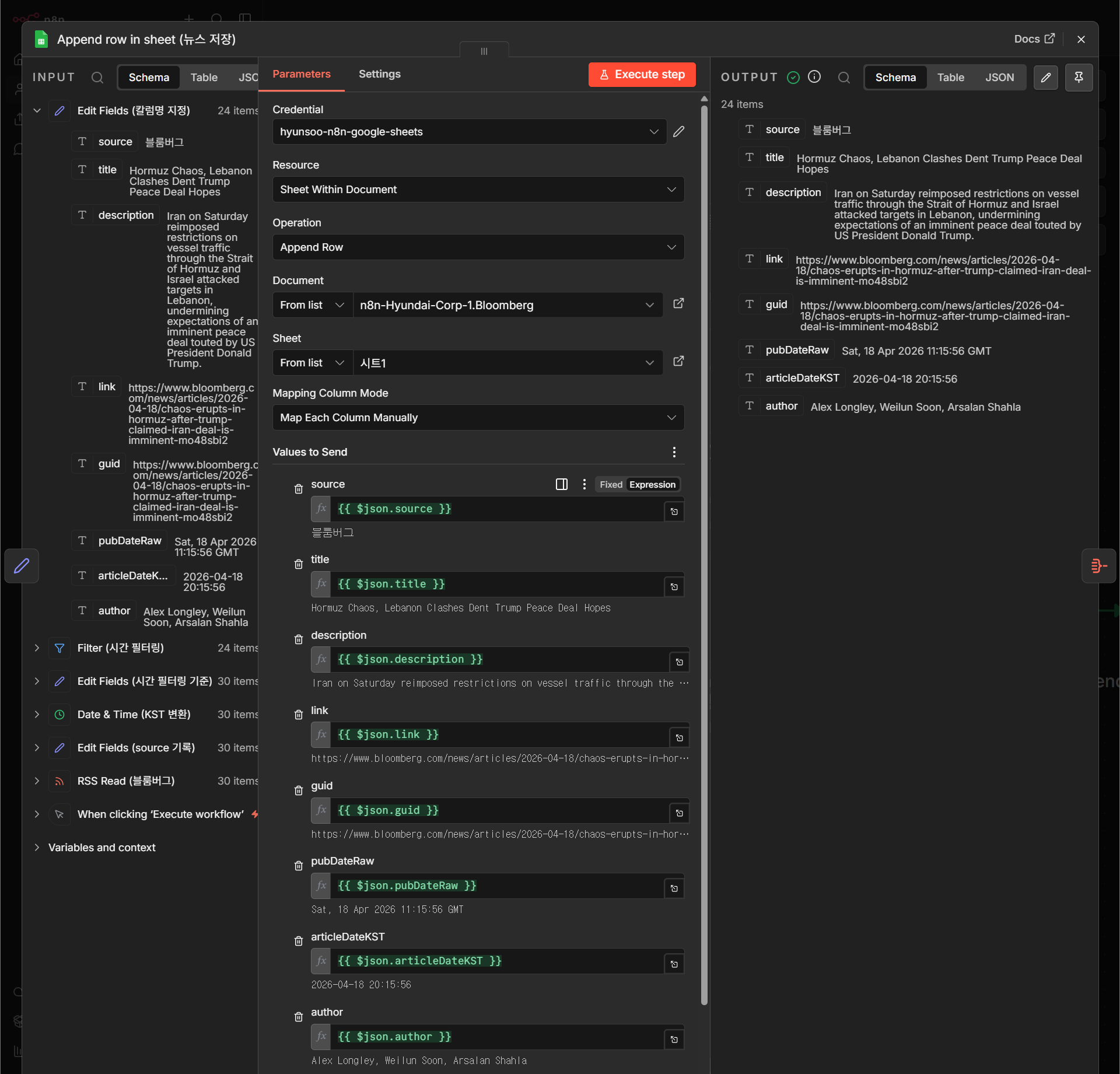
Google Sheets — 기사 한 행씩 Append
n8n-nodes-base.googleSheetsOperation은 Append Row, 대상은 앞서 만든 DB 파일과 시트를 지정합니다. 아이템 개수만큼 새 행이 생깁니다. 중복 방지가 필요하면 Append or Update로 바꾸고 Key 칼럼(예: link)을 지정하십시오.
Code 보기
{
  "nodes": [
    {
      "parameters": {
        "operation": "append",
        "documentId": {
          "__rl": true,
          "value": "1Wf1K7V4BIEJZ7vwV706xwoqCNQcQlkwhjFeOriUAGkU",
          "mode": "list",
          "cachedResultName": "n8n-Bloomberg",
          "cachedResultUrl": "https://docs.google.com/spreadsheets/d/1Wf1K7V4BIEJZ7vwV706xwoqCNQcQlkwhjFeOriUAGkU/edit?usp=drivesdk"
        },
        "sheetName": {
          "__rl": true,
          "value": "gid=0",
          "mode": "list",
          "cachedResultName": "시트1",
          "cachedResultUrl": "https://docs.google.com/spreadsheets/d/1Wf1K7V4BIEJZ7vwV706xwoqCNQcQlkwhjFeOriUAGkU/edit#gid=0"
        },
        "columns": {
          "mappingMode": "defineBelow",
          "value": {
            "source": "={{ $json.source }}",
            "title": "={{ $json.title }}",
            "description": "={{ $json.description }}",
            "link": "={{ $json.link }}",
            "guid": "={{ $json.guid }}",
            "pubDateRaw": "={{ $json.pubDateRaw }}",
            "articleDateKST": "={{ $json.articleDateKST }}",
            "author": "={{ $json.author }}"
          },
          "matchingColumns": [],
          "schema": [
            {
              "id": "source",
              "displayName": "source",
              "required": false,
              "defaultMatch": false,
              "display": true,
              "type": "string",
              "canBeUsedToMatch": true
            },
            {
              "id": "title",
              "displayName": "title",
              "required": false,
              "defaultMatch": false,
              "display": true,
              "type": "string",
              "canBeUsedToMatch": true
            },
            {
              "id": "description",
              "displayName": "description",
              "required": false,
              "defaultMatch": false,
              "display": true,
              "type": "string",
              "canBeUsedToMatch": true
            },
            {
              "id": "link",
              "displayName": "link",
              "required": false,
              "defaultMatch": false,
              "display": true,
              "type": "string",
              "canBeUsedToMatch": true
            },
            {
              "id": "guid",
              "displayName": "guid",
              "required": false,
              "defaultMatch": false,
              "display": true,
              "type": "string",
              "canBeUsedToMatch": true
            },
            {
              "id": "pubDateRaw",
              "displayName": "pubDateRaw",
              "required": false,
              "defaultMatch": false,
              "display": true,
              "type": "string",
              "canBeUsedToMatch": true
            },
            {
              "id": "articleDateKST",
              "displayName": "articleDateKST",
              "required": false,
              "defaultMatch": false,
              "display": true,
              "type": "string",
              "canBeUsedToMatch": true
            },
            {
              "id": "author",
              "displayName": "author",
              "required": false,
              "defaultMatch": false,
              "display": true,
              "type": "string",
              "canBeUsedToMatch": true
            }
          ],
          "attemptToConvertTypes": false,
          "convertFieldsToString": false
        },
        "options": {}
      },
      "type": "n8n-nodes-base.googleSheets",
      "typeVersion": 4.7,
      "position": [
        224,
        416
      ],
      "id": "064201ec-ee0c-4c57-8ad7-4ac49ffe9c82",
      "name": "Append row in sheet (뉴스 저장)",
      "credentials": {
        "googleSheetsOAuth2Api": {
          "id": "Spx5Q5S3g82eKaQN",
          "name": "hyunsoo-n8n-google-sheets"
        }
      }
    }
  ],
  "connections": {}
}Aggregate — 여러 기사를 하나의 아이템으로 통합
n8n-nodes-base.aggregate지금까지는 n8n 관점에서 “기사 1개 = 아이템 1개”였습니다. 이메일 본문에 “10개 기사 전부”를 한 통에 담으려면 아이템을 하나의 배열 필드로 묶어야 합니다. Aggregate 노드가 그 역할을 합니다.
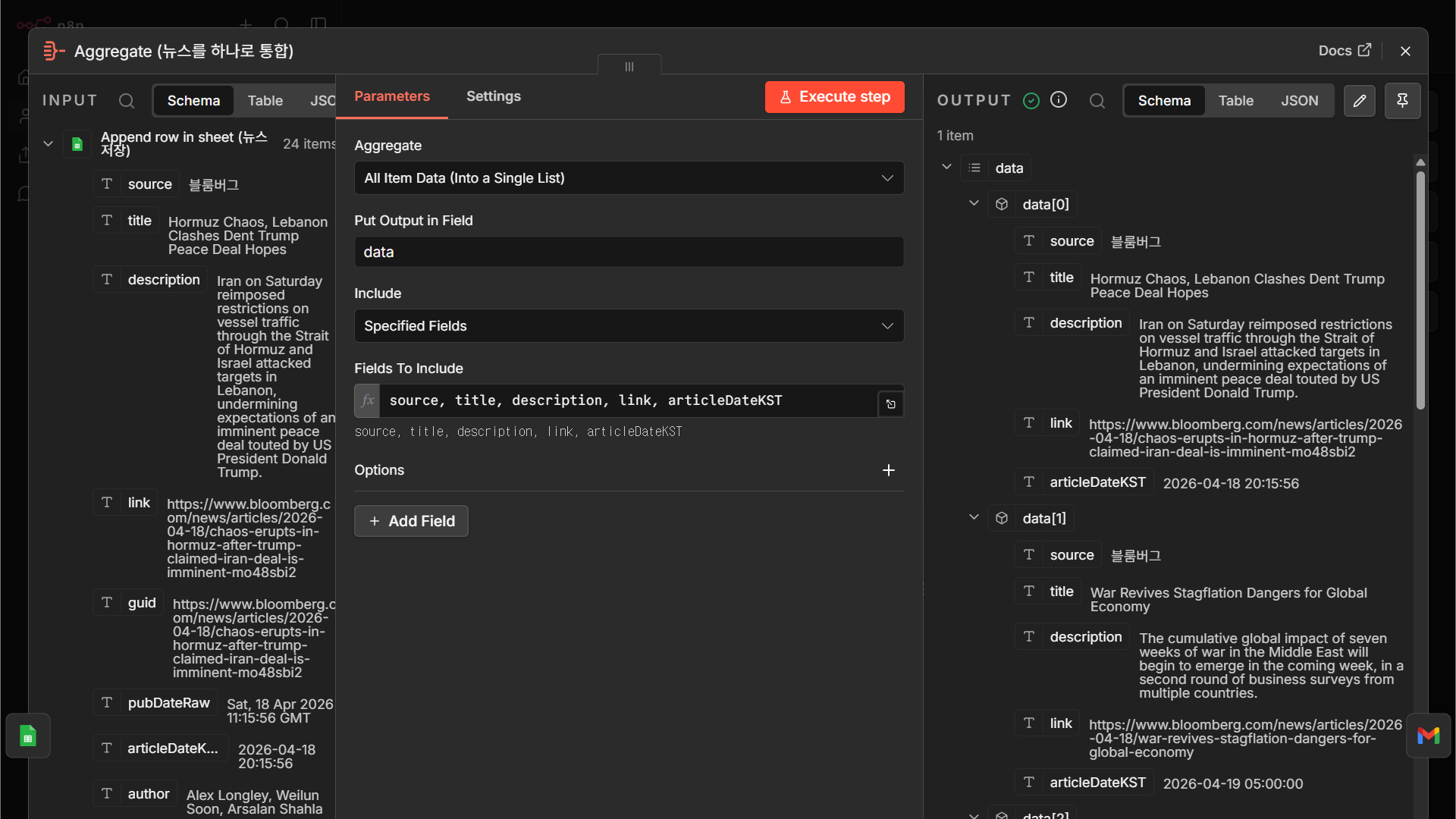
Code 보기
{
  "nodes": [
    {
      "parameters": {
        "aggregate": "aggregateAllItemData",
        "include": "specifiedFields",
        "fieldsToInclude": "=source, title, description, link, articleDateKST",
        "options": {}
      },
      "type": "n8n-nodes-base.aggregate",
      "typeVersion": 1,
      "position": [
        448,
        416
      ],
      "id": "465018c9-af68-431f-836d-db3fde3adcc3",
      "name": "Aggregate (뉴스를 하나로 통합)"
    }
  ],
  "connections": {}
}Gmail — 계정 연결 & 뉴스 목록 이메일 발송
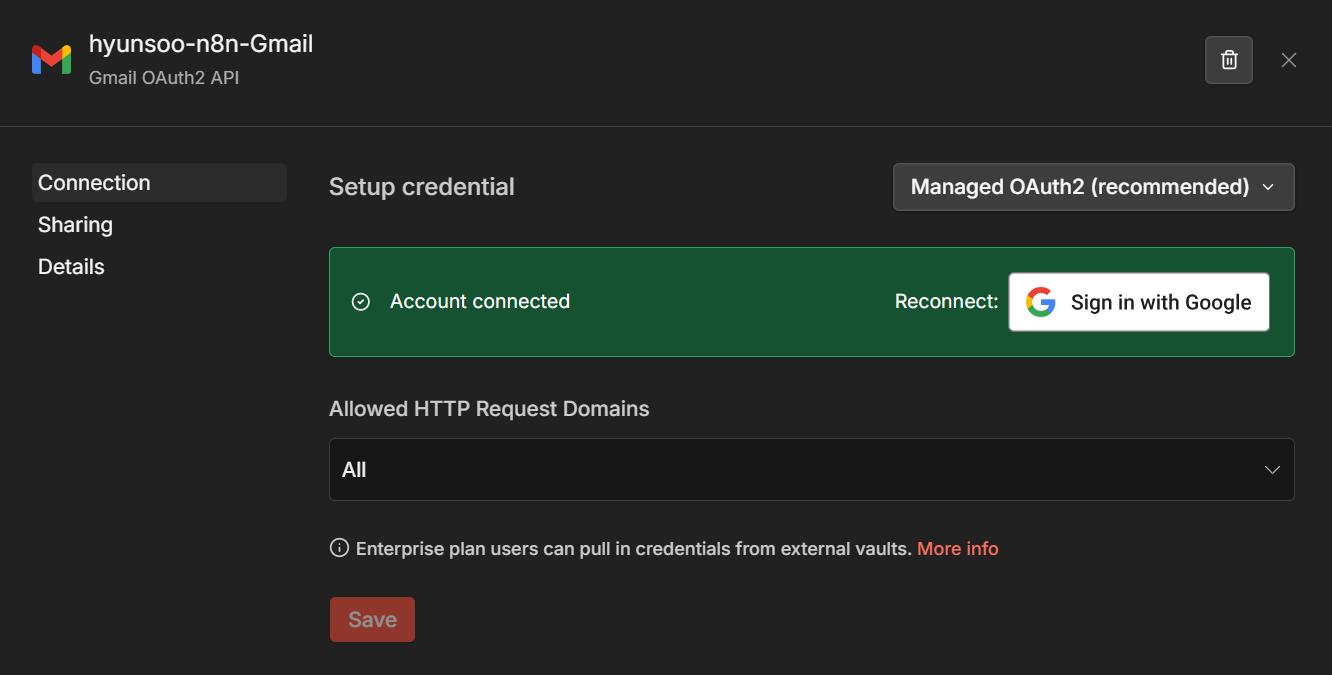
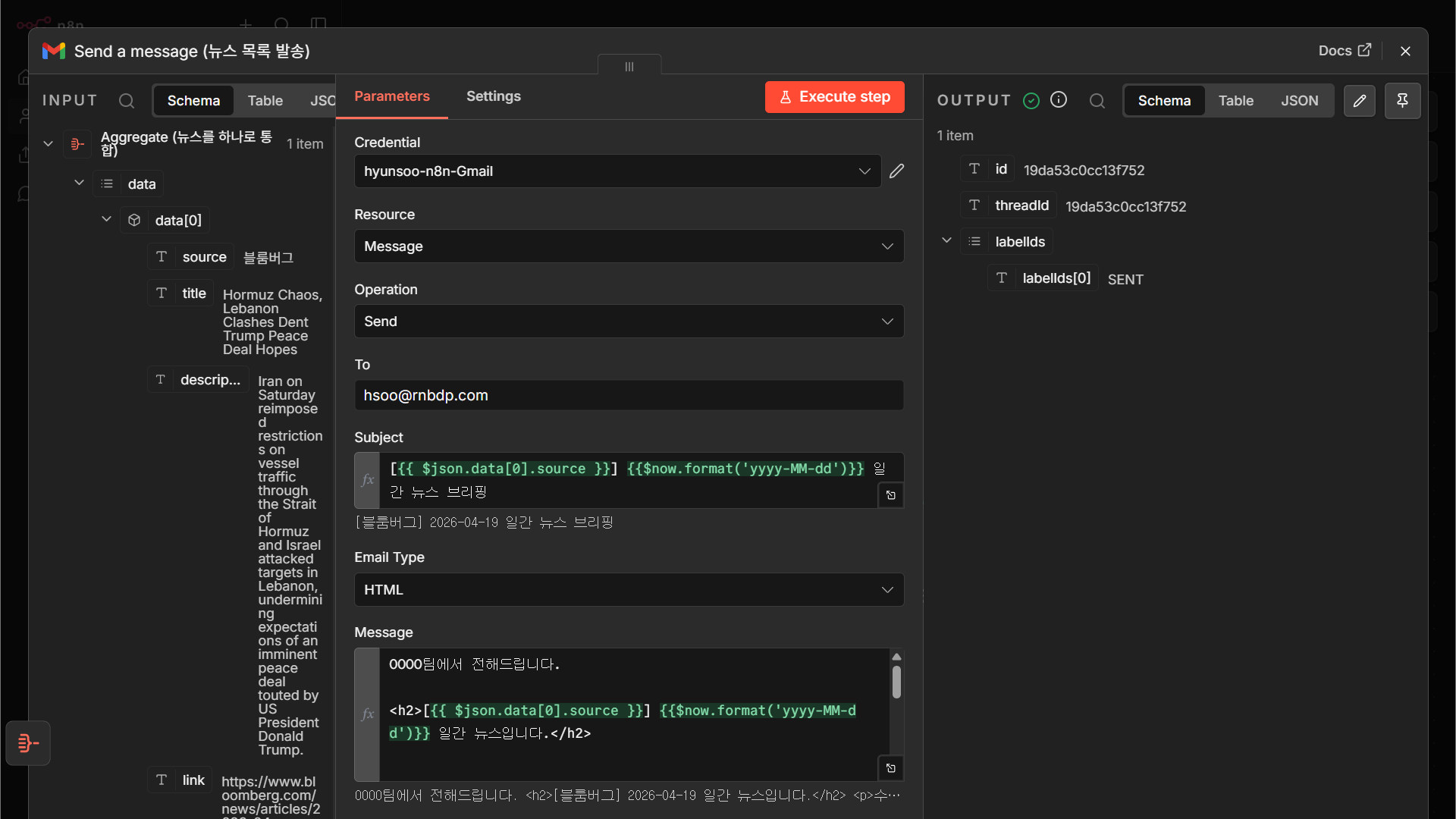
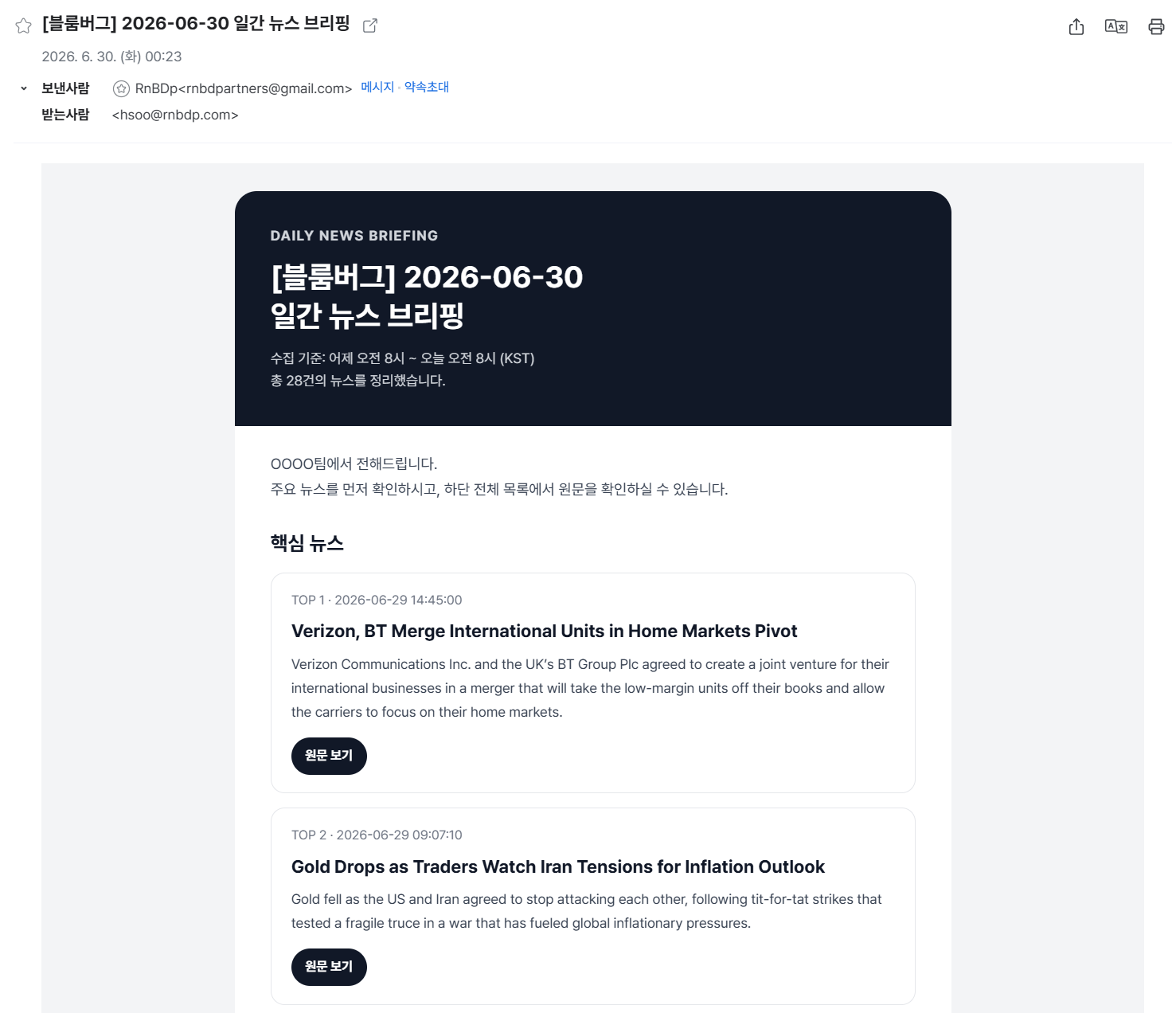
n8n-nodes-base.gmailGmail도 OAuth2로 한 번 연결해 두면 재사용 가능합니다. 본문은 HTML 또는 텍스트로 작성하는데, Aggregate 결과 배열을 {{ $json.items.map(i => '<li><a href="'+i.link+'">'+i.title+'</a></li>').join('') }} 같은 식으로 HTML <li> 리스트로 렌더링합니다.
Code 보기
{
"nodes": [
{
"parameters": {
"sendTo": "hsoo@rnbdp.com",
"subject": "=[{{ $json.data[0].source || '뉴스' }}] {{$now.setZone('Asia/Seoul').toFormat('yyyy-MM-dd')}} 일간 뉴스 브리핑",
"emailType": "html",
"message": "={{ (() => {\n const articles = Array.isArray($json.data) ? $json.data : [];\n const source = articles[0]?.source || '뉴스';\n const today = $now.setZone('Asia/Seoul').toFormat('yyyy-MM-dd');\n\n const esc = (v) => String(v ?? '')\n .replace(/&/g, '&')\n .replace(/</g, '<')\n .replace(/>/g, '>')\n .replace(/\"/g, '"');\n\n const getUrl = (a) => a.link || a.url || a.originalLink || a.href || '';\n\n const emptyMessage = `\n <tr>\n <td style=\"padding:24px;border:1px solid #e5e7eb;border-radius:14px;background:#ffffff;color:#6b7280;font-size:14px;line-height:1.7;\">\n 수집된 뉴스가 없습니다.\n </td>\n </tr>\n `;\n\n const topArticles = articles.slice(0, 5);\n\n const highlightCards = topArticles.length\n ? topArticles.map((a, i) => {\n const url = getUrl(a);\n\n return `\n <tr>\n <td style=\"padding:0 0 14px 0;\">\n <table width=\"100%\" cellpadding=\"0\" cellspacing=\"0\" role=\"presentation\" style=\"border:1px solid #e5e7eb;border-radius:14px;background:#ffffff;\">\n <tr>\n <td style=\"padding:18px 20px;\">\n <div style=\"font-size:13px;color:#6b7280;margin-bottom:8px;\">\n TOP ${i + 1} · ${esc(a.articleDateKST || '')}\n </div>\n\n <div style=\"font-size:18px;line-height:1.45;font-weight:700;color:#111827;margin-bottom:8px;\">\n ${esc(a.title)}\n </div>\n\n <div style=\"font-size:14px;line-height:1.7;color:#374151;margin-bottom:14px;\">\n ${esc(a.description)}\n </div>\n\n ${url ? `\n <a href=\"${esc(url)}\" style=\"display:inline-block;padding:9px 14px;background:#111827;color:#ffffff;text-decoration:none;border-radius:999px;font-size:13px;font-weight:700;\">\n 원문 보기\n </a>\n ` : ''}\n </td>\n </tr>\n </table>\n </td>\n </tr>\n `;\n }).join('')\n : emptyMessage;\n\n const rows = articles.length\n ? articles.map((a, i) => {\n const url = getUrl(a);\n\n return `\n <tr>\n <td style=\"padding:12px 10px;border-bottom:1px solid #e5e7eb;color:#6b7280;font-size:13px;text-align:center;\">\n ${i + 1}\n </td>\n <td style=\"padding:12px 10px;border-bottom:1px solid #e5e7eb;font-size:14px;line-height:1.5;color:#111827;font-weight:700;\">\n ${esc(a.title)}\n </td>\n <td style=\"padding:12px 10px;border-bottom:1px solid #e5e7eb;font-size:13px;line-height:1.55;color:#4b5563;\">\n ${esc(a.description)}\n </td>\n <td style=\"padding:12px 10px;border-bottom:1px solid #e5e7eb;font-size:12px;color:#6b7280;white-space:nowrap;\">\n ${esc(a.articleDateKST)}\n </td>\n <td style=\"padding:12px 10px;border-bottom:1px solid #e5e7eb;font-size:13px;text-align:center;white-space:nowrap;\">\n ${url ? `<a href=\"${esc(url)}\" style=\"color:#2563eb;text-decoration:none;font-weight:700;\">보기</a>` : ''}\n </td>\n </tr>\n `;\n }).join('')\n : `\n <tr>\n <td colspan=\"5\" style=\"padding:24px 10px;text-align:center;color:#6b7280;font-size:14px;\">\n 수집된 뉴스가 없습니다.\n </td>\n </tr>\n `;\n\n return `\n<!doctype html>\n<html>\n <body style=\"margin:0;padding:0;background:#f3f4f6;font-family:Arial,'Apple SD Gothic Neo','Malgun Gothic',sans-serif;\">\n <table width=\"100%\" cellpadding=\"0\" cellspacing=\"0\" role=\"presentation\" style=\"background:#f3f4f6;padding:28px 0;\">\n <tr>\n <td align=\"center\">\n <table width=\"720\" cellpadding=\"0\" cellspacing=\"0\" role=\"presentation\" style=\"width:720px;max-width:720px;background:#ffffff;border-radius:22px;overflow:hidden;box-shadow:0 8px 28px rgba(15,23,42,0.08);\">\n\n <tr>\n <td style=\"padding:34px 36px;background:#111827;color:#ffffff;\">\n <div style=\"font-size:14px;letter-spacing:0.08em;color:#d1d5db;font-weight:700;margin-bottom:12px;\">\n DAILY NEWS BRIEFING\n </div>\n <div style=\"font-size:30px;line-height:1.3;font-weight:800;margin-bottom:12px;\">\n [${esc(source)}] ${esc(today)}<br>\n 일간 뉴스 브리핑\n </div>\n <div style=\"font-size:14px;line-height:1.6;color:#d1d5db;\">\n 수집 기준: 어제 오전 8시 ~ 오늘 오전 8시 (KST)<br>\n 총 ${articles.length}건의 뉴스를 정리했습니다.\n </div>\n </td>\n </tr>\n\n <tr>\n <td style=\"padding:26px 36px 8px 36px;\">\n <div style=\"font-size:15px;line-height:1.7;color:#374151;\">\n OOOO팀에서 전해드립니다.<br>\n 주요 뉴스를 먼저 확인하시고, 하단 전체 목록에서 원문을 확인하실 수 있습니다.\n </div>\n </td>\n </tr>\n\n <tr>\n <td style=\"padding:18px 36px 4px 36px;\">\n <div style=\"font-size:20px;font-weight:800;color:#111827;margin-bottom:14px;\">\n 핵심 뉴스\n </div>\n\n <table width=\"100%\" cellpadding=\"0\" cellspacing=\"0\" role=\"presentation\">\n ${highlightCards}\n </table>\n </td>\n </tr>\n\n <tr>\n <td style=\"padding:20px 36px 34px 36px;\">\n <div style=\"font-size:20px;font-weight:800;color:#111827;margin-bottom:14px;\">\n 전체 뉴스 목록\n </div>\n\n <table width=\"100%\" cellpadding=\"0\" cellspacing=\"0\" role=\"presentation\" style=\"border-collapse:collapse;border:1px solid #e5e7eb;border-radius:14px;overflow:hidden;\">\n <thead>\n <tr style=\"background:#f9fafb;\">\n <th style=\"padding:12px 10px;border-bottom:1px solid #e5e7eb;font-size:12px;color:#6b7280;text-align:center;width:42px;\">No.</th>\n <th style=\"padding:12px 10px;border-bottom:1px solid #e5e7eb;font-size:12px;color:#6b7280;text-align:left;\">제목</th>\n <th style=\"padding:12px 10px;border-bottom:1px solid #e5e7eb;font-size:12px;color:#6b7280;text-align:left;\">내용</th>\n <th style=\"padding:12px 10px;border-bottom:1px solid #e5e7eb;font-size:12px;color:#6b7280;text-align:left;\">게시시각</th>\n <th style=\"padding:12px 10px;border-bottom:1px solid #e5e7eb;font-size:12px;color:#6b7280;text-align:center;\">링크</th>\n </tr>\n </thead>\n <tbody>\n ${rows}\n </tbody>\n </table>\n </td>\n </tr>\n\n <tr>\n <td style=\"padding:18px 36px;background:#f9fafb;border-top:1px solid #e5e7eb;\">\n <div style=\"font-size:12px;line-height:1.6;color:#6b7280;\">\n 본 메일은 자동 수집된 뉴스 데이터를 기반으로 작성되었습니다.\n </div>\n </td>\n </tr>\n\n </table>\n </td>\n </tr>\n </table>\n </body>\n</html>\n `;\n})() }}",
"options": {
"appendAttribution": false
}
},
"type": "n8n-nodes-base.gmail",
"typeVersion": 2.2,
"position": [
672,
416
],
"id": "278e081a-1e23-4b2b-8af6-26af346eb5d1",
"name": "Send a message (뉴스 목록 발송)",
"webhookId": "7c9b29a0-f603-4400-95fe-e7b8a3e013fc",
"credentials": {
"gmailOAuth2": {
"id": "hhw5240RFQieWxBf",
"name": "hyunsoo-n8n-Gmail"
}
}
}
],
"connections": {}
}
World Steel 뉴스로 동일 패턴 응용하기
Case 1에서 만든 “RSS → 필터 → Sheets → Gmail” 뼈대를 다른 소스(World Steel Association)에 그대로 붙입니다. 구조는 같지만 소스마다 있는 미세한 차이(description 필드 정리, 시간 표기, 인코딩)를 어떻게 맞추는지가 핵심 학습 포인트입니다.
① Case 1과의 차이점
같은 뼈대이지만, World Steel 피드는 Bloomberg보다 description 필드에 HTML 태그와 불필요한 공백이 섞여 있습니다. 그래서 노드가 하나 더 붙습니다 — “Edit Fields (description 정리)”. 또 시간 필드 포맷도 미묘하게 다를 수 있어 Date & Time 노드에서 포맷 지정이 필요할 수 있습니다.
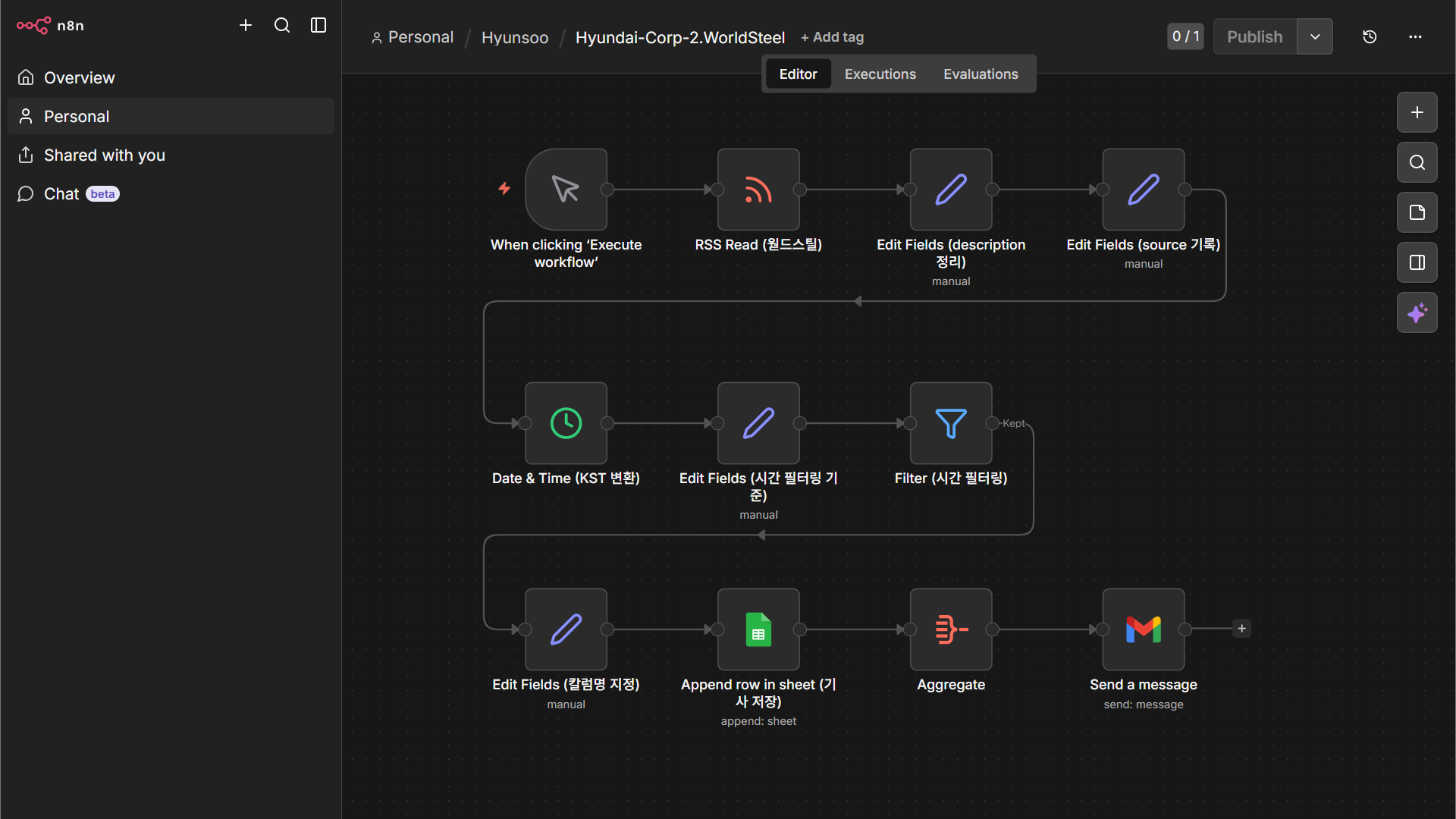
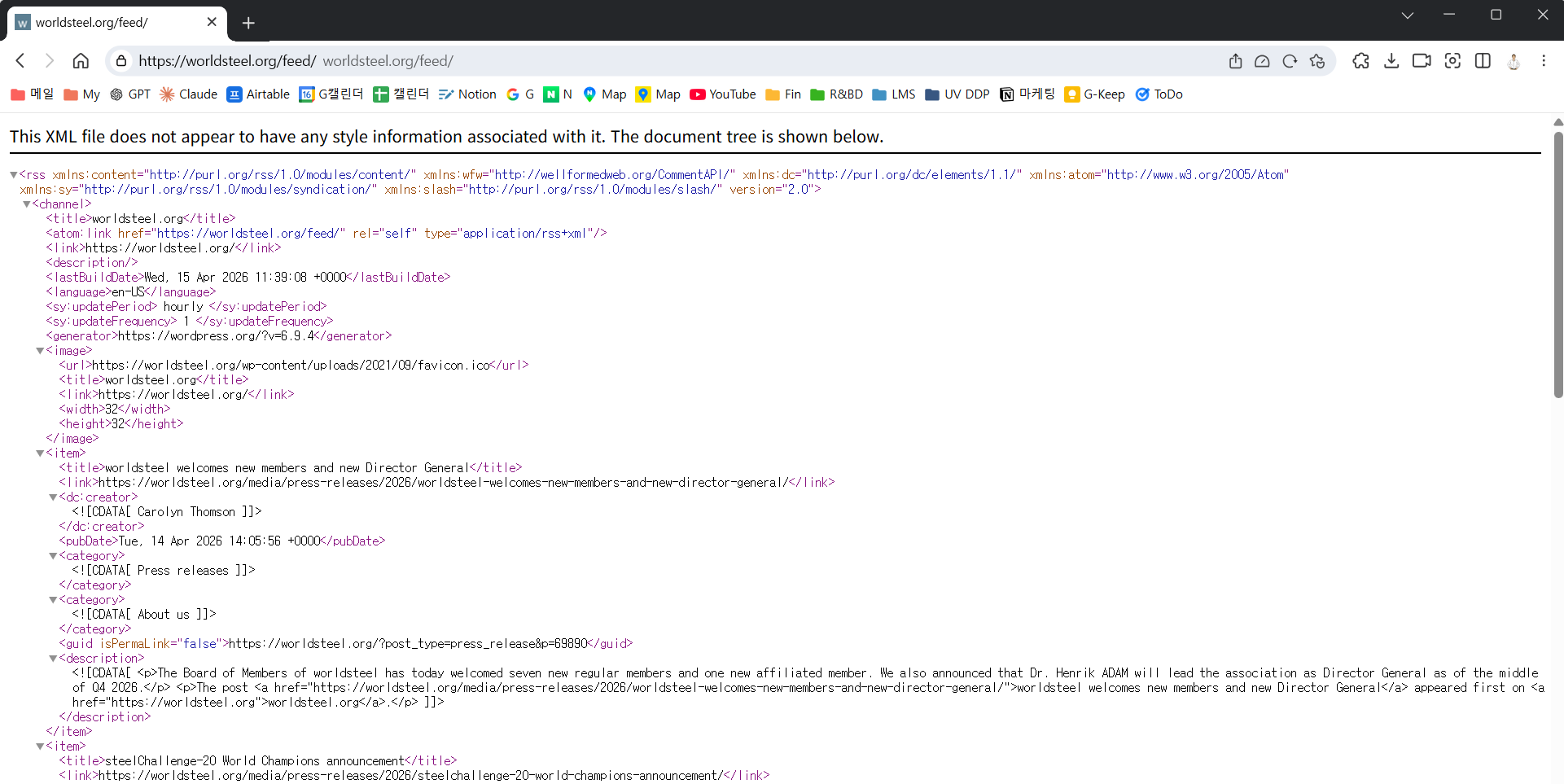
② 노드별 구성 (총 11개)
RSS Read — World Steel 피드
n8n-nodes-base.rssFeedReadWorld Steel Association RSS 피드 URL: https://worldsteel.org/feed/ — URL만 Case 1의 Bloomberg에서 World Steel로 바꿔 줍니다. 노드 자체의 설정은 완전히 동일합니다.
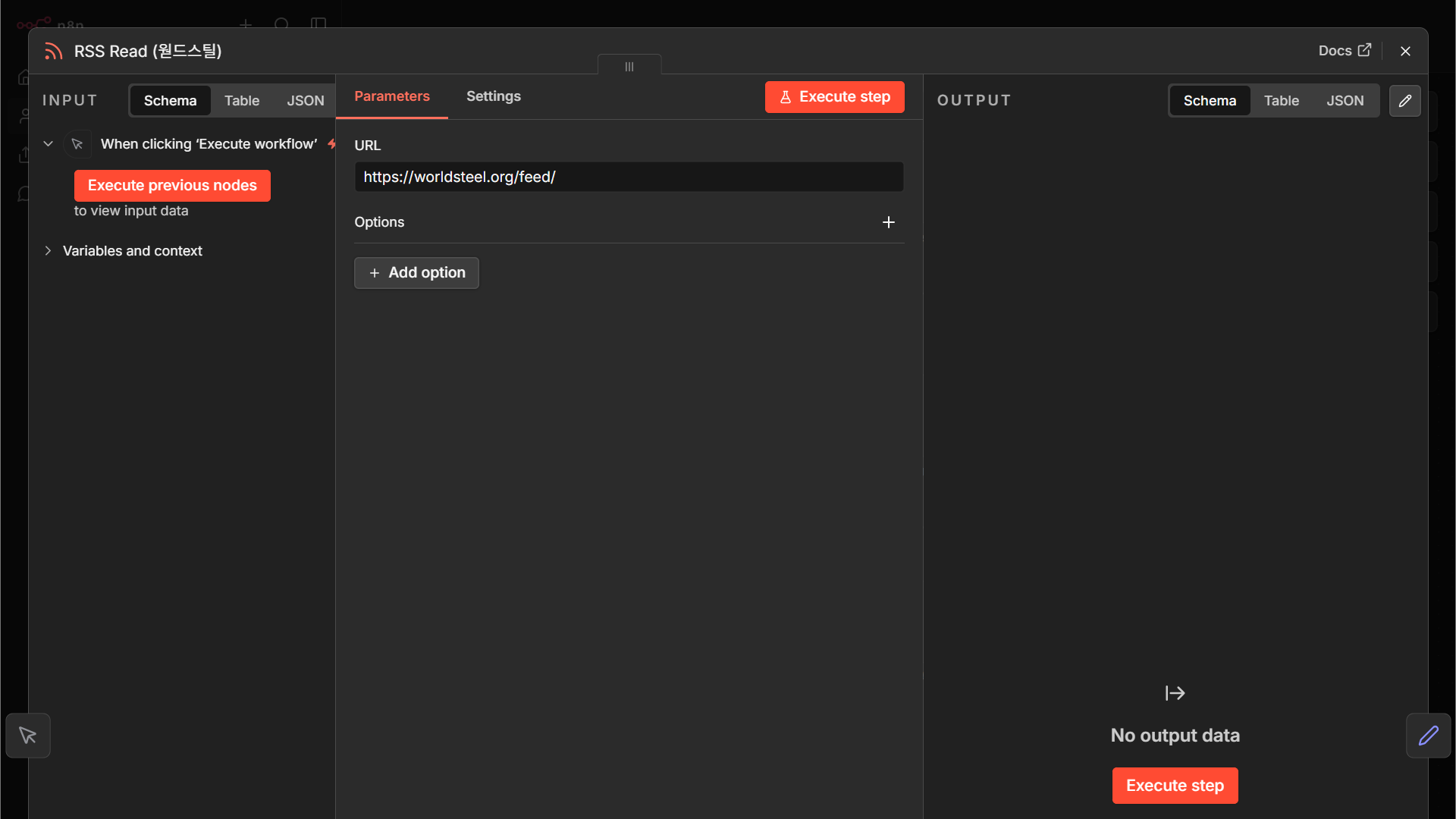
Code 보기
{
  "nodes": [
    {
      "parameters": {
        "url": "https://worldsteel.org/feed/",
        "options": {}
      },
      "type": "n8n-nodes-base.rssFeedRead",
      "typeVersion": 1.2,
      "position": [
        224,
        0
      ],
      "id": "f3f3286b-334a-4277-91ea-763a79e415d0",
      "name": "RSS Read (웓드스틸)"
    }
  ],
  "connections": {}
}Edit Fields — description 정리 (소스 특성 대응)
n8n-nodes-base.setCase 2에서 새로 추가된 노드. World Steel의 description에는 HTML 태그(<p>, <br>)와 줄바꿈 공백이 섞여 있습니다. .replace(/<[^>]+>/g, '')로 태그를 제거하고 공백을 정돈해 “읽을 수 있는 요약문”으로 만듭니다.
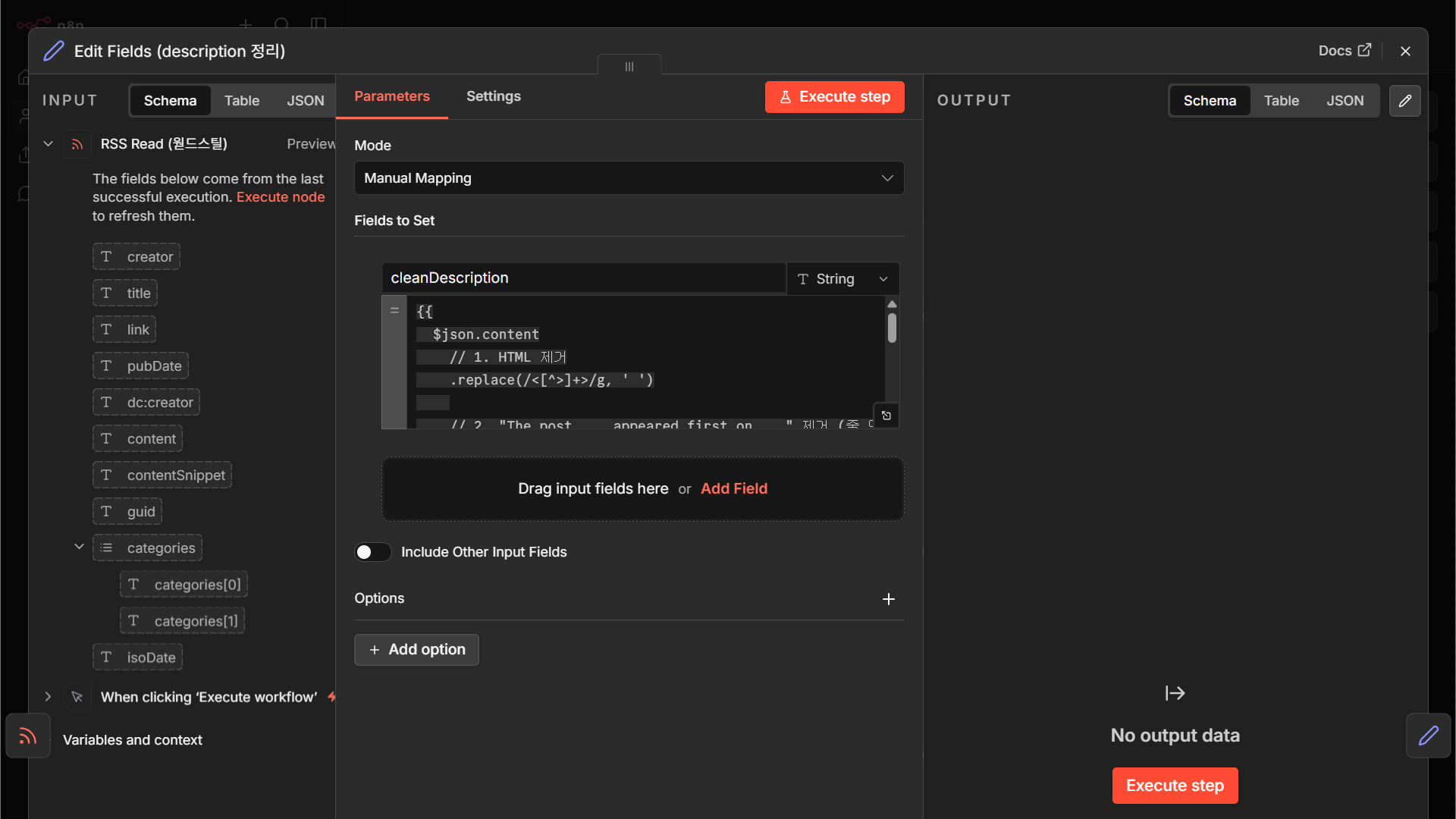
Code 보기
{
  "nodes": [
    {
      "parameters": {
        "assignments": {
          "assignments": [
            {
              "id": "1725d5d5-e755-4767-a398-9db7a3608f4e",
              "name": "cleanDescription",
              "value": "={{\n  $json.content\n    // 1. HTML 제거\n    .replace(/<[^>]+>/g, ' ')\n    \n    // 2. \"The post ... appeared first on ...\" 제거 (줄 단위 제거)\n    .replace(/The post .*?appeared first on .*?\\./g, '')\n    \n    // 3. 줄바꿈 기준으로 나누기\n    .split('\\n')\n    \n    // 4. 앞뒤 공백 제거 + 빈 줄 제거\n    .map(s => s.trim())\n    .filter(s => s.length > 30)\n    \n    // 5. 다시 합치기\n    .join('\\n\\n')\n}}",
              "type": "string"
            }
          ]
        },
        "options": {}
      },
      "type": "n8n-nodes-base.set",
      "typeVersion": 3.4,
      "position": [
        448,
        0
      ],
      "id": "e7c8ae35-30c4-4dbd-9eca-70e886aac019",
      "name": "Edit Fields (description 정리)"
    }
  ],
  "connections": {}
}Edit Fields — source 기록
n8n-nodes-base.setsource = "World Steel". Case 1과 완전히 동일한 패턴입니다.
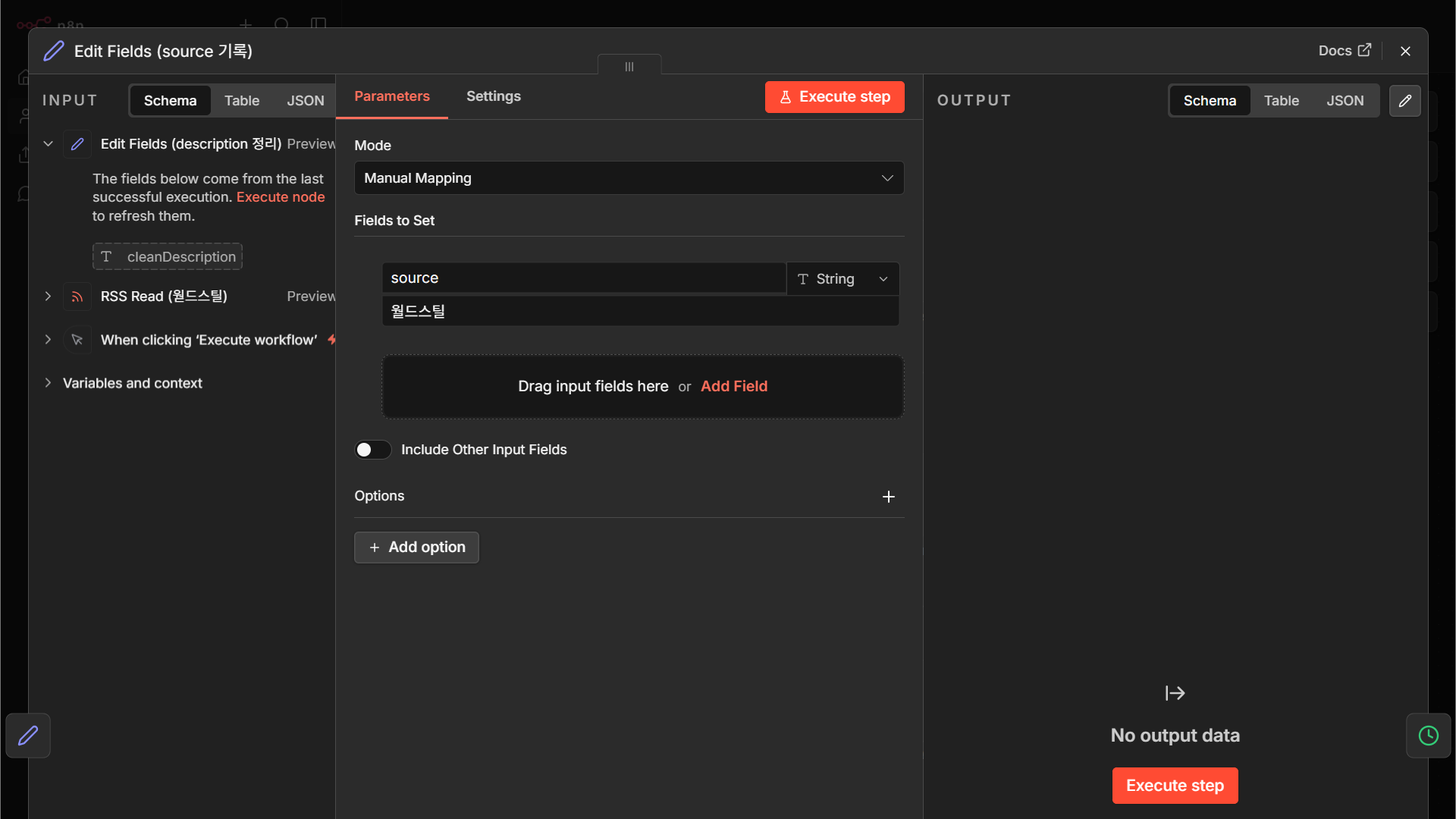
Code 보기
{
  "nodes": [
    {
      "parameters": {
        "assignments": {
          "assignments": [
            {
              "id": "b9e05ce2-30e6-4ebf-98a6-e593e534d6e7",
              "name": "source",
              "value": "월드스틸",
              "type": "string"
            }
          ]
        },
        "options": {}
      },
      "type": "n8n-nodes-base.set",
      "typeVersion": 3.4,
      "position": [
        672,
        0
      ],
      "id": "5a0f2d9c-4cf4-4862-929a-e25595ff8479",
      "name": "Edit Fields (source 기록)"
    }
  ],
  "connections": {}
}Date & Time — KST 변환
n8n-nodes-base.dateTimeCase 1과 동일. 세계 시장 뉴스이므로 원본이 UTC일 확률이 높습니다.
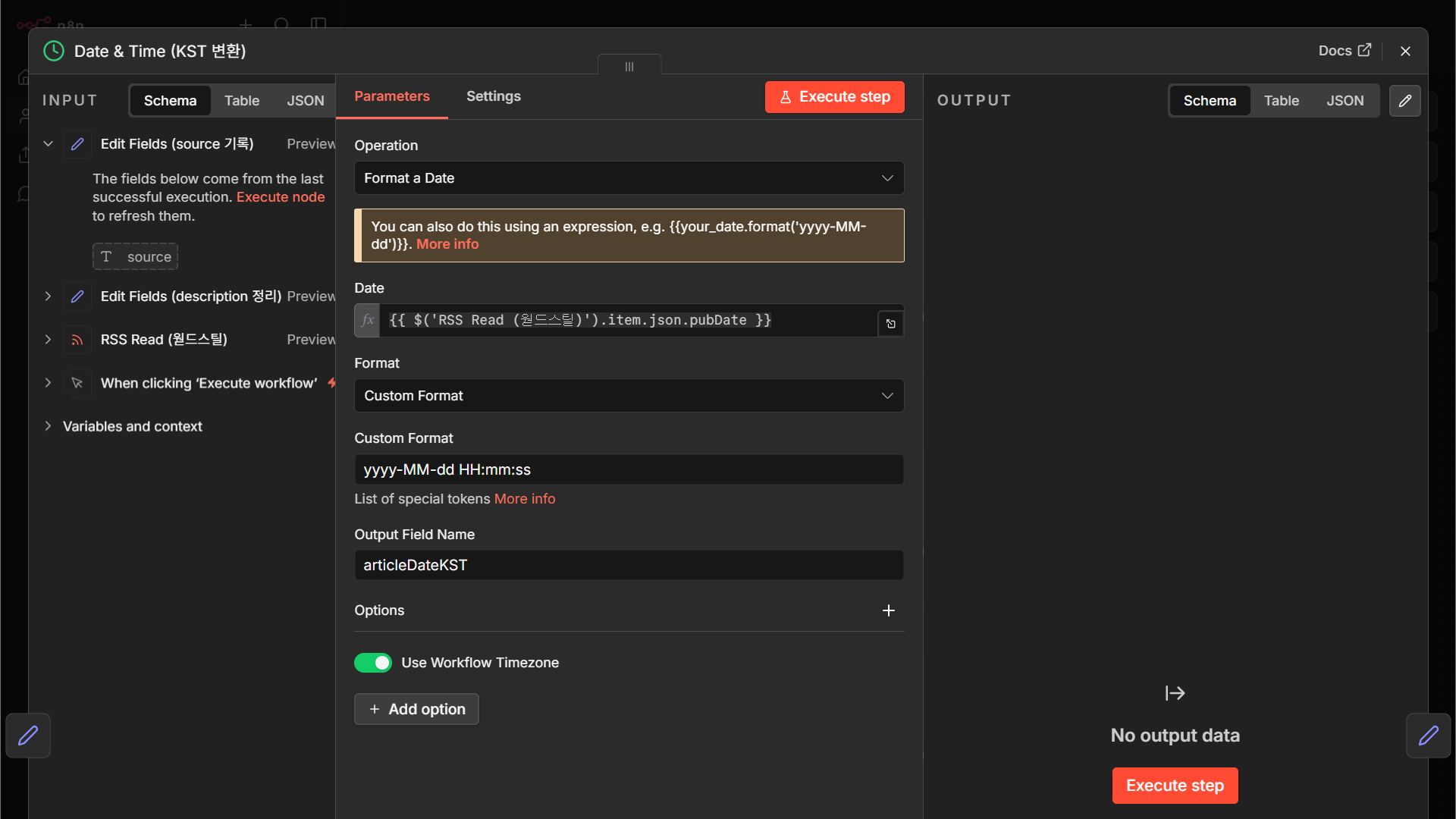
Code 보기
{
  "nodes": [
    {
      "parameters": {
        "operation": "formatDate",
        "date": "={{ $('RSS Read (웓드스틸)').item.json.pubDate }}",
        "format": "custom",
        "customFormat": "yyyy-MM-dd HH:mm:ss",
        "outputFieldName": "articleDateKST",
        "options": {
          "timezone": true
        }
      },
      "type": "n8n-nodes-base.dateTime",
      "typeVersion": 2,
      "position": [
        0,
        272
      ],
      "id": "e9f43157-c80f-4af7-a937-d6ab26e26614",
      "name": "Date & Time (KST 변환)"
    }
  ],
  "connections": {}
}Edit Fields — 시간 필터링 기준
n8n-nodes-base.set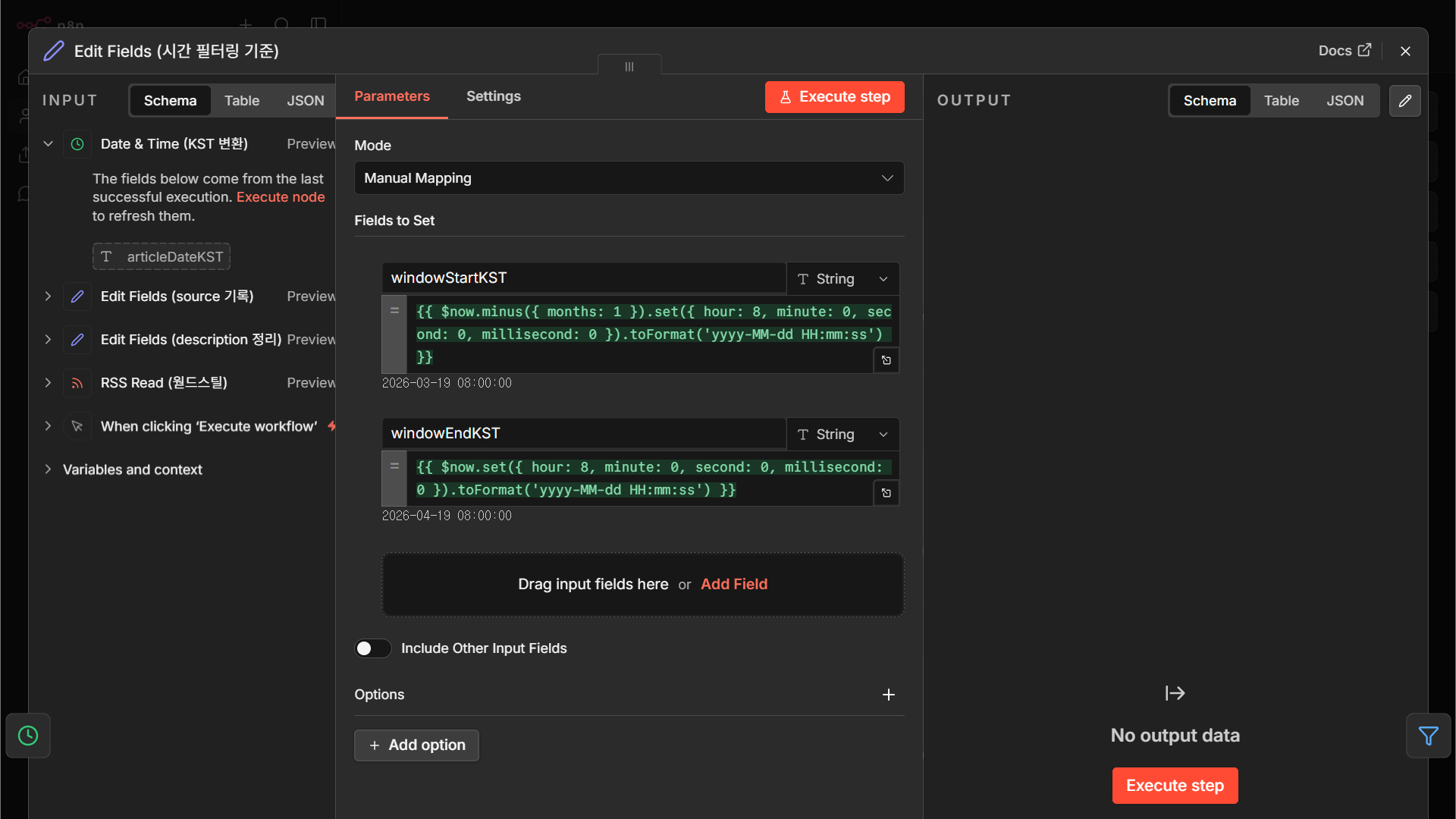
Code 보기
{
  "nodes": [
    {
      "parameters": {
        "assignments": {
          "assignments": [
            {
              "id": "da540810-0c95-49c3-94f4-94f5416c4fef",
              "name": "windowStartKST",
              "value": "={{ $now.minus({ months: 1 }).set({ hour: 8, minute: 0, second: 0, millisecond: 0 }).toFormat('yyyy-MM-dd HH:mm:ss') }}",
              "type": "string"
            },
            {
              "id": "89fc7156-596d-423e-ac2c-a9c9fb86361d",
              "name": "windowEndKST",
              "value": "={{ $now.set({ hour: 8, minute: 0, second: 0, millisecond: 0 }).toFormat('yyyy-MM-dd HH:mm:ss') }}",
              "type": "string"
            }
          ]
        },
        "options": {}
      },
      "type": "n8n-nodes-base.set",
      "typeVersion": 3.4,
      "position": [
        224,
        272
      ],
      "id": "9d674cb1-5585-4692-912e-2092888a2c96",
      "name": "Edit Fields (시간 필터링 기준)"
    }
  ],
  "connections": {}
}Filter — 시간 조건
n8n-nodes-base.filter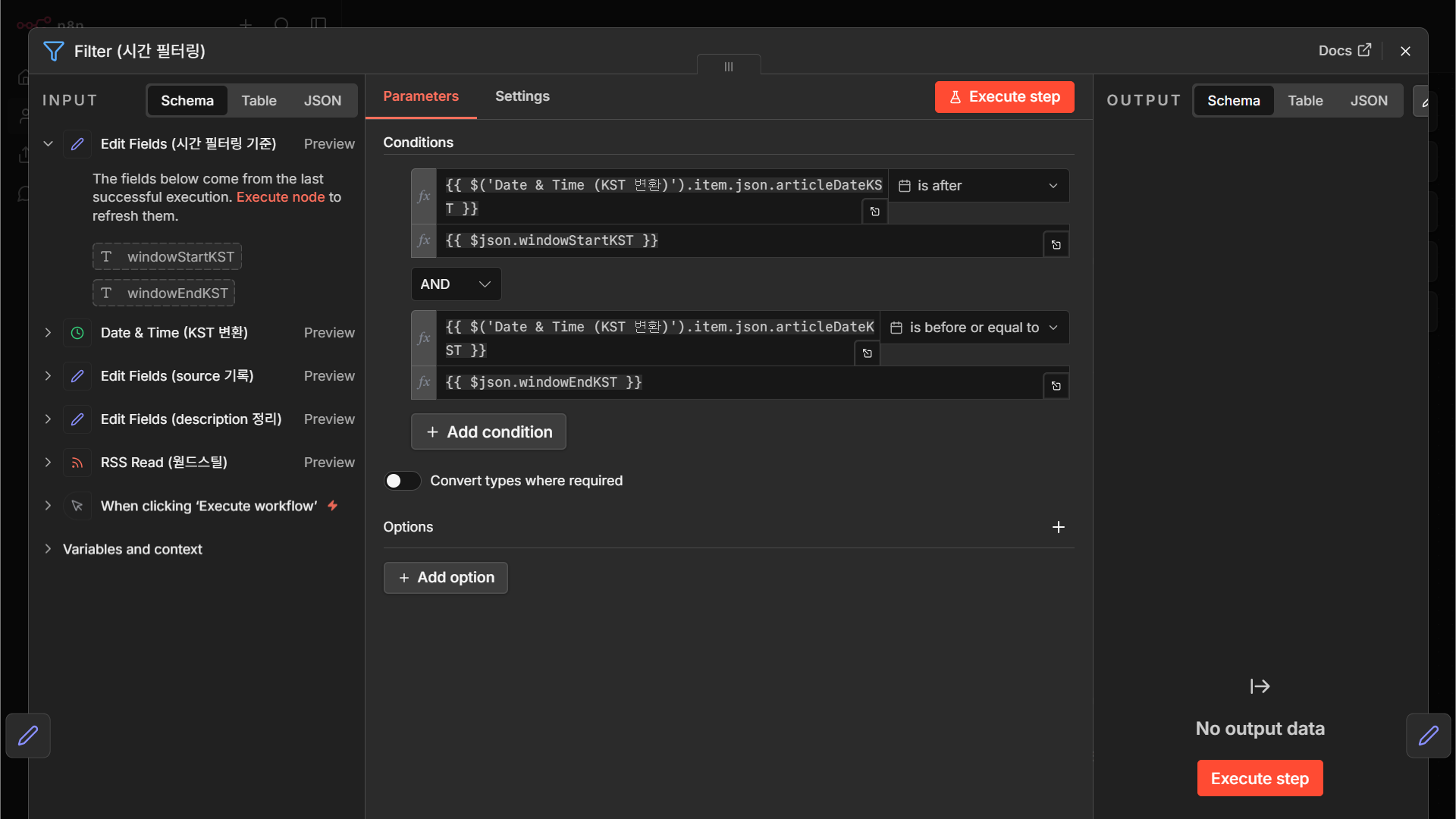
Code 보기
{
  "nodes": [
    {
      "parameters": {
        "conditions": {
          "options": {
            "caseSensitive": true,
            "leftValue": "",
            "typeValidation": "strict",
            "version": 3
          },
          "conditions": [
            {
              "id": "ea6179ee-0c93-4544-8fe0-0bba2cb7da6f",
              "leftValue": "={{ $('Date & Time (KST 변환)').item.json.articleDateKST }}",
              "rightValue": "={{ $json.windowStartKST }}",
              "operator": {
                "type": "dateTime",
                "operation": "after"
              }
            },
            {
              "id": "124b24c8-7c07-4ed9-b266-8995324457b1",
              "leftValue": "={{ $('Date & Time (KST 변환)').item.json.articleDateKST }}",
              "rightValue": "={{ $json.windowEndKST }}",
              "operator": {
                "type": "dateTime",
                "operation": "beforeOrEquals"
              }
            }
          ],
          "combinator": "and"
        },
        "options": {}
      },
      "type": "n8n-nodes-base.filter",
      "typeVersion": 2.3,
      "position": [
        448,
        272
      ],
      "id": "1a32dfa6-ee6c-4aff-b70b-d6dc53e81efe",
      "name": "Filter (시간 필터링)"
    }
  ],
  "connections": {}
}Edit Fields — Sheets 칼럼명 정리
n8n-nodes-base.set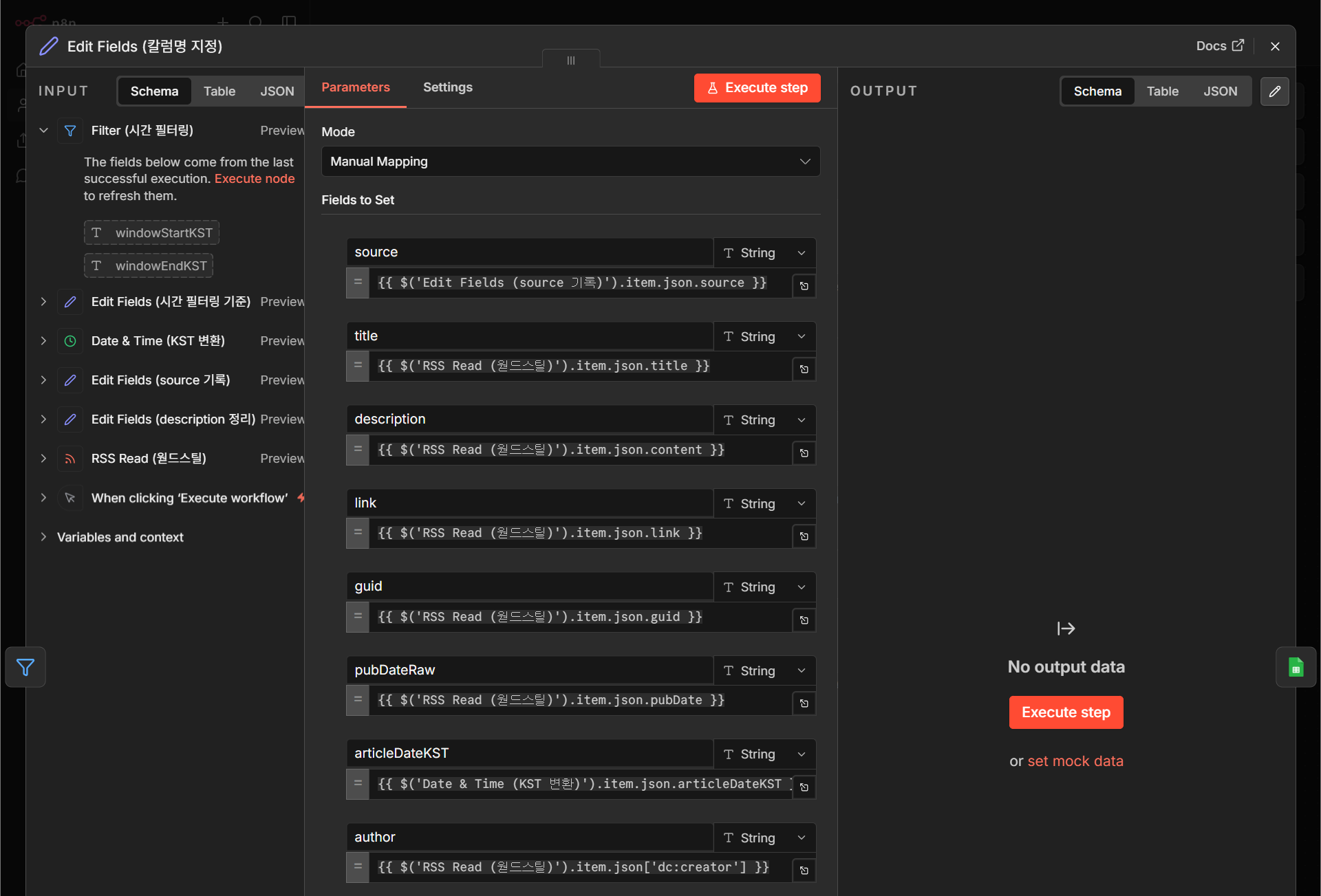
Code 보기
{
  "nodes": [
    {
      "parameters": {
        "assignments": {
          "assignments": [
            {
              "id": "fa902690-75fd-4bbe-bab8-41fe664a9774",
              "name": "source",
              "value": "={{ $('Edit Fields (source 기록)').item.json.source }}",
              "type": "string"
            },
            {
              "id": "1b815529-08c5-4096-be88-6ea14d97ece8",
              "name": "title",
              "value": "={{ $('RSS Read (웓드스틸)').item.json.title }}",
              "type": "string"
            },
            {
              "id": "9f68365a-62af-4d99-9394-bae46aee4708",
              "name": "description",
              "value": "={{ $('RSS Read (웓드스틸)').item.json.content }}",
              "type": "string"
            },
            {
              "id": "fbca3bfa-bb26-4b67-b2f5-e54f6a91f702",
              "name": "link",
              "value": "={{ $('RSS Read (웓드스틸)').item.json.link }}",
              "type": "string"
            },
            {
              "id": "1bd9e766-4747-49b6-b3ee-043fc7886754",
              "name": "guid",
              "value": "={{ $('RSS Read (웓드스틸)').item.json.guid }}",
              "type": "string"
            },
            {
              "id": "d7d401ce-5899-4ba9-8569-adfe50996786",
              "name": "pubDateRaw",
              "value": "={{ $('RSS Read (웓드스틸)').item.json.pubDate }}",
              "type": "string"
            },
            {
              "id": "1bd7d061-10fc-4cf7-850e-d4c717d11a7a",
              "name": "articleDateKST",
              "value": "={{ $('Date & Time (KST 변환)').item.json.articleDateKST }}",
              "type": "string"
            },
            {
              "id": "9eb68fc7-b0cf-4aff-8def-ddd709c1639c",
              "name": "author",
              "value": "={{ $('RSS Read (웓드스틸)').item.json['dc:creator'] }}",
              "type": "string"
            }
          ]
        },
        "options": {}
      },
      "type": "n8n-nodes-base.set",
      "typeVersion": 3.4,
      "position": [
        0,
        512
      ],
      "id": "5237146e-fb72-4026-a47f-47d1f6e12cb9",
      "name": "Edit Fields (칼럼명 지정)"
    }
  ],
  "connections": {}
}Google Sheets — DB 준비 & Append
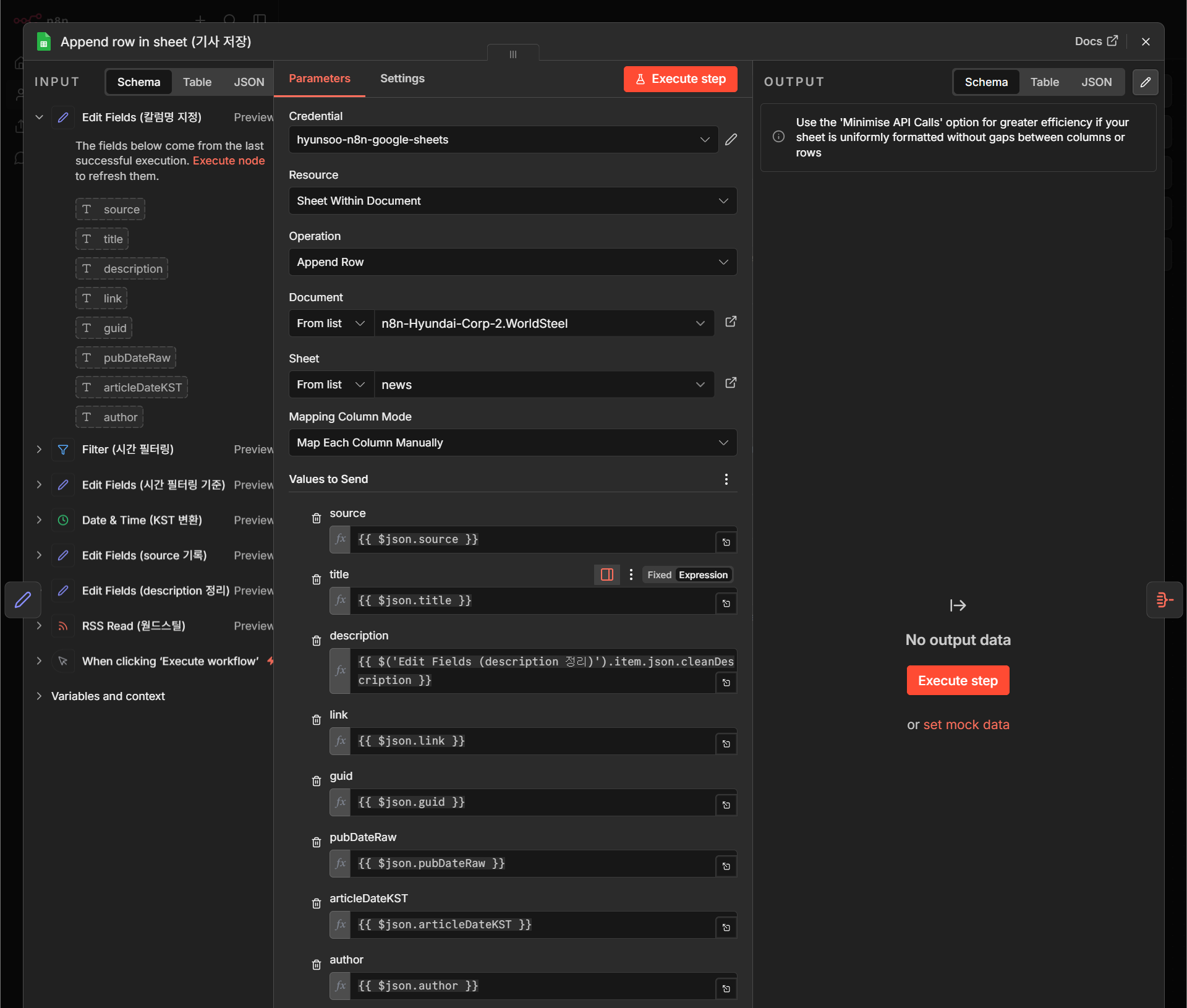
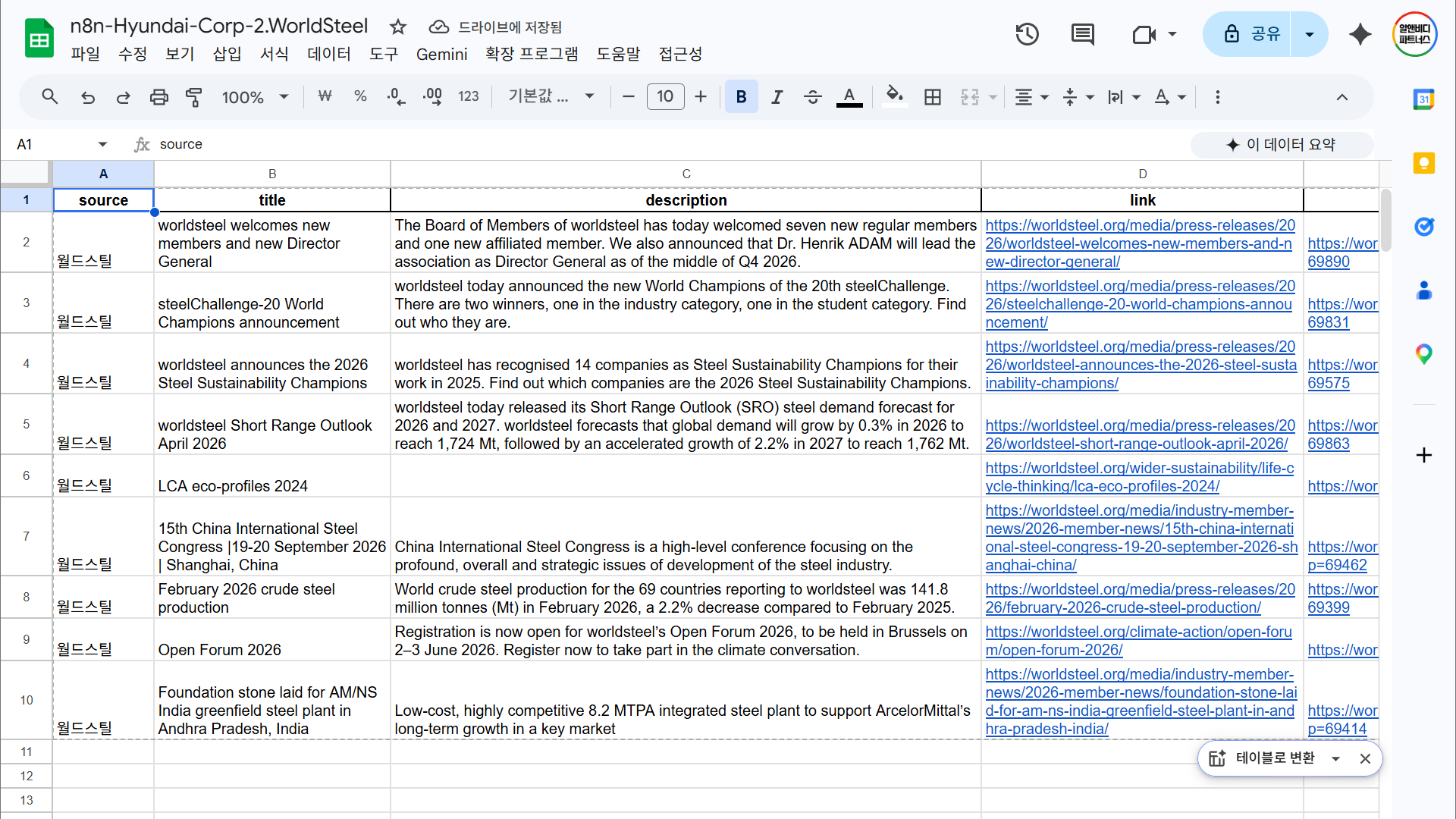
n8n-nodes-base.googleSheetsCase 1과 동일한 Sheets 파일을 그대로 재사용하는 것이 실무 팁입니다. source 칼럼으로 두 소스를 구분하면 한 시트 안에 Bloomberg와 World Steel이 나란히 쌓입니다.
Code 보기
{
  "nodes": [
    {
      "parameters": {
        "operation": "append",
        "documentId": {
          "__rl": true,
          "value": "1ryecVr-NayL022nKWz6EH1y2atGkAMH1HI7kWzsHH58",
          "mode": "list",
          "cachedResultName": "n8n-WorldSteel",
          "cachedResultUrl": "https://docs.google.com/spreadsheets/d/1ryecVr-NayL022nKWz6EH1y2atGkAMH1HI7kWzsHH58/edit?usp=drivesdk"
        },
        "sheetName": {
          "__rl": true,
          "value": "gid=0",
          "mode": "list",
          "cachedResultName": "news",
          "cachedResultUrl": "https://docs.google.com/spreadsheets/d/1ryecVr-NayL022nKWz6EH1y2atGkAMH1HI7kWzsHH58/edit#gid=0"
        },
        "columns": {
          "mappingMode": "defineBelow",
          "value": {
            "source": "={{ $json.source }}",
            "title": "={{ $json.title }}",
            "link": "={{ $json.link }}",
            "pubDateRaw": "={{ $json.pubDateRaw }}",
            "articleDateKST": "={{ $json.articleDateKST }}",
            "guid": "={{ $json.guid }}",
            "description": "={{ $('Edit Fields (description 정리)').item.json.cleanDescription }}",
            "author": "={{ $json.author }}"
          },
          "matchingColumns": [],
          "schema": [
            {
              "id": "source",
              "displayName": "source",
              "required": false,
              "defaultMatch": false,
              "display": true,
              "type": "string",
              "canBeUsedToMatch": true
            },
            {
              "id": "title",
              "displayName": "title",
              "required": false,
              "defaultMatch": false,
              "display": true,
              "type": "string",
              "canBeUsedToMatch": true
            },
            {
              "id": "description",
              "displayName": "description",
              "required": false,
              "defaultMatch": false,
              "display": true,
              "type": "string",
              "canBeUsedToMatch": true
            },
            {
              "id": "link",
              "displayName": "link",
              "required": false,
              "defaultMatch": false,
              "display": true,
              "type": "string",
              "canBeUsedToMatch": true
            },
            {
              "id": "guid",
              "displayName": "guid",
              "required": false,
              "defaultMatch": false,
              "display": true,
              "type": "string",
              "canBeUsedToMatch": true
            },
            {
              "id": "pubDateRaw",
              "displayName": "pubDateRaw",
              "required": false,
              "defaultMatch": false,
              "display": true,
              "type": "string",
              "canBeUsedToMatch": true
            },
            {
              "id": "articleDateKST",
              "displayName": "articleDateKST",
              "required": false,
              "defaultMatch": false,
              "display": true,
              "type": "string",
              "canBeUsedToMatch": true
            },
            {
              "id": "author",
              "displayName": "author",
              "required": false,
              "defaultMatch": false,
              "display": true,
              "type": "string",
              "canBeUsedToMatch": true
            }
          ],
          "attemptToConvertTypes": false,
          "convertFieldsToString": false
        },
        "options": {}
      },
      "type": "n8n-nodes-base.googleSheets",
      "typeVersion": 4.7,
      "position": [
        224,
        512
      ],
      "id": "dff5b979-f353-4d49-bca9-7b95c795f0f2",
      "name": "Append row in sheet (기사 저장)",
      "credentials": {
        "googleSheetsOAuth2Api": {
          "id": "Spx5Q5S3g82eKaQN",
          "name": "hyunsoo-n8n-google-sheets"
        }
      }
    }
  ],
  "connections": {}
}Aggregate — 하나의 아이템으로 통합
n8n-nodes-base.aggregate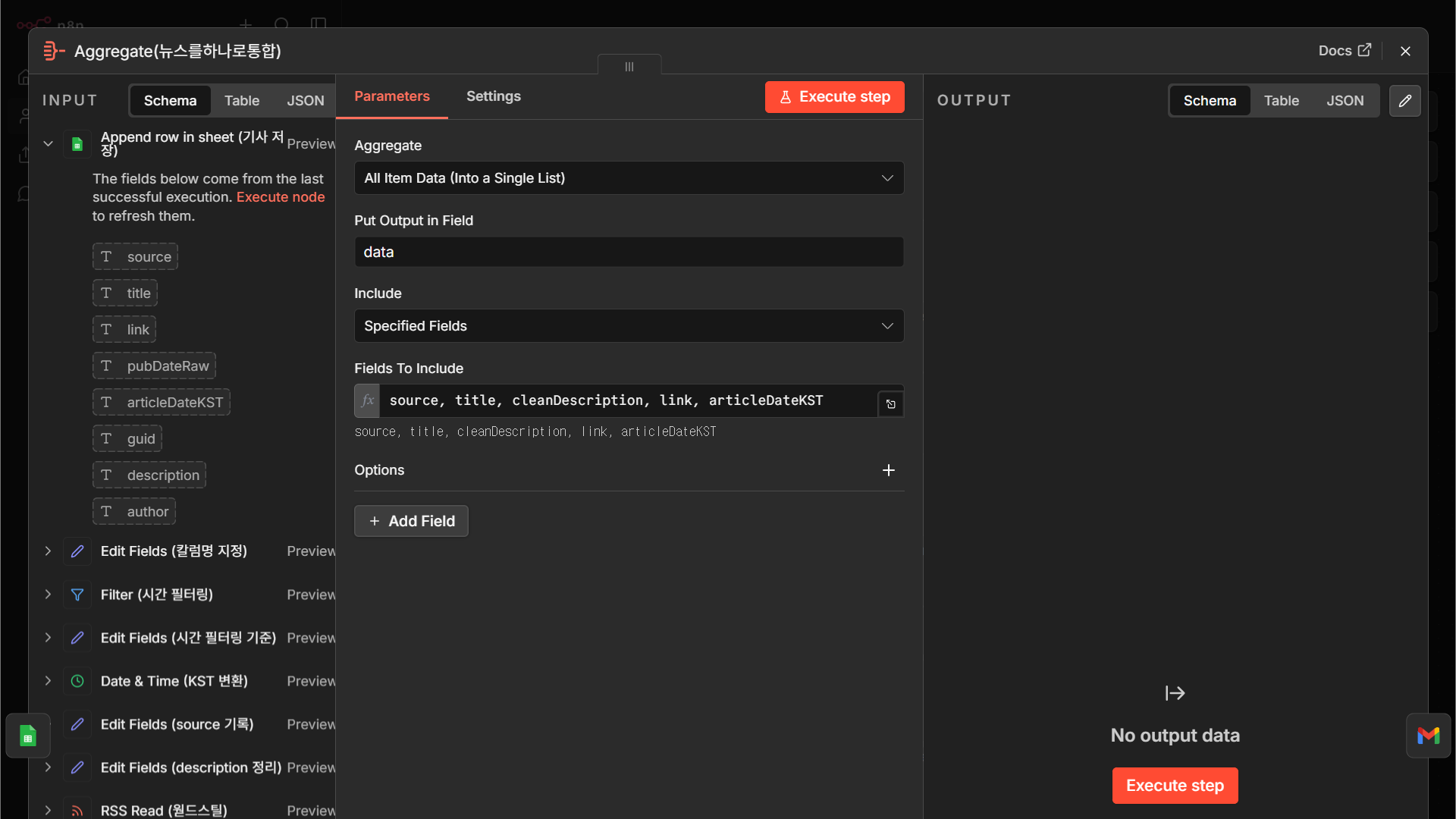
Code 보기
{
  "nodes": [
    {
      "parameters": {
        "aggregate": "aggregateAllItemData",
        "include": "specifiedFields",
        "fieldsToInclude": "=source, title, cleanDescription, link, articleDateKST",
        "options": {}
      },
      "type": "n8n-nodes-base.aggregate",
      "typeVersion": 1,
      "position": [
        448,
        512
      ],
      "id": "ae578a2f-f31e-4b83-8927-01dd6a1ace0c",
      "name": "Aggregate(뉴스를하나로통합)"
    }
  ],
  "connections": {}
}Gmail — 이메일 발송
n8n-nodes-base.gmail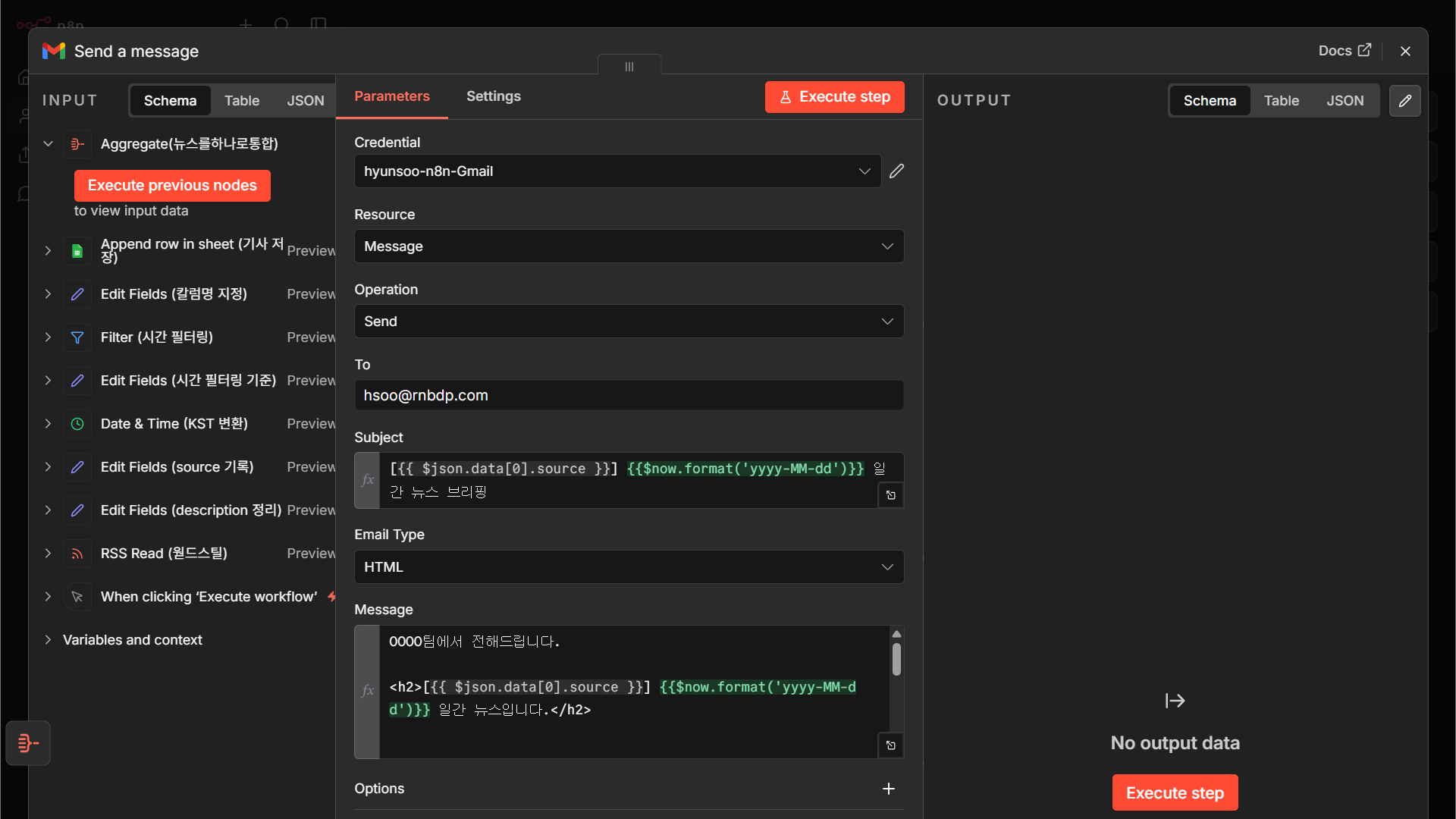
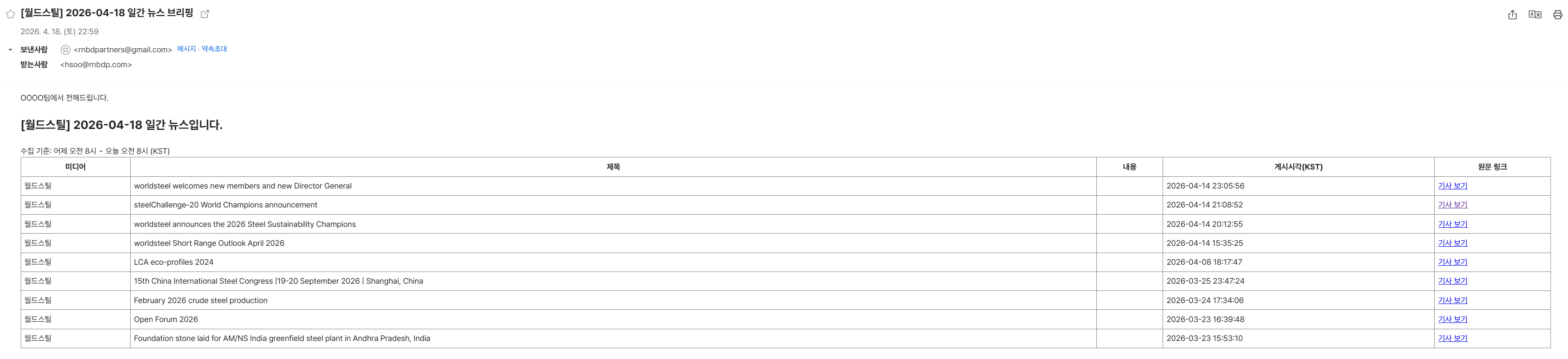
Code 보기
{
"nodes": [
{
"parameters": {
"sendTo": "hsoo@rnbdp.com",
"subject": "=[{{ $json.data[0].source }}] {{$now.format('yyyy-MM-dd')}} 일간 뉴스 브리핑",
"message": "=OOOO팀에서 전해드립니다.\n\n[{{ $json.data[0].source }}] {{$now.format('yyyy-MM-dd')}} 일간 뉴스입니다.\n\n\n{{ `수집 기준: 어제 오전 8시 ~ 오늘 오전 8시 (KST)
\n\n 미디어 제목 내용 게시시각(KST) 원문 링크 \n${ $json.data.map(a => ` ${a.source || ''} ${a.title || ''} ${a.description || ''} ${a.articleDateKST || ''} 기사 보기 `).join('') }\n
` }}",
"options": {}
},
"type": "n8n-nodes-base.gmail",
"typeVersion": 2.2,
"position": [
672,
512
],
"id": "2bedec9f-420b-4896-8ab2-4a45650b3d48",
"name": "Send a message",
"webhookId": "268a1ec1-5cba-487b-b3a3-95805aa45030",
"credentials": {
"gmailOAuth2": {
"id": "hhw5240RFQieWxBf",
"name": "hyunsoo-n8n-Gmail"
}
}
}
],
"connections": {}
}3개 소스 통합 + AI가 뉴스레터 본문까지 작성
Case 1·2의 “수집-저장-발송” 뼈대를 확장합니다. Trading Economics(뉴스 API) + Investing.com(RSS) + 네이버증권 원자재(HTML 크롤) 3개 소스를 HTTP Request/RSS Read/Code 노드로 각각 수집한 뒤 Merge로 합치고, 마지막에 OpenAI “Message a model” 노드가 뉴스레터 본문을 직접 써 줍니다. 실무에서 쓸 수 있는 가장 현실적인 형태입니다.
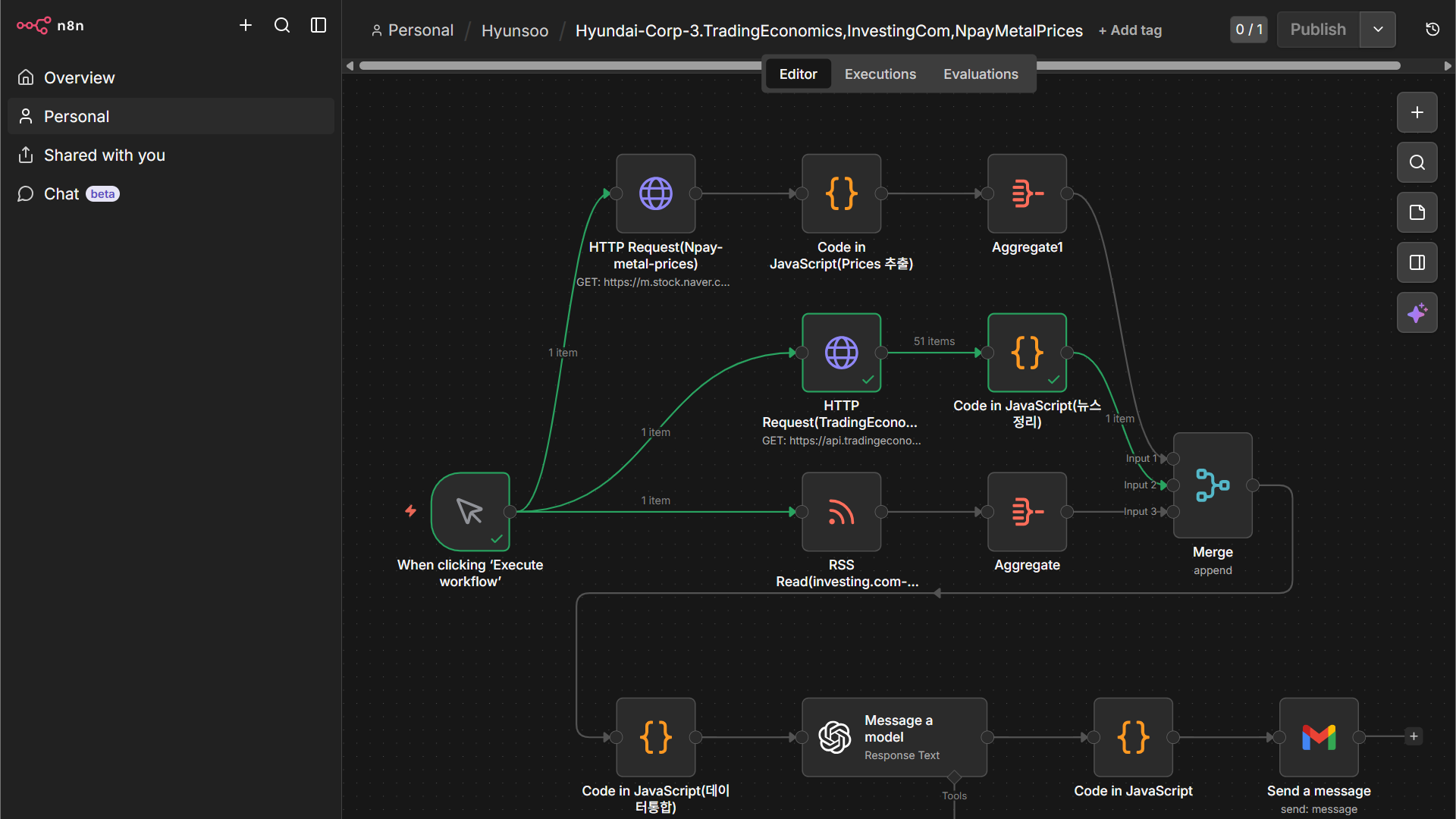
① 복합 아키텍처의 이해
Case 3는 앞 두 사례와 달리 3개의 병렬 브랜치로 시작합니다. 각 브랜치가 다른 형태의 소스를 읽어 오기 때문에 필요한 노드도 다릅니다:
브랜치 A — 네이버증권 원자재
HTTP Request → Code (HTML 파싱) → Aggregate. 페이지 HTML에서 원자재 가격표를 직접 스크래핑합니다.
브랜치 B — Trading Economics
HTTP Request (API 호출) → Code (JSON 정리). API 키를 Header에 붙여 뉴스 데이터를 받아 옵니다.
브랜치 C — Investing.com
RSS Read → Aggregate. 가장 단순한 RSS 수집 패턴.
세 브랜치의 결과를 Merge 노드로 합치고, Code 노드에서 하나의 JSON 구조로 정리한 뒤, Message a model(OpenAI)에게 “이걸로 뉴스레터 써줘”라고 넘깁니다. 마지막 Code 노드는 뉴스레터 디자인(HTML) 템플릿에 AI 텍스트를 끼워 넣는 역할을 합니다.
② 노드별 구성 (총 13개)
브랜치 A — 네이버증권 원자재 가격
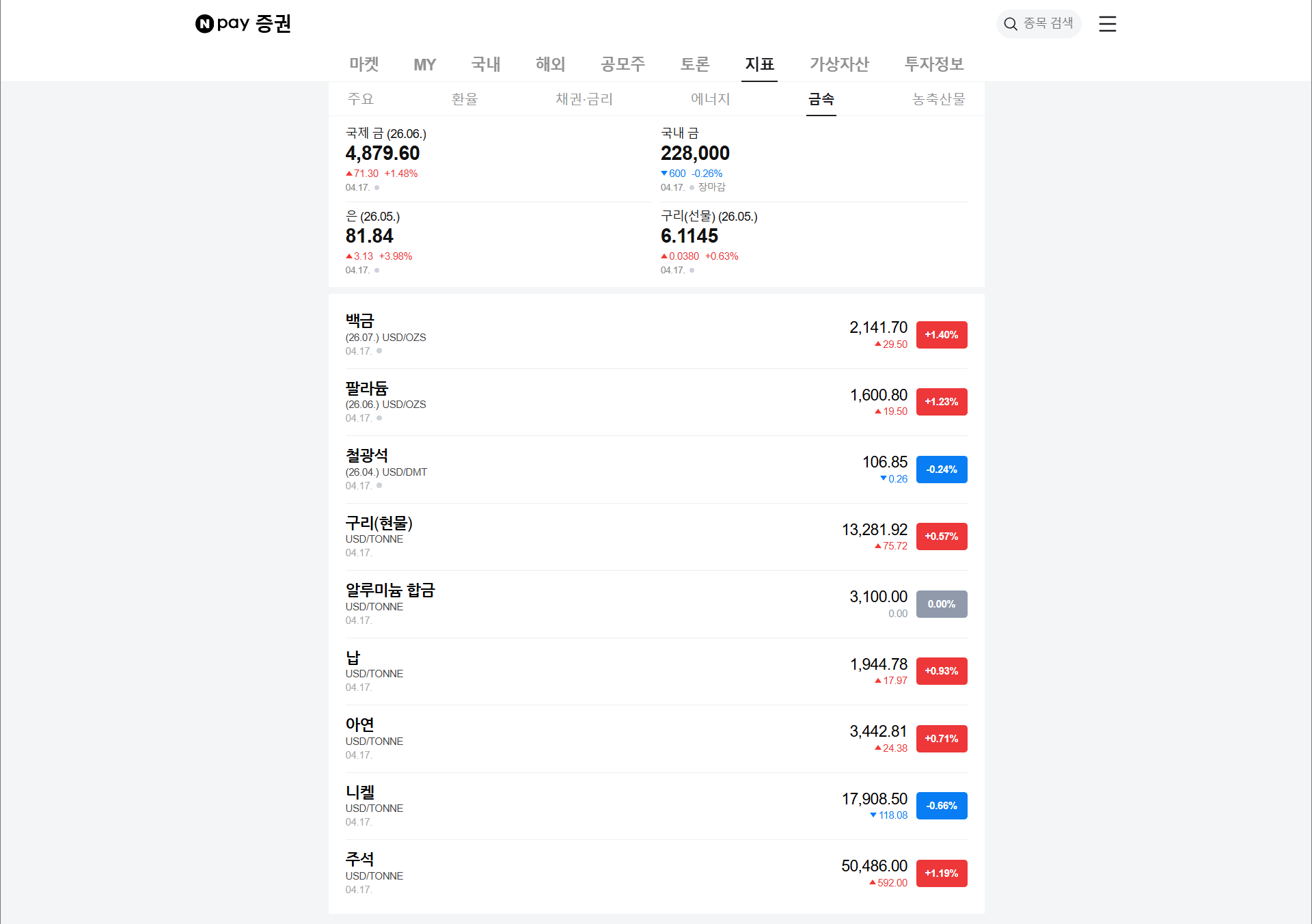
HTTP Request — 네이버증권 HTML 받기
n8n-nodes-base.httpRequest네이버증권 원자재 페이지 URL: https://m.stock.naver.com/marketindex/home/metals. Method GET, 대상 URL을 넣으면 전체 HTML이 data 필드에 문자열로 들어옵니다. User-Agent 헤더를 브라우저처럼 설정하지 않으면 차단되는 사이트가 많으므로 Header Parameters에서 추가해 두십시오.
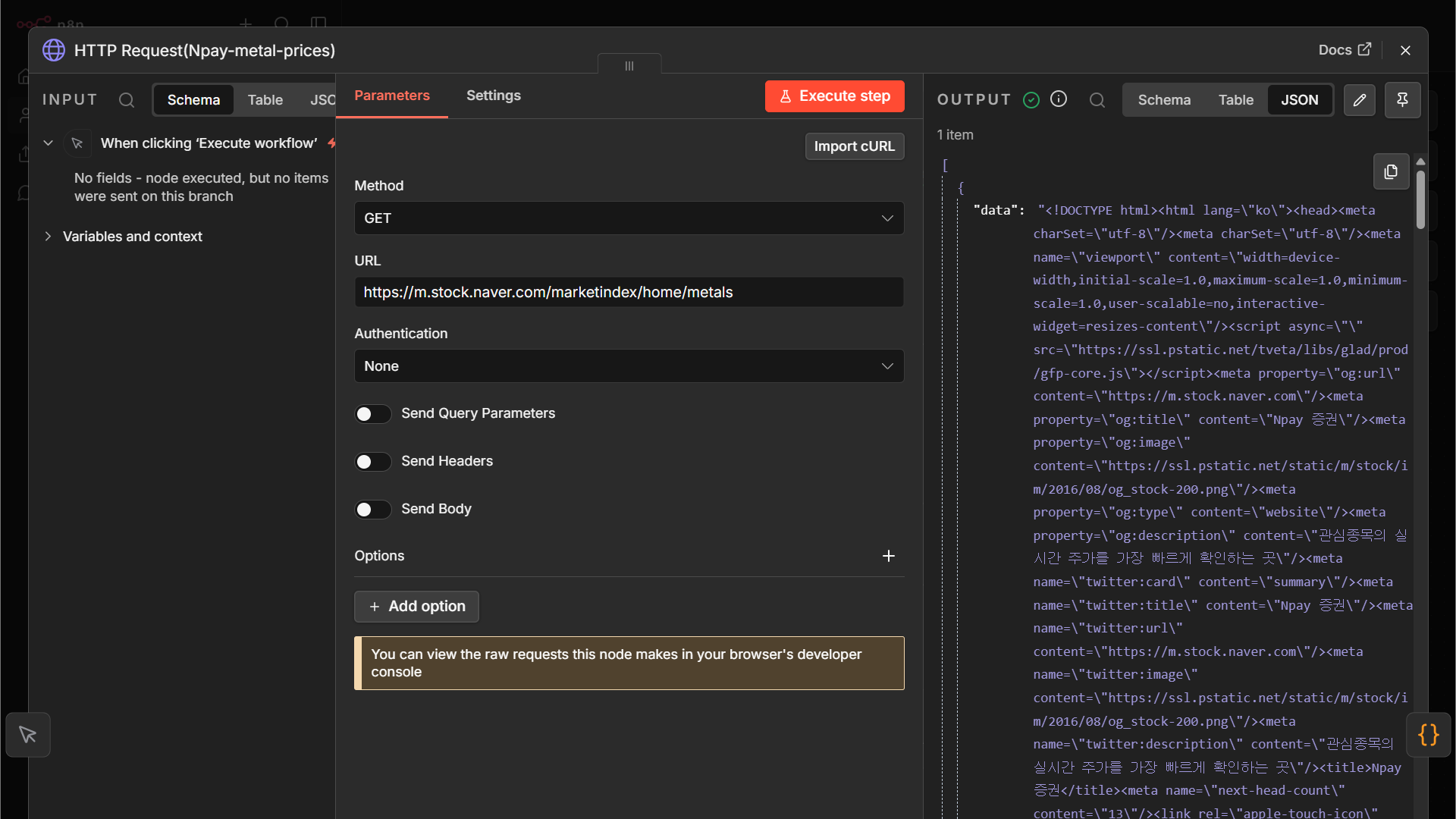
Code 보기
{
  "nodes": [
    {
      "parameters": {
        "url": "https://m.stock.naver.com/marketindex/home/metals",
        "options": {}
      },
      "type": "n8n-nodes-base.httpRequest",
      "typeVersion": 4.4,
      "position": [
        224,
        -192
      ],
      "id": "e1a1f0f1-2413-493e-8815-ccf87ce74c8b",
      "name": "HTTP Request(Npay-metal-prices)"
    }
  ],
  "connections": {}
}Code — HTML에서 가격표 추출
n8n-nodes-base.codeJavaScript로 받은 HTML을 파싱합니다. cheerio를 쓰거나 정규식으로 <tr>...</tr>만 뽑아 품목명/가격/변동률을 꺼냅니다. 사이트 구조가 바뀌면 이 노드가 가장 먼저 깨지므로 에러 처리와 최소한의 로그를 넣는 것이 실무 팁입니다.
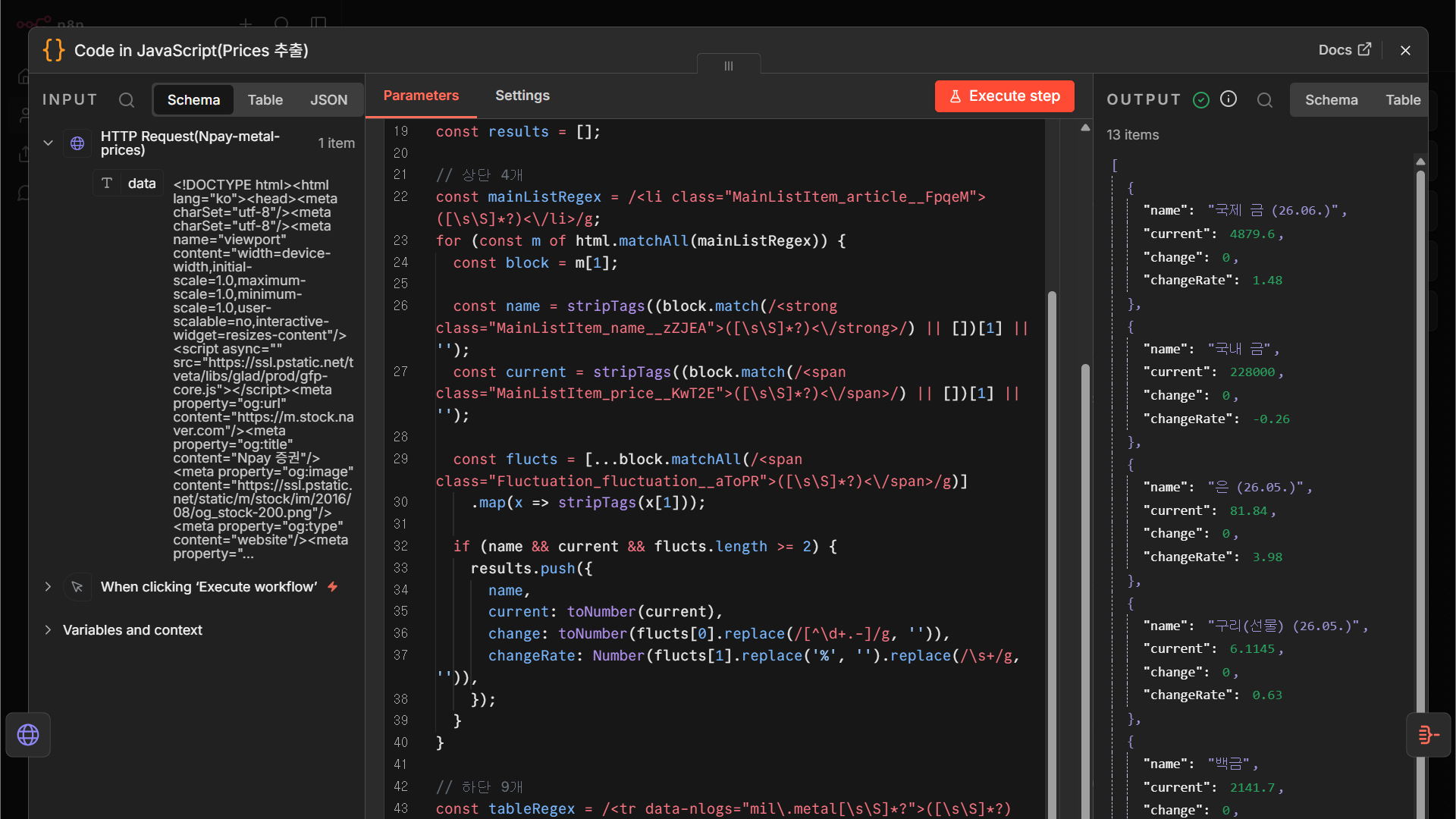
Code 보기
{
"nodes": [
{
"parameters": {
"jsCode": "const html = $json.body ?? $json.data ?? $json.html ?? '';\n\nif (!html || typeof html !== 'string') {\n throw new Error('HTML 문자열이 없습니다.');\n}\n\nfunction stripTags(s) {\n return s\n .replace(/<[^>]+>/g, ' ')\n .replace(/ /g, ' ')\n .replace(/\\s+/g, ' ')\n .trim();\n}\n\nfunction toNumber(s) {\n return Number(String(s).replace(/,/g, '').trim());\n}\n\nconst results = [];\n\n// 상단 4개\nconst mainListRegex = /([\\s\\S]*?)<\\/li>/g;\nfor (const m of html.matchAll(mainListRegex)) {\n const block = m[1];\n\n const name = stripTags((block.match(/([\\s\\S]*?)<\\/strong>/) || [])[1] || '');\n const current = stripTags((block.match(/([\\s\\S]*?)<\\/span>/) || [])[1] || '');\n\n const flucts = [...block.matchAll(/([\\s\\S]*?)<\\/span>/g)]\n .map(x => stripTags(x[1]));\n\n if (name && current && flucts.length >= 2) {\n results.push({\n name,\n current: toNumber(current),\n change: toNumber(flucts[0].replace(/[^\\d+.-]/g, '')),\n changeRate: Number(flucts[1].replace('%', '').replace(/\\s+/g, '')),\n });\n }\n}\n\n// 하단 9개\nconst tableRegex = /([\\s\\S]*?)<\\/tr>/g;\nfor (const m of html.matchAll(tableRegex)) {\n const block = m[1];\n\n const tds = [...block.matchAll(/([\\s\\S]*?)<\\/td>/g)].map(x => x[1]);\n if (tds.length < 3) continue;\n\n const name = stripTags((tds[0].match(/([\\s\\S]*?)<\\/span>/) || [])[1] || '');\n const current = stripTags((tds[1].match(/^([\\s\\S]*?)([\\s\\S]*?)<\\/span>/) || [])[1] || '');\n const changeRate = stripTags((tds[2].match(/([\\s\\S]*?)<\\/span>/) || [])[1] || '');\n\n if (name && current) {\n results.push({\n name,\n current: toNumber(current),\n change: toNumber(change.replace(/[^\\d+.-]/g, '')),\n changeRate: Number(changeRate.replace('%', '').replace(/\\s+/g, '')),\n });\n }\n}\n\nreturn results.map(item => ({ json: item }));"
},
"type": "n8n-nodes-base.code",
"typeVersion": 2,
"position": [
448,
-192
],
"id": "cc4e64ab-15c7-4ea8-9cf2-9b9414917df3",
"name": "Code in JavaScript(Prices 추출)"
}
],
"connections": {}
}
NODE A-3Aggregate — 가격 리스트를 하나로
n8n-nodes-base.aggregate
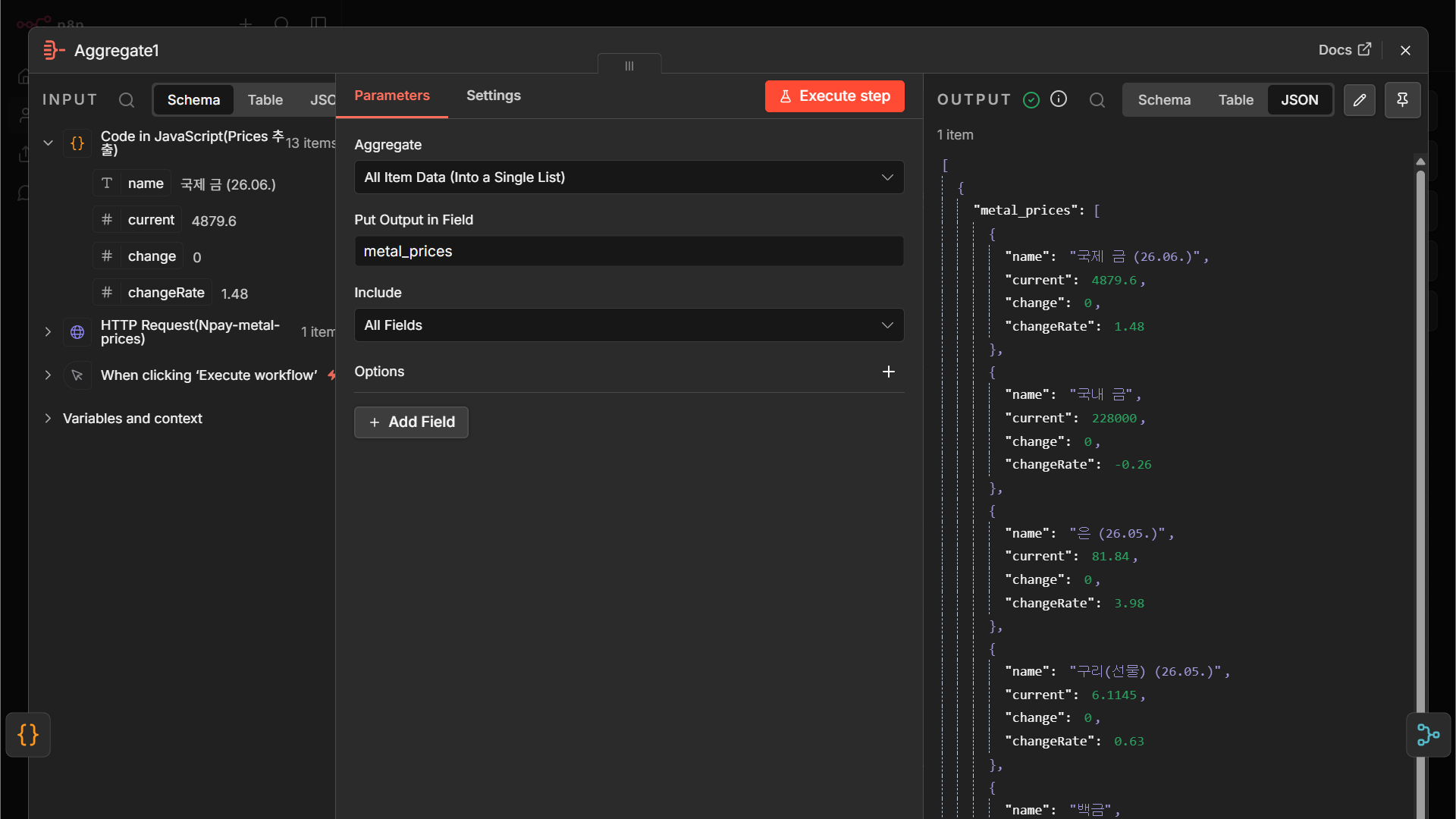
Code 보기
n8n 노드 JSON — 캔버스에 붙여넣으면 동일 노드 복원
{
"nodes": [
{
"parameters": {
"aggregate": "aggregateAllItemData",
"destinationFieldName": "metal_prices",
"options": {}
},
"type": "n8n-nodes-base.aggregate",
"typeVersion": 1,
"position": [
672,
-192
],
"id": "ea147611-cae1-440a-ae5f-ab9fbcde4719",
"name": "Aggregate(Npay)"
}
],
"connections": {}
}
브랜치 B — Trading Economics 뉴스 API
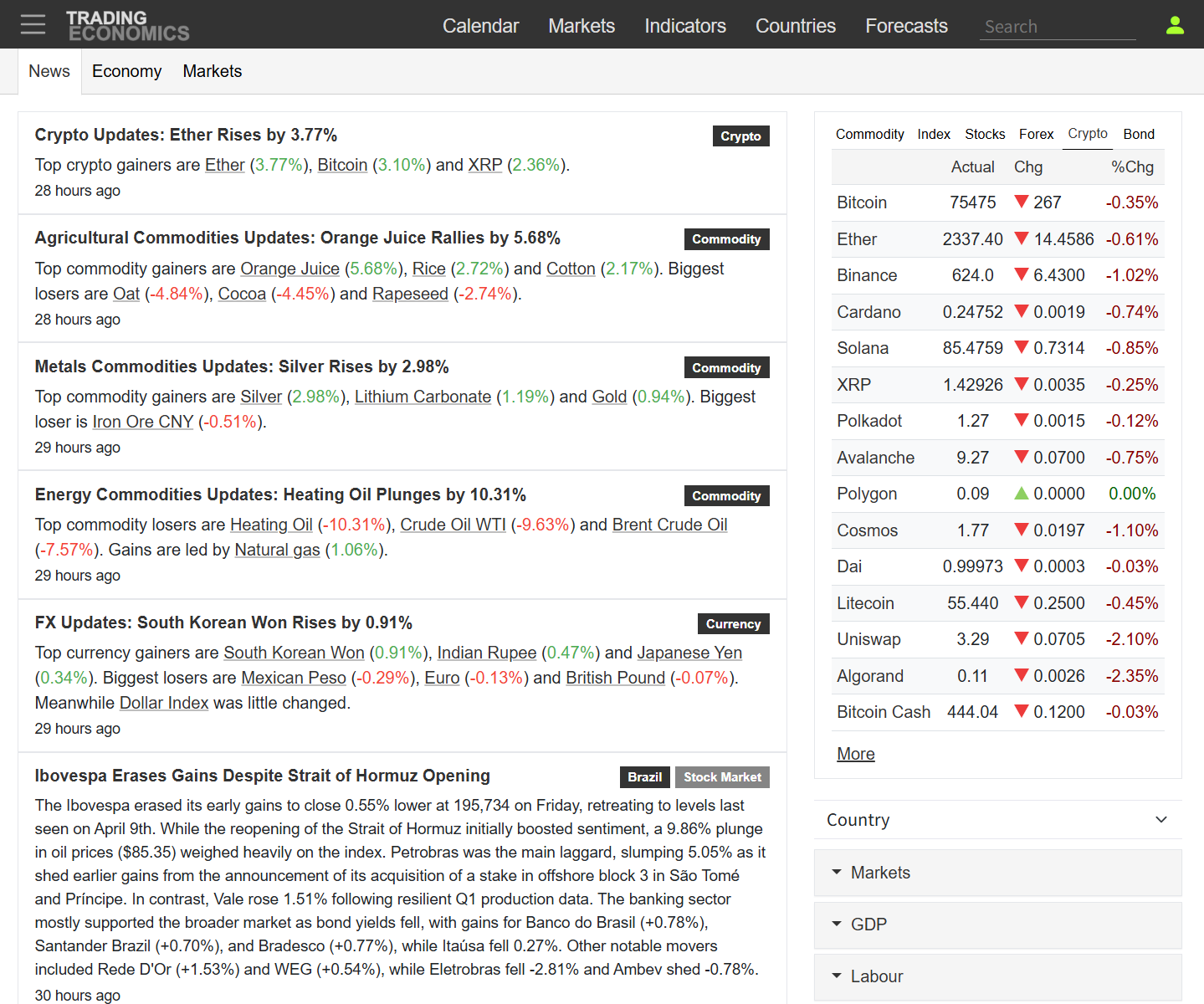
그림 3-3. Trading Economics 뉴스 화면 — 이 데이터를 API로 받아 옵니다
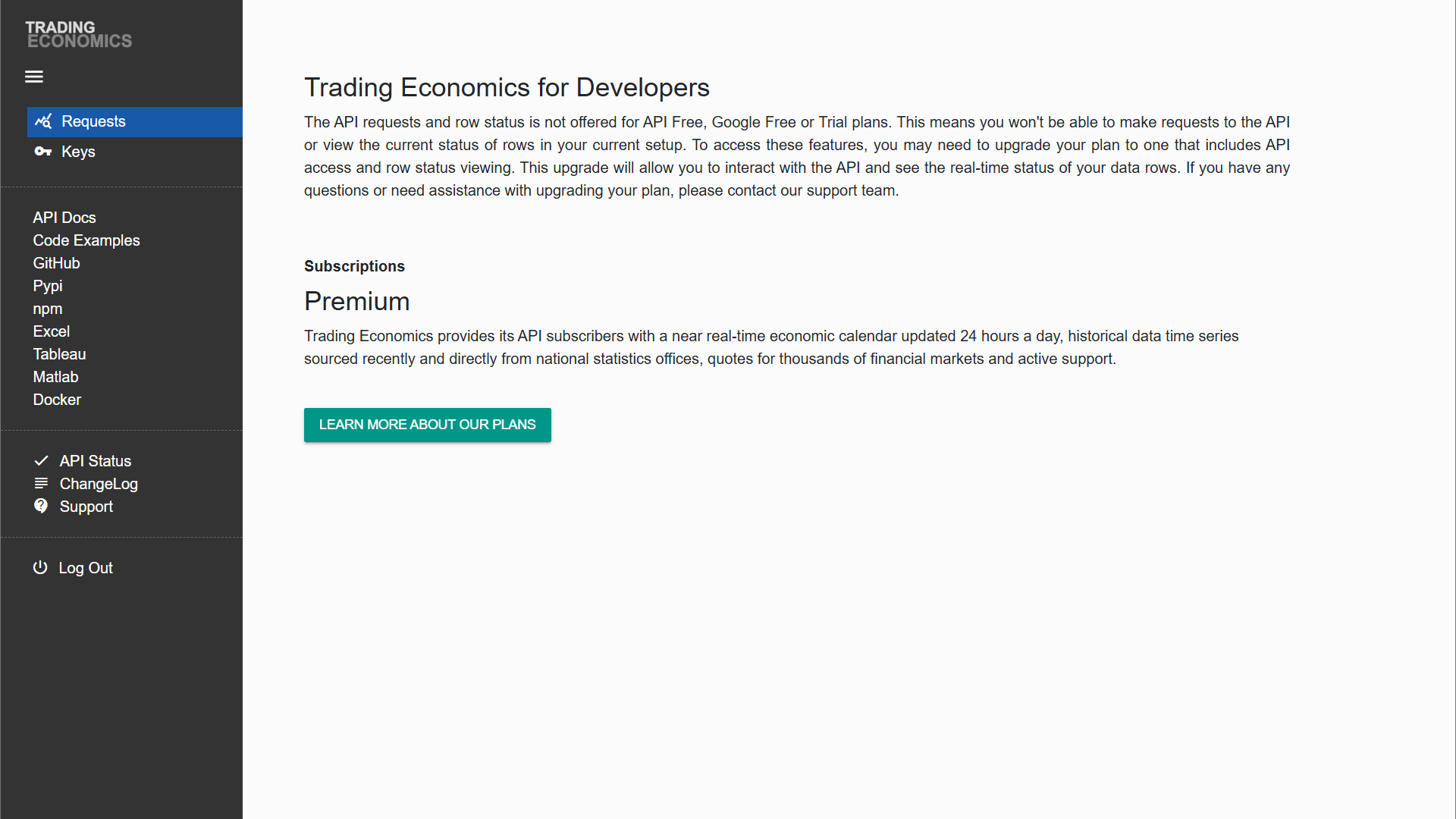
그림 3-4. API 키 발급 화면 — Developer portal에서 무료 티어 키 발급
실전 주의: Trading Economics 무료 티어는 4개 국가(멕시코·뉴질랜드·스웨덴·태국)로 데이터가 제한됩니다. 교육 용도로는 괜찮지만 실제 업무 배포 시에는 유료 플랜 필요성을 미리 확인하십시오. 이 제약은 문서 첫 줄에 없고 실제로 데이터를 받아 봐야 드러납니다.
NODE B-1HTTP Request — Trading Economics 뉴스 API
n8n-nodes-base.httpRequest
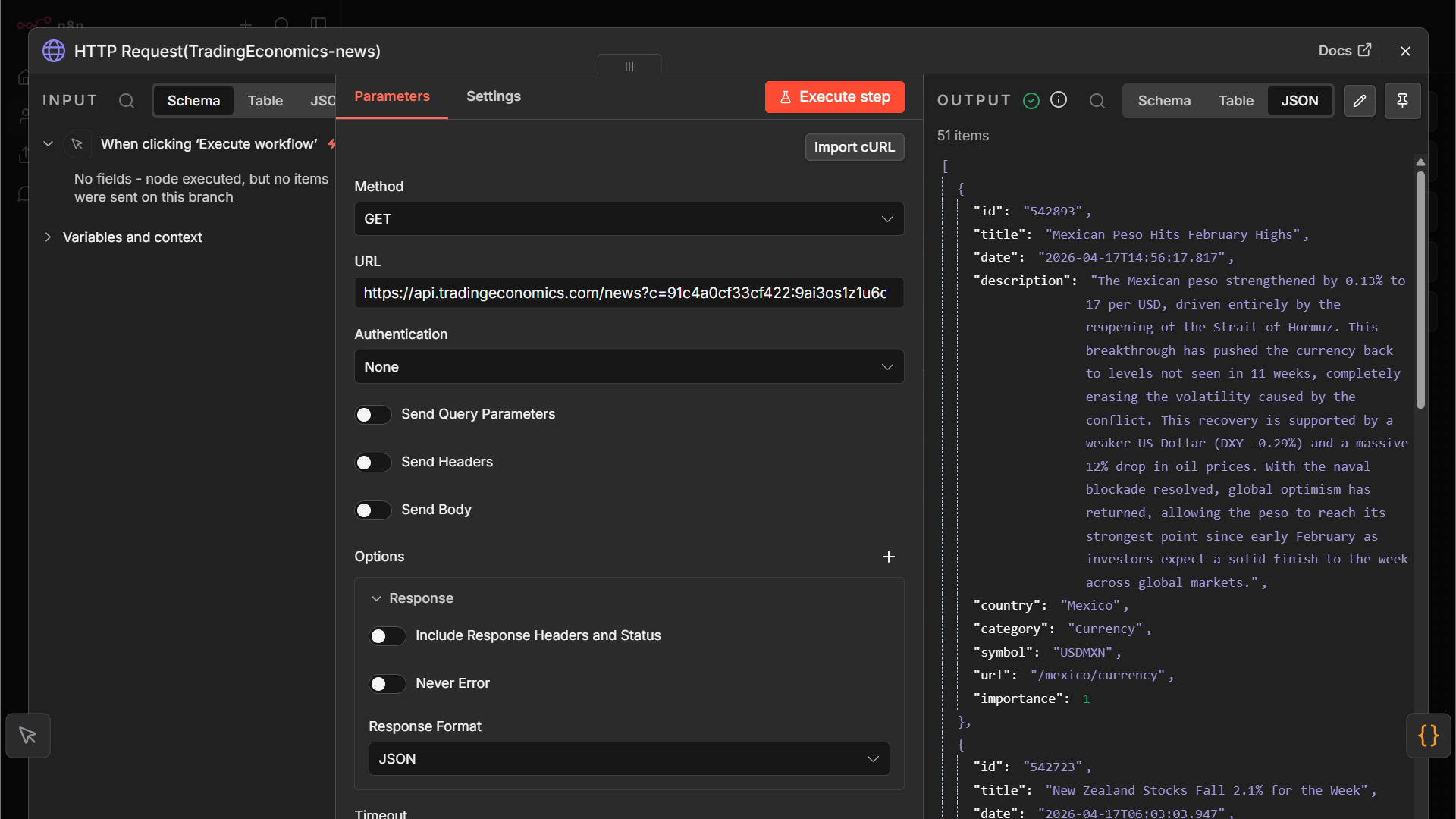
Trading Economics News API. 엔드포인트: https://api.tradingeconomics.com/news. API 키 발급: https://developer.tradingeconomics.com/Home/Keys (회원가입 후 Home → Keys 메뉴). Query Parameters에 c=<apikey>와 f=json을 추가. 전체 URL 예시: https://api.tradingeconomics.com/news?c=<APIKEY>&f=json.
Code 보기
n8n 노드 JSON — 캔버스에 붙여넣으면 동일 노드 복원
{
"nodes": [
{
"parameters": {
"url": "https://api.tradingeconomics.com/news?c=91c4a0cf33cf422:9ai3os1z1u6dwqv&f=json",
"options": {
"response": {
"response": {
"responseFormat": "json"
}
},
"timeout": 15000
}
},
"type": "n8n-nodes-base.httpRequest",
"typeVersion": 4.4,
"position": [
448,
0
],
"id": "f4b25dee-006f-474e-a493-c6d06bb42f1c",
"name": "HTTP Request(TradingEconomics-news)"
}
],
"connections": {}
}
NODE B-2Code — Trading Economics 결과 정리
n8n-nodes-base.code
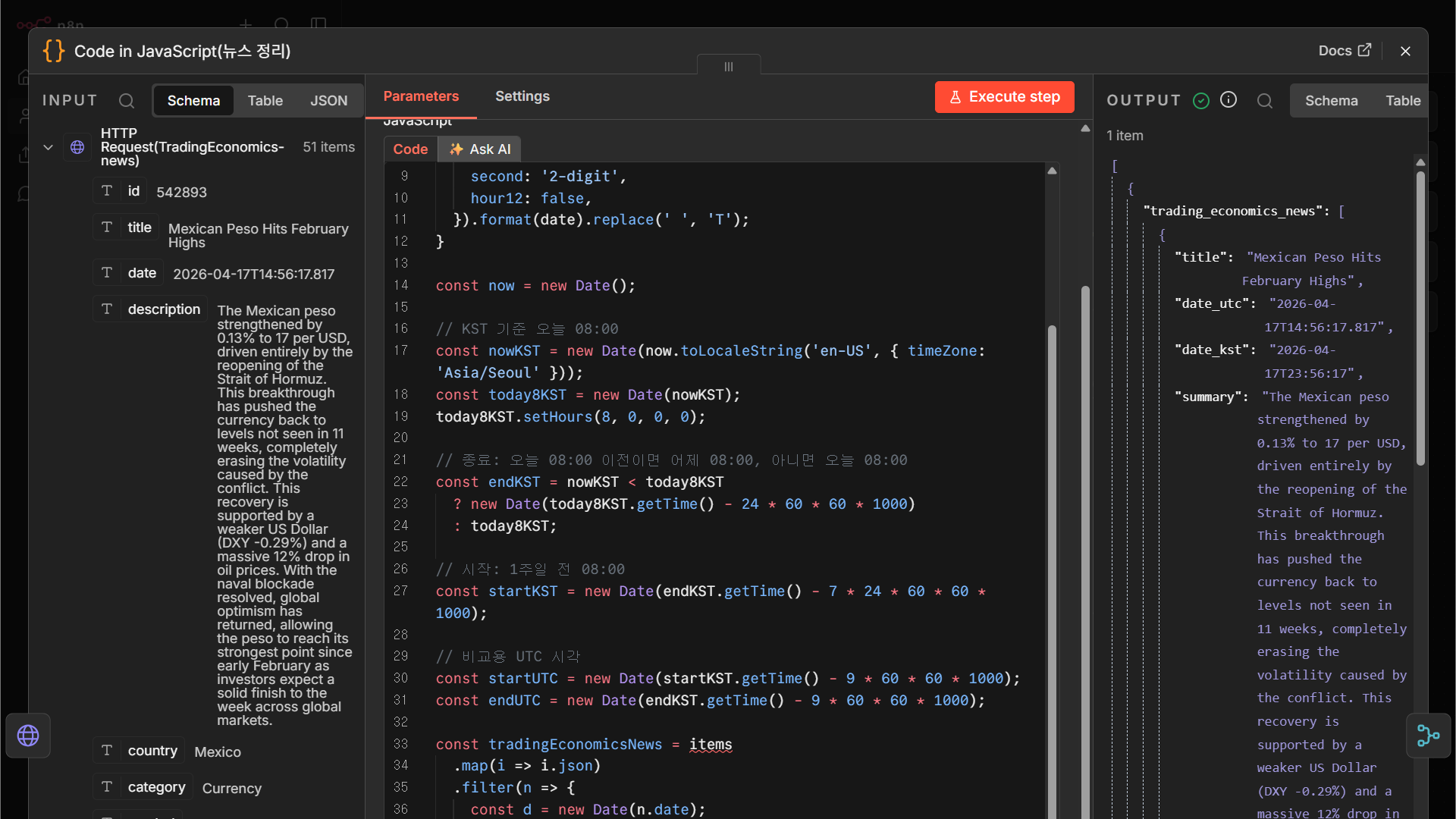
응답 JSON에서 우리가 쓸 필드만 추려 {title, link, date, country, source:'TE'} 형태로 정규화합니다. 다른 브랜치들과 합칠 때 필드명이 맞아야 Merge가 깔끔합니다.
Code 보기
n8n 노드 JSON — 캔버스에 붙여넣으면 동일 노드 복원
{
"nodes": [
{
"parameters": {
"jsCode": "function formatKST(date) {\n return new Intl.DateTimeFormat('sv-SE', {\n timeZone: 'Asia/Seoul',\n year: 'numeric',\n month: '2-digit',\n day: '2-digit',\n hour: '2-digit',\n minute: '2-digit',\n second: '2-digit',\n hour12: false,\n }).format(date).replace(' ', 'T');\n}\n\nconst now = new Date();\n\n// KST 기준 오늘 08:00\nconst nowKST = new Date(now.toLocaleString('en-US', { timeZone: 'Asia/Seoul' }));\nconst today8KST = new Date(nowKST);\ntoday8KST.setHours(8, 0, 0, 0);\n\n// 종료: 오늘 08:00 이전이면 어제 08:00, 아니면 오늘 08:00\nconst endKST = nowKST < today8KST\n ? new Date(today8KST.getTime() - 24 * 60 * 60 * 1000)\n : today8KST;\n\n// 시작: 1주일 전 08:00\nconst startKST = new Date(endKST.getTime() - 7 * 24 * 60 * 60 * 1000);\n\n// 비교용 UTC 시각\nconst startUTC = new Date(startKST.getTime() - 9 * 60 * 60 * 1000);\nconst endUTC = new Date(endKST.getTime() - 9 * 60 * 60 * 1000);\n\nconst tradingEconomicsNews = items\n .map(i => i.json)\n .filter(n => {\n const d = new Date(n.date);\n return !isNaN(d) && d >= startUTC && d < endUTC;\n })\n .map(n => {\n const d = new Date(n.date);\n return {\n title: n.title,\n date_utc: n.date,\n date_kst: formatKST(d),\n summary: n.description,\n url: 'https://tradingeconomics.com' + n.url,\n country: n.country,\n category: n.category,\n symbol: n.symbol,\n };\n });\n\nreturn [\n {\n json: {\n 'trading_economics_news': tradingEconomicsNews,\n },\n },\n];"
},
"type": "n8n-nodes-base.code",
"typeVersion": 2,
"position": [
672,
0
],
"id": "c6090a5b-0cd8-4fce-b8fb-e41fceb693e2",
"name": "Code in JavaScript(뉴스 정리)"
}
],
"connections": {}
}
브랜치 C — Investing.com RSS
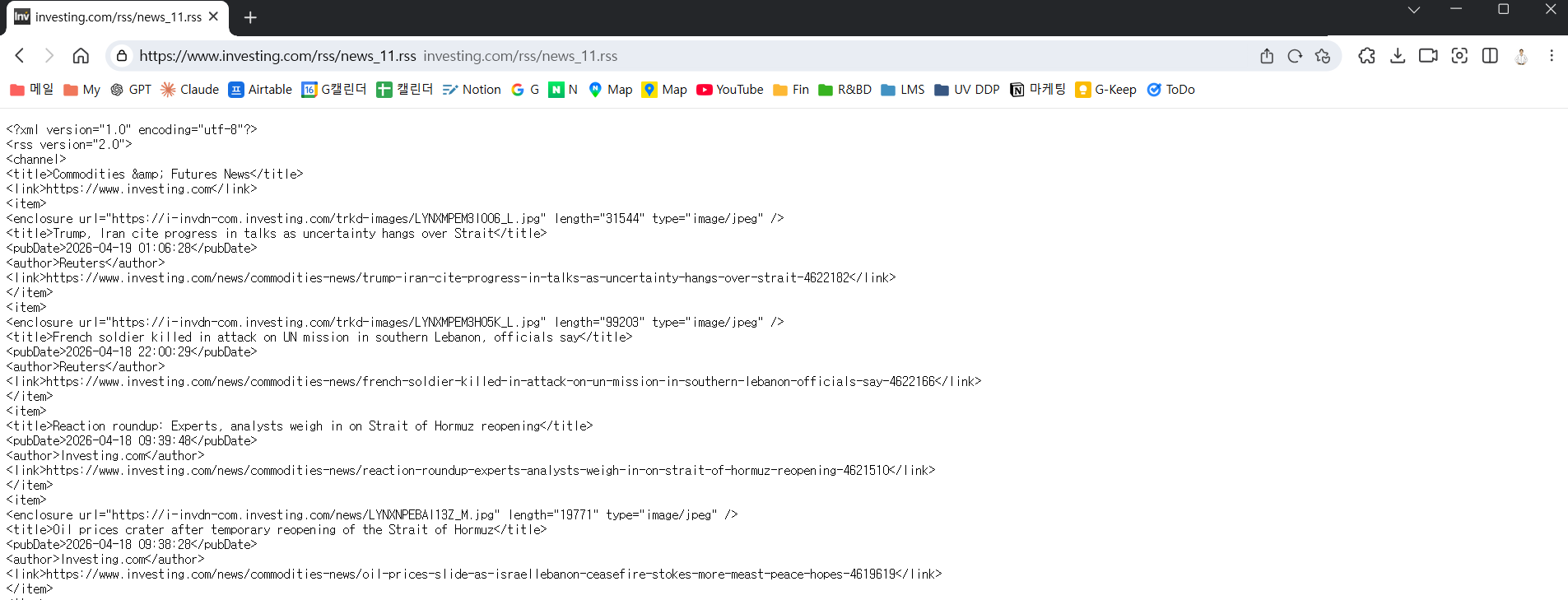
그림 3-5. Investing.com Commodities 섹션 — RSS로 받습니다
NODE C-1RSS Read — Investing.com
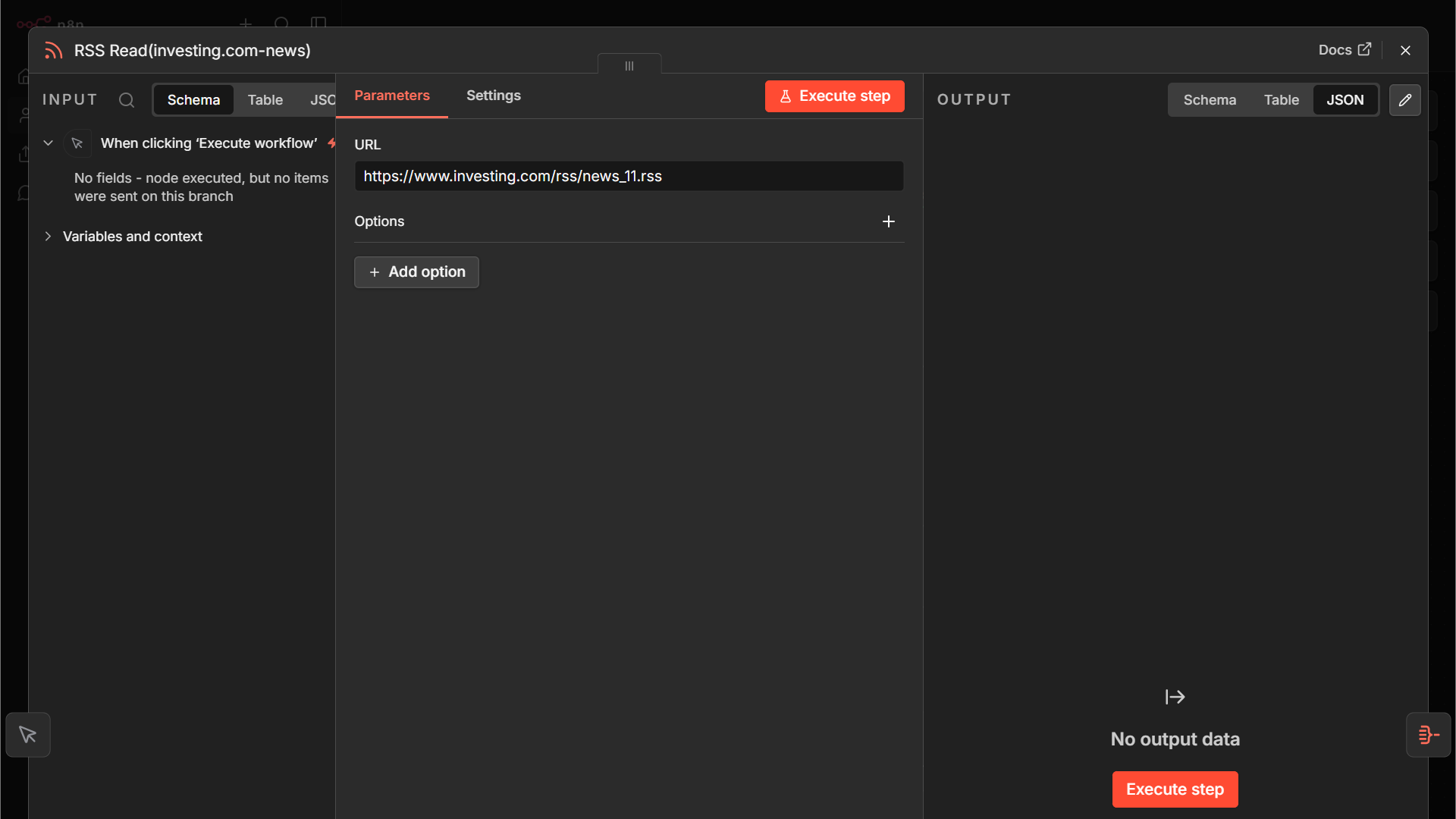
n8n-nodes-base.rssFeedRead
Investing.com Commodities News RSS 피드 URL: https://www.investing.com/rss/news_11.rss. Bloomberg/World Steel과 동일한 RSS Read 노드 사용.
Code 보기
n8n 노드 JSON — 캔버스에 붙여넣으면 동일 노드 복원
{
"nodes": [
{
"parameters": {
"url": "https://www.investing.com/rss/news_11.rss",
"options": {}
},
"type": "n8n-nodes-base.rssFeedRead",
"typeVersion": 1.2,
"position": [
448,
192
],
"id": "61524e0f-3597-4ef2-b328-ee019e5b855f",
"name": "RSS Read(investing.com-news)"
}
],
"connections": {}
}
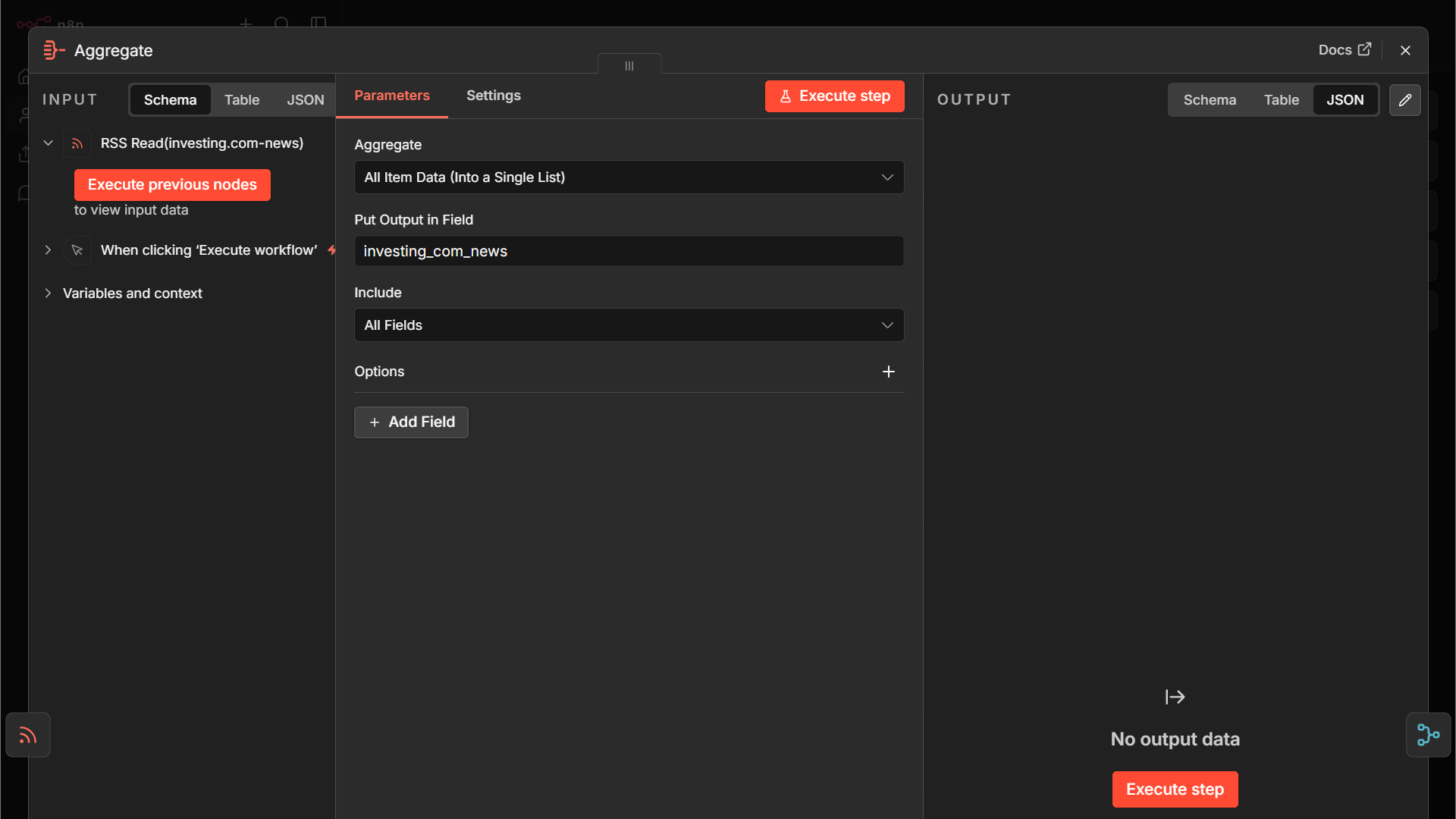
NODE C-2Aggregate — Investing.com 기사 묶기
n8n-nodes-base.aggregate
Code 보기
n8n 노드 JSON — 캔버스에 붙여넣으면 동일 노드 복원
{
"nodes": [
{
"parameters": {
"aggregate": "aggregateAllItemData",
"destinationFieldName": "investing_com_news",
"options": {}
},
"type": "n8n-nodes-base.aggregate",
"typeVersion": 1,
"position": [
672,
192
],
"id": "2e00b35a-559a-4ede-bbab-31bc882c5f81",
"name": "Aggregate(Investing.com)"
}
],
"connections": {}
}
3개 브랜치 합치기 & AI 뉴스레터 생성
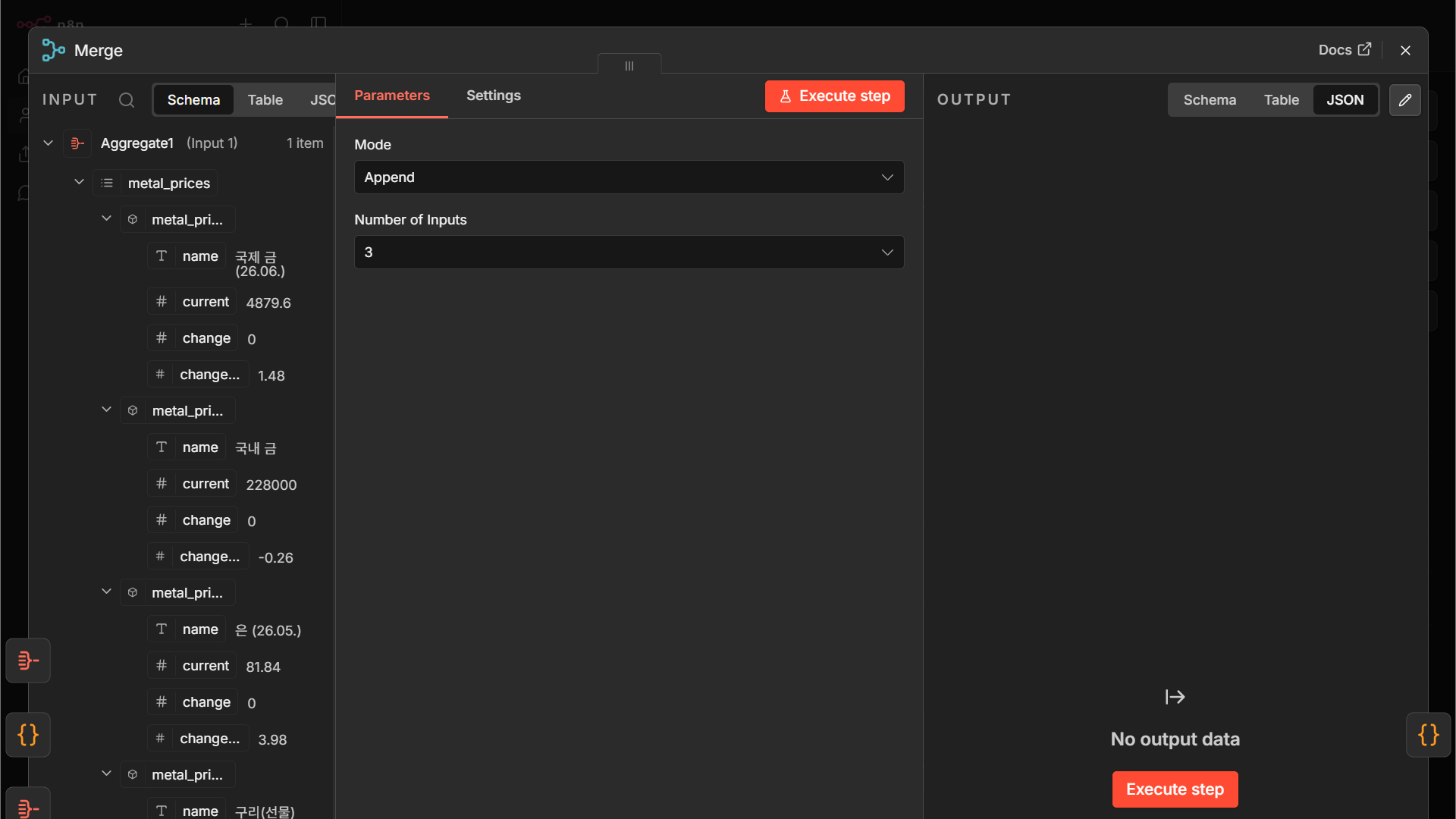
NODE MMerge — 3개 브랜치를 하나로
n8n-nodes-base.merge
Merge 노드의 Mode는 Combine으로 설정. 세 브랜치의 결과가 하나의 데이터 스트림으로 합쳐집니다. 각 브랜치가 source 필드를 다르게 갖고 있어서 어디서 온 데이터인지 구분됩니다.
Code 보기
n8n 노드 JSON — 캔버스에 붙여넣으면 동일 노드 복원
{
"nodes": [
{
"parameters": {
"numberInputs": 3
},
"type": "n8n-nodes-base.merge",
"typeVersion": 3.2,
"position": [
896,
144
],
"id": "e4d1aba8-f7dc-42e4-a641-01868eae72b7",
"name": "Merge(3개의출처를하나로통합)"
}
],
"connections": {}
}
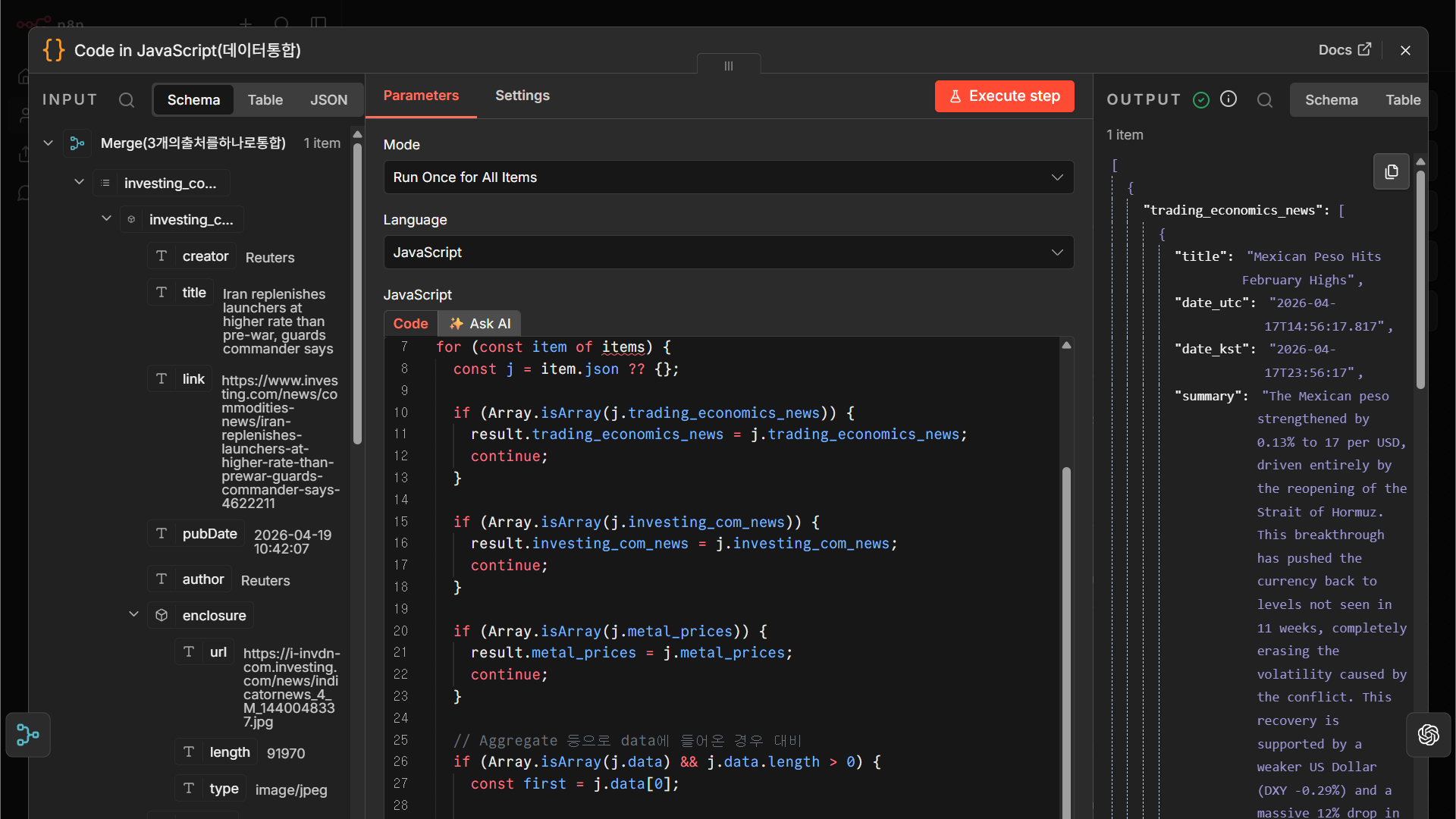
NODE DCode — 3개 데이터를 하나의 JSON으로 재구성
n8n-nodes-base.code
Merge 결과를 AI가 이해하기 좋은 형태로 재구성합니다. 예: {prices: [...], news: [...], generated_at: '...'} 같은 구조. 이 JSON이 다음 단계 AI 프롬프트에 그대로 들어갑니다.
Code 보기
n8n 노드 JSON — 캔버스에 붙여넣으면 동일 노드 복원
{
"nodes": [
{
"parameters": {
"jsCode": "const result = {\n trading_economics_news: [],\n investing_com_news: [],\n metal_prices: [],\n};\n\nfor (const item of items) {\n const j = item.json ?? {};\n\n if (Array.isArray(j.trading_economics_news)) {\n result.trading_economics_news = j.trading_economics_news;\n continue;\n }\n\n if (Array.isArray(j.investing_com_news)) {\n result.investing_com_news = j.investing_com_news;\n continue;\n }\n\n if (Array.isArray(j.metal_prices)) {\n result.metal_prices = j.metal_prices;\n continue;\n }\n\n // Aggregate 등으로 data에 들어온 경우 대비\n if (Array.isArray(j.data) && j.data.length > 0) {\n const first = j.data[0];\n\n if (first.title && (first.link || first.url || first.isoDate || first.pubDate)) {\n result.investing_com_news = j.data;\n continue;\n }\n\n if (first.name && first.current !== undefined) {\n result.metal_prices = j.data;\n continue;\n }\n }\n}\n\nreturn [\n {\n json: result,\n },\n];"
},
"type": "n8n-nodes-base.code",
"typeVersion": 2,
"position": [
224,
464
],
"id": "022daf7d-b2eb-4dc4-83ec-a943ad69c880",
"name": "Code in JavaScript(데이터통합)"
}
],
"connections": {}
}
NODE AIMessage a model — OpenAI가 뉴스레터 본문 작성
@n8n/n8n-nodes-langchain.openAi
모델: GPT-4o 또는 GPT-4o-mini. 시스템 프롬프트에 “당신은 원자재 시장 뉴스레터 편집자입니다. 주어진 가격 데이터와 뉴스를 받아 한국 사업개발 담당자용 일일 브리프를 작성합니다” 같은 역할을 부여하고, 사용자 메시지에 앞 Code 노드의 JSON을 넘깁니다.
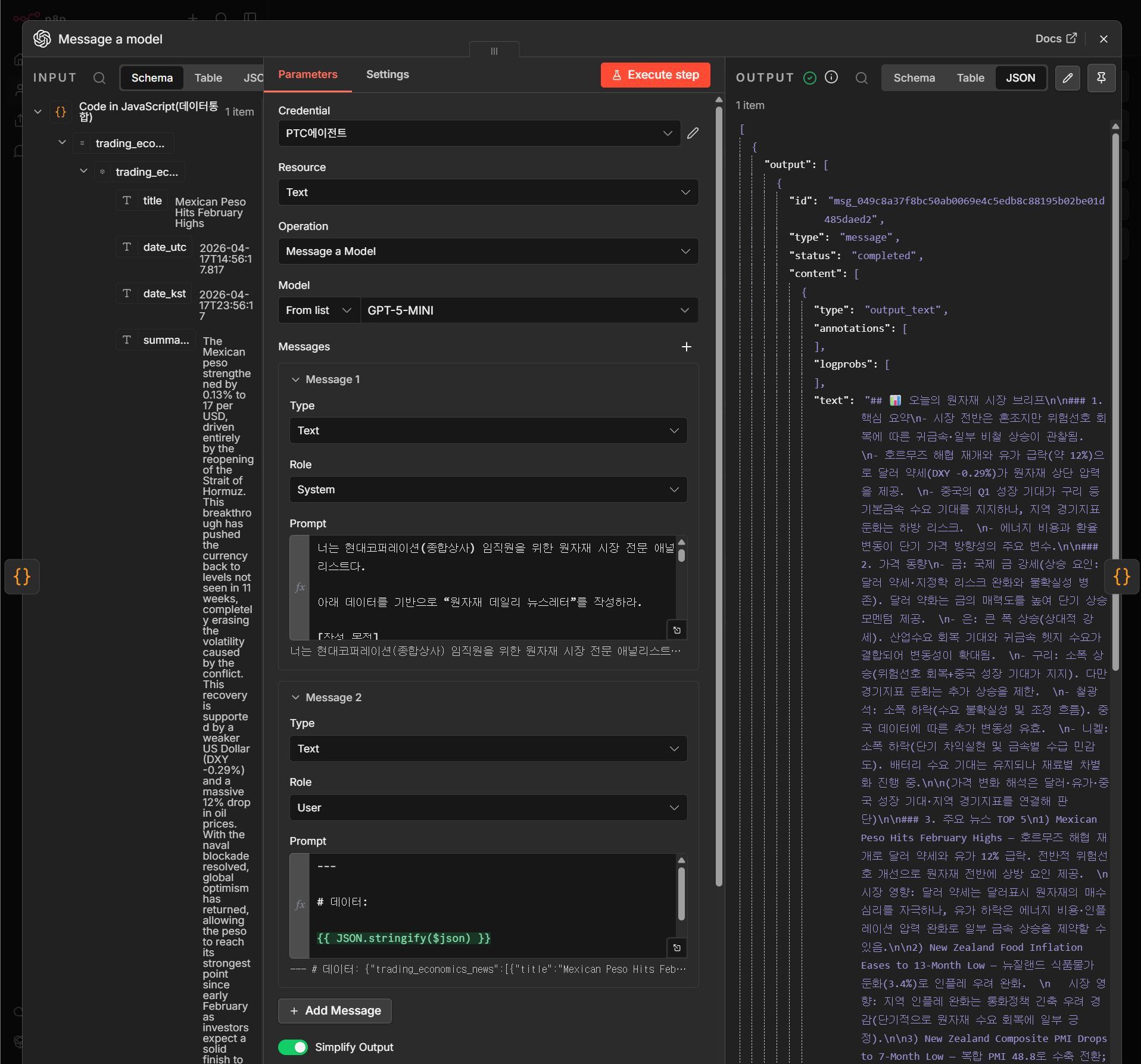
Code 보기
n8n 노드 JSON — 캔버스에 붙여넣으면 동일 노드 복원
{
"nodes": [
{
"parameters": {
"modelId": {
"__rl": true,
"value": "gpt-5-mini",
"mode": "list",
"cachedResultName": "GPT-5-MINI"
},
"responses": {
"values": [
{
"role": "system",
"content": "=너는 현대코퍼레이션(종합상사) 임직원을 위한 원자재 시장 전문 애널리스트다.\n\n아래 데이터를 기반으로 “원자재 데일리 뉴스레터”를 작성하라.\n\n[작성 목적]\n- 구매팀, 트레이딩팀, 경영진이 빠르게 시장 상황을 이해\n- 실무 의사결정에 도움 (가격 방향성, 리스크, 기회)\n\n[입력 데이터]\n1) Naver 증권 금속 가격 (당일)\n2) Trading Economics 뉴스 (최근 1주일)\n3) Investing.com 뉴스 (최근 1일)\n\n\n---\n\n[작성 규칙]\n\n1. 전체 톤\n- 전문적, 간결, 보고서 스타일\n- 불필요한 수식어 금지\n- 핵심만 전달 (실무용)\n\n2. 구조 (반드시 지켜라)\n\n① 오늘의 핵심 요약 (5줄 이내)\n- 시장 전체 방향 (상승/하락/혼조)\n- 주요 원인 (거시/지정학/수급)\n\n② 주요 원자재 가격 동향\n- 금, 은, 구리, 철광석, 니켈 중심으로 요약\n- 상승/하락 이유를 뉴스와 연결해서 설명\n- 숫자 그대로 나열하지 말고 “의미” 중심\n\n③ 주요 뉴스 TOP 5\n- 각 뉴스 2~3줄 요약\n- 시장 영향까지 포함\n\n④ 실무 인사이트 (가장 중요)\n- 구매팀 관점 리스크 3개\n- 기회 요인 2개\n- 가격 방향성 (단기 전망)\n\n⑤ 경영진 요약 (200자 이내)\n- 가장 중요한 포인트만 압축\n\n---\n\n[중요 규칙]\n\n- 가격 데이터 + 뉴스 내용을 반드시 연결해서 해석\n- 단순 요약 금지 (→ 반드시 “왜 중요한지” 포함)\n- 원자재 이름은 한국어 기준 사용 (구리, 니켈 등)\n- 불확실하면 추측하지 말고 생략\n- 리스트는 가독성 좋게 정리\n\n---\n\n[출력 형식]\n\n마크다운 형식으로 출력:\n\n## 📊 오늘의 원자재 시장 브리프\n\n### 1. 핵심 요약\n...\n\n### 2. 가격 동향\n...\n\n### 3. 주요 뉴스\n...\n\n### 4. 실무 인사이트\n...\n\n### 5. 경영진 요약\n..."
},
{
"content": "=---\n\n# 데이터:\n\n{{ JSON.stringify($json) }}\n\n---\n"
}
]
},
"builtInTools": {},
"options": {}
},
"type": "@n8n/n8n-nodes-langchain.openAi",
"typeVersion": 2.1,
"position": [
448,
464
],
"id": "a5fece50-a0c5-4b15-9e46-df7551e22967",
"name": "Message a model(뉴스레터 본문 생성)",
"credentials": {
"openAiApi": {
"id": "kVJMpgD7P9ktluTg",
"name": "PTC에이전트"
}
}
}
],
"connections": {}
}
NODE ECode — 뉴스레터 HTML 디자인 생성
n8n-nodes-base.code
AI가 만든 본문 텍스트를 회사 색/폰트 스타일이 적용된 HTML 템플릿에 끼워 넣습니다. 여기서는 순수 JavaScript 템플릿 리터럴로 처리합니다.
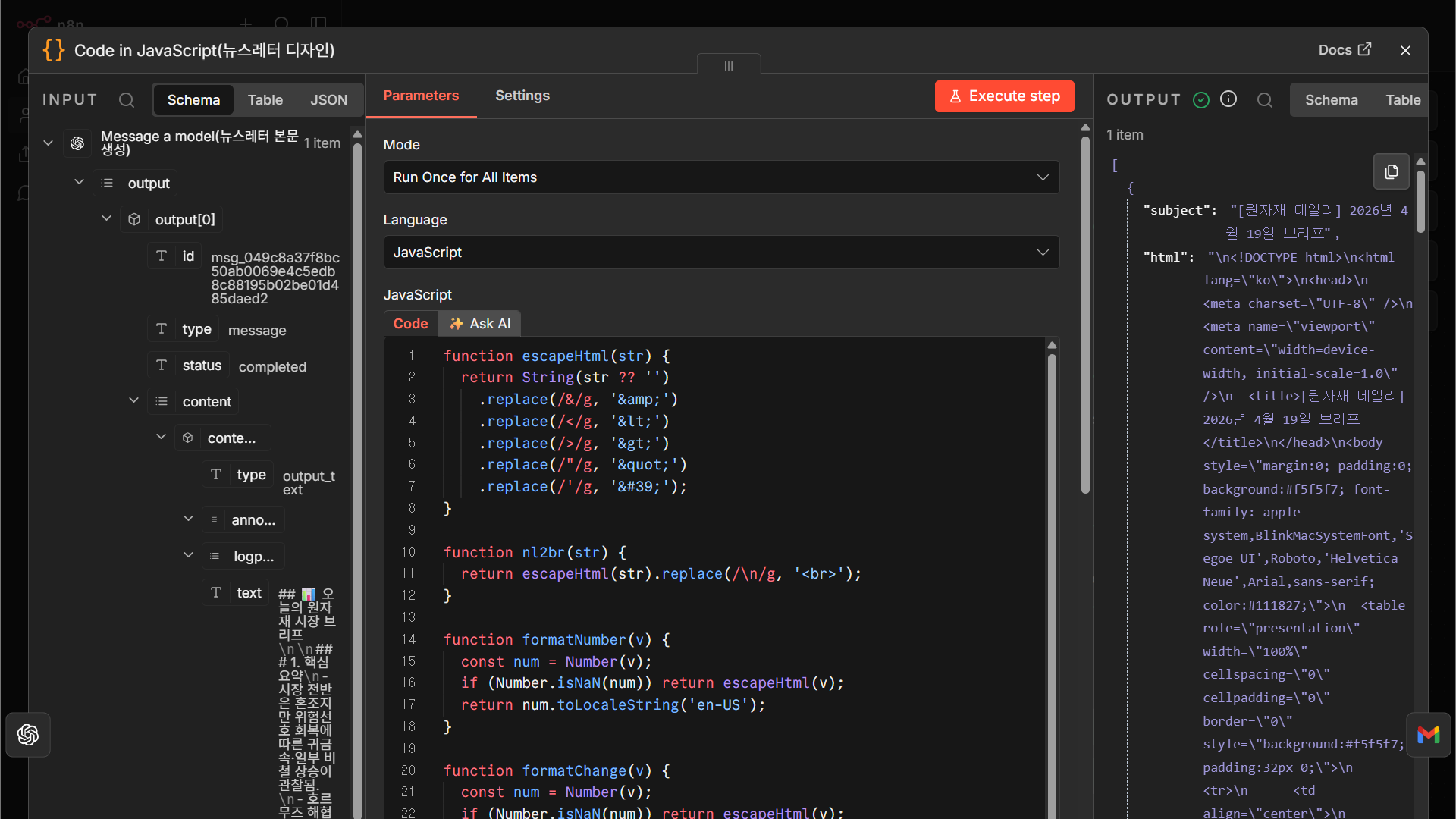
Code 보기
n8n 노드 JSON — 캔버스에 붙여넣으면 동일 노드 복원
{
"nodes": [
{
"parameters": {
"jsCode": "function escapeHtml(str) {\n return String(str ?? '')\n .replace(/&/g, '&')\n .replace(//g, '>')\n .replace(/\"/g, '"')\n .replace(/'/g, ''');\n}\n\nfunction nl2br(str) {\n return escapeHtml(str).replace(/\\n/g, '
');\n}\n\nfunction formatNumber(v) {\n const num = Number(v);\n if (Number.isNaN(num)) return escapeHtml(v);\n return num.toLocaleString('en-US');\n}\n\nfunction formatChange(v) {\n const num = Number(v);\n if (Number.isNaN(num)) return escapeHtml(v);\n if (num > 0) return `+${num.toLocaleString('en-US')}`;\n return num.toLocaleString('en-US');\n}\n\nfunction formatRate(v) {\n const num = Number(v);\n if (Number.isNaN(num)) return escapeHtml(v);\n if (num > 0) return `+${num}%`;\n return `${num}%`;\n}\n\nfunction changeColor(v) {\n const num = Number(v);\n if (num > 0) return '#d92d20';\n if (num < 0) return '#2563eb';\n return '#6b7280';\n}\n\n// 이전 노드 데이터 가져오기\nconst unified = $('Code in JavaScript(데이터통합)').first().json;\nconst ai = $('Message a model(뉴스레터 본문 생성)').first().json;\n\n// AI 텍스트 추출\nconst aiNode = $('Message a model(뉴스레터 본문 생성)').first().json;\n\n// n8n OpenAI 노드 실제 구조 대응\nconst aiText =\n aiNode.output_text ||\n aiNode.output?.[0]?.content?.[0]?.text ||\n aiNode.output?.[0]?.content?.[0]?.content ||\n aiNode.data?.[0]?.content?.[0]?.text ||\n aiNode.choices?.[0]?.message?.content ||\n JSON.stringify(aiNode, null, 2);\n\n// 데이터\nconst metalPrices = unified.metal_prices || [];\nconst teNews = unified.trading_economics_news || [];\nconst investingNews = unified.investing_com_news || [];\n\n// 뉴스 합치기\nconst allNews = [\n ...teNews.map((n) => ({\n source: 'Trading Economics',\n title: n.title || '',\n url: n.url || '',\n })),\n ...investingNews.map((n) => ({\n source: 'Investing.com',\n title: n.title || '',\n url: n.link || n.url || '',\n })),\n];\n\n// 가격 테이블 rows\nconst priceRows = metalPrices.map((item, idx) => {\n const color = changeColor(item.changeRate);\n const border = idx === metalPrices.length - 1\n ? ''\n : 'border-bottom:1px solid #eef0f3;';\n\n return `\n \n \n ${escapeHtml(item.name)}\n \n \n ${formatNumber(item.current)}\n \n \n ${formatChange(item.change)}\n \n \n ${formatRate(item.changeRate)}\n \n \n `;\n}).join('');\n\n// 뉴스 목록\nconst newsRows = allNews.map((item, idx) => {\n const border = idx === allNews.length - 1\n ? ''\n : 'border-bottom:1px solid #eef0f3;';\n\n return `\n \n \n \n ${escapeHtml(item.source)}\n \n \n ${escapeHtml(item.title)}\n \n \n \n `;\n}).join('');\n\n// 날짜\nconst now = new Date();\nconst dateText = new Intl.DateTimeFormat('ko-KR', {\n timeZone: 'Asia/Seoul',\n year: 'numeric',\n month: 'long',\n day: 'numeric',\n}).format(now);\n\nconst subject = `[원자재 데일리] ${dateText} 브리프`;\n\nconst html = `\n\n\n\n \n \n ${escapeHtml(subject)} \n\n\n \n \n \n \n \n \n \n 한국GPT협회 안현수\n \n 현대코퍼레이션 원자재 데일리 뉴스레터\n \n \n ${escapeHtml(dateText)}\n \n \n \n\n \n \n \n GPT 요약 보고서\n \n \n \n \n ${nl2br(aiText)}\n \n \n
\n \n \n\n \n \n \n Npay Metals Prices\n \n \n \n 품목 \n 현재가 \n 등락 \n 등락률 \n \n ${priceRows}\n
\n \n \n\n \n \n \n 전체 뉴스 목록\n \n \n \n \n \n ${newsRows}\n
\n \n \n
\n \n \n\n \n \n \n 본 메일은 현대코퍼레이션 임직원을 위한 원자재 시장 브리프입니다.
\n 발신: 한국GPT협회 안현수\n \n \n \n\n
\n \n \n
\n\n\n`;\n\nreturn [\n {\n json: {\n subject,\n html,\n },\n },\n];"
},
"type": "n8n-nodes-base.code",
"typeVersion": 2,
"position": [
800,
464
],
"id": "258dd1a6-cdbe-408e-b54d-cb227fb70737",
"name": "Code in JavaScript(뉴스레터 디자인)"
}
],
"connections": {}
}
NODE GGmail — 최종 뉴스레터 발송
n8n-nodes-base.gmail
HTML 본문, 제목(“[일일 원자재 브리프] 2026-04-19”), 수신자를 설정하면 발송 완료.
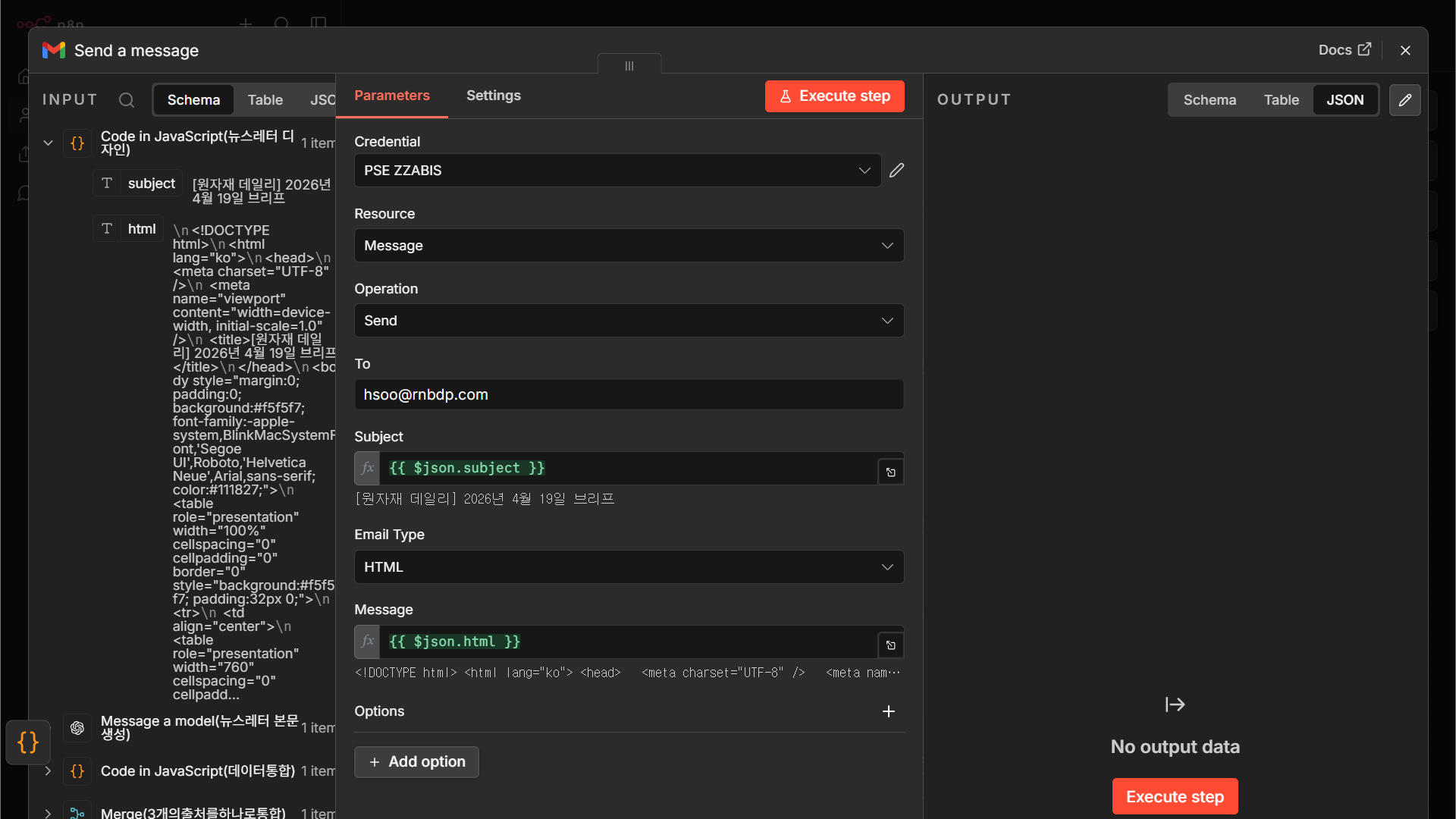
Code 보기
n8n 노드 JSON — 캔버스에 붙여넣으면 동일 노드 복원
{
"nodes": [
{
"parameters": {
"sendTo": "hsoo@rnbdp.com",
"subject": "={{ $json.subject }}",
"message": "={{ $json.html }}",
"options": {}
},
"type": "n8n-nodes-base.gmail",
"typeVersion": 2.2,
"position": [
1024,
464
],
"id": "6832f86f-5450-47e0-bb73-9a76fd1dfc80",
"name": "Send a message",
"webhookId": "65ae9e1a-e9b5-404b-b4aa-03fb3e927751",
"credentials": {
"gmailOAuth2": {
"id": "6DhAa3toh8LJSSFT",
"name": "PSE ZZABIS"
}
}
}
],
"connections": {}
}
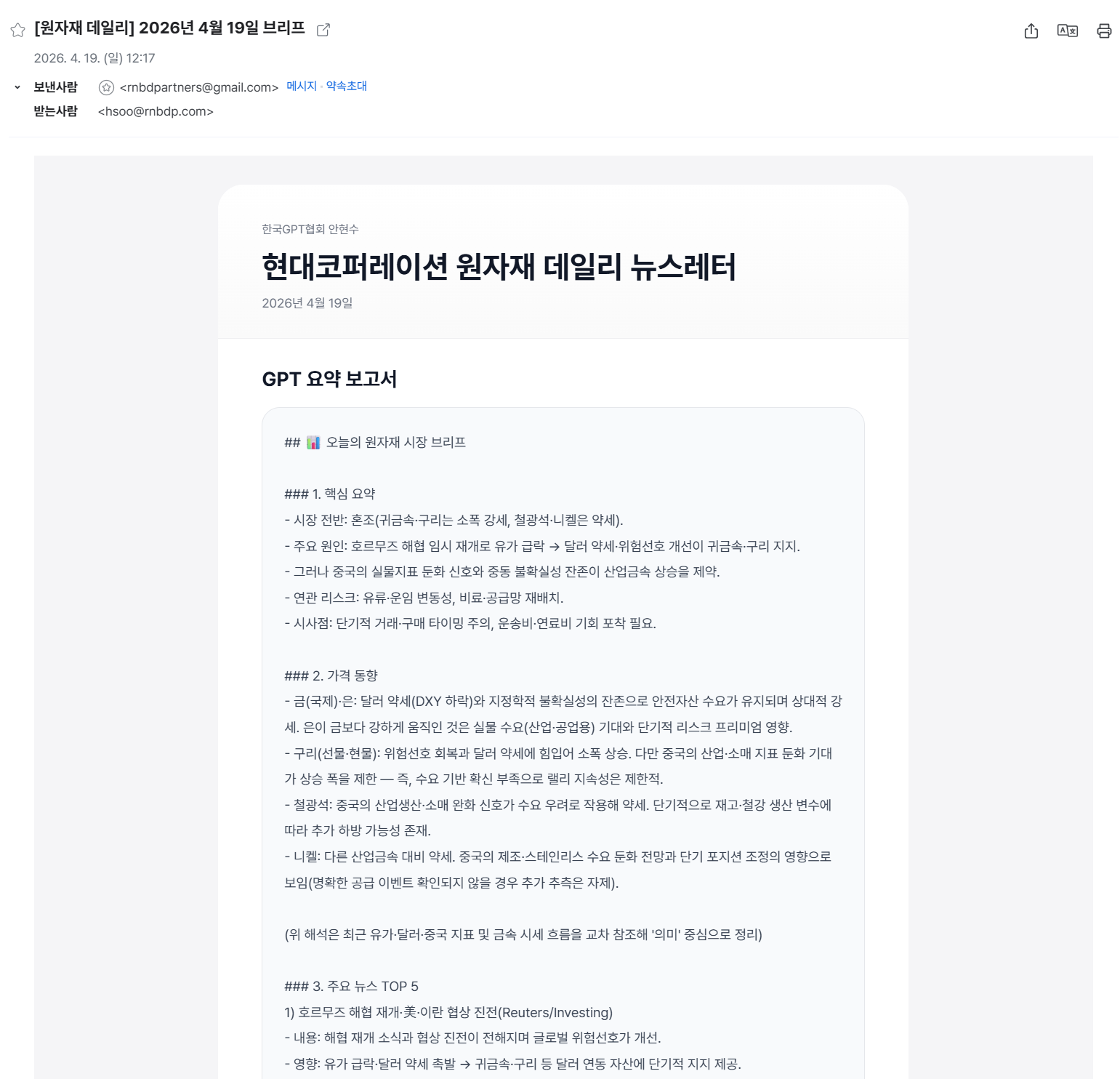
그림 3-6. 최종 발송된 뉴스레터 — AI가 쓴 본문 + 가격 표 + 뉴스 리스트가 한 통에 담깁니다
Wrap-up — 3개 사례를 관통하는 핵심 정리
사례가 달라져도 변하지 않는 것, 그리고 변하는 것을 구분합니다.
① 뼈대는 같다
수집 → 정리(Set) → 필터 → 저장(Sheets) → 통합(Aggregate/Merge) → 발송(Gmail). 이 패턴은 Case 1~3에 동일하게 깔려 있습니다. 3번 반복해 보면 자연스럽게 몸에 익습니다.
② 소스 특성만 다르다
RSS는 구조가 정해져 있고 쉽습니다. HTTP+HTML은 사이트 구조가 바뀌면 깨지므로 Code 노드에서 방어 로직이 필요합니다. API는 안정적이지만 티어 제약(국가·호출 수)이 있습니다.
③ AI는 도구이자 실행자
Case 1~2에서 AI는 “만드는 과정의 조력자”였습니다(프롬프트 치고 코드 받기). Case 3에서 AI는 “워크플로우 안의 노드”로 들어갑니다(본문 생성). 이 전이가 자동화의 레벨업입니다.
④ 막히는 순간이 학습 시점
fetch not defined, 403, 타임아웃, 빈 필터 결과 — 이런 에러들이 튀어나올 때가 AI에게 질문을 가장 잘 뽑을 수 있는 때입니다. 에러 텍스트 + 시도한 코드 + 얻고 싶은 결과를 한 번에 던지십시오.